Hi @simon spanyol
Welcome to Microsoft Q&A forum.
Thank you for reaching out to us. I want to sincerely apologize for the inconvenience this issue has caused. I completely understand how important it is for you to have Outlook working smoothly, and I truly appreciate your patience while we work through this together.
The error you’re seeing, ADD, occurs in the New Outlook experience when cached data becomes corrupted. This cache stores temporary files that help Outlook load faster and keep your settings. When these files become damaged, Outlook may fail to add accounts or allow certain actions like inserting images.
Option 1: Clear New Outlook cache
- Close Outlook completely.
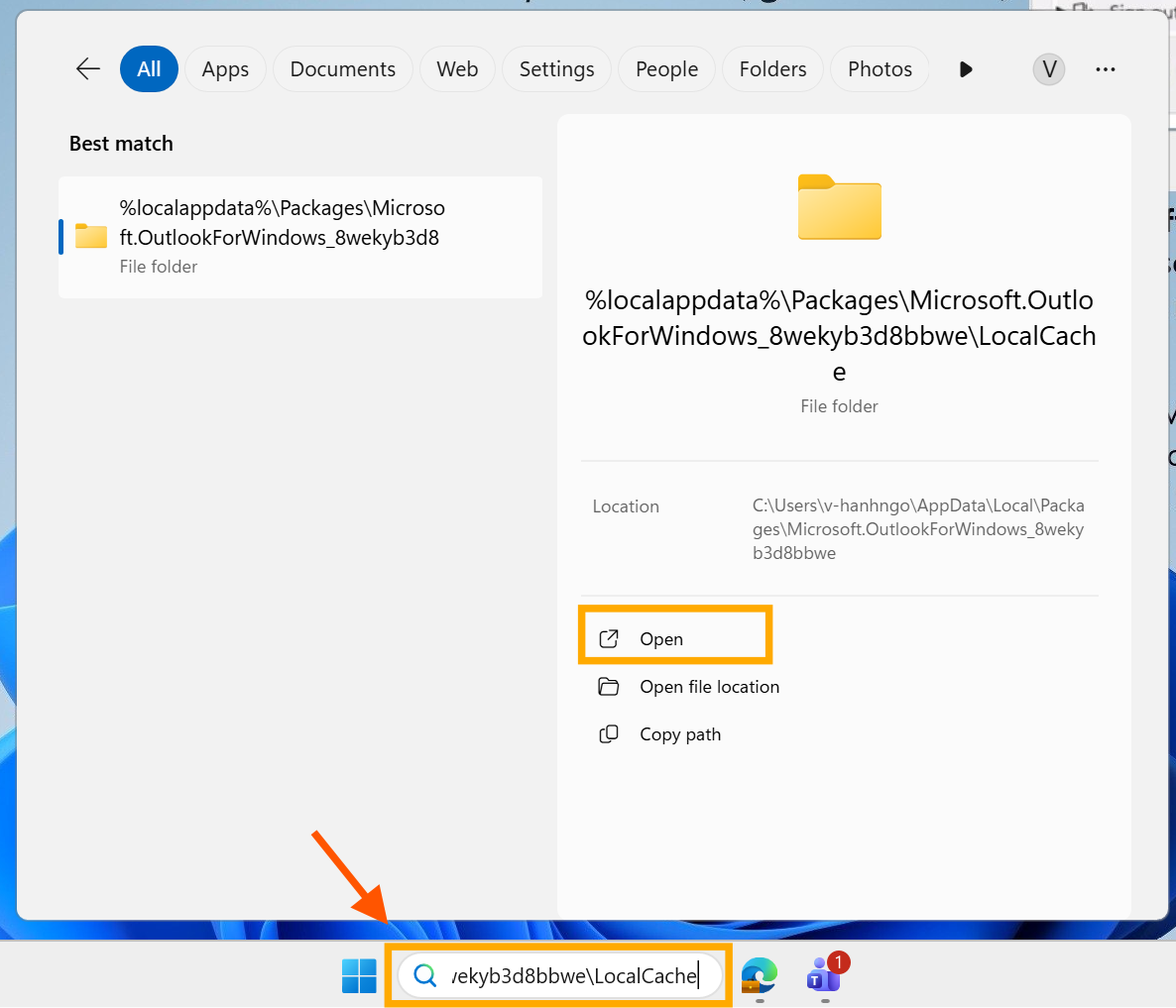
- At the search bar, navigate to: %localappdata%\Packages\Microsoft.OutlookForWindows_8wekyb3d8bbwe\LocalCache
- Open and delete all files in this folder.
- Restart Outlook and sign in again.
Option 2: Check device compliance
If your organization uses Microsoft 365 security policies, the error can also appear when the device is not compliant with required settings. Please check your device compliance in:
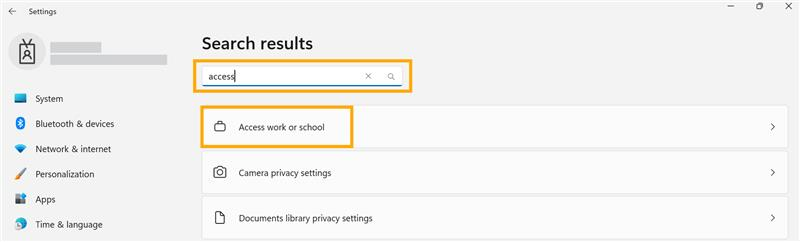
- Settings > On the search bar, search Access work or school > Info > Device compliance
- Ensure all required policies are met, then restart Outlook.
Since you have checked all the steps, but the issue still persists, we believe Microsoft Support Engineering should step in to investigate further. Please reach out to them directly.
- Ticket Support: In the Microsoft 365 Admin Center>Support>Help & Support. You can raise support ticket. Please note that you’ll need an account with admin rights to sign in to the Microsoft 365 Admin Center.
- Phone Support: Microsoft provides customer service phone numbers based on your region. You can find the appropriate contact number here.
Note: Please understand that our initial response does not always resolve the issue immediately. However, with your help and more detailed information, we can work together to find a solution.
I hope this information is helpful. Please follow these steps and let me know if it works for you. If not, we can work together to resolve this.
We sincerely apologize once again for the inconvenience you’ve experienced, and we truly appreciate your continued support and engagement with Microsoft. If you have any questions, please feel free to reach out.
I'm looking forward to your reply.
Best regards,
If the answer is helpful, please click "Accept Answer" and kindly upvote it. If you have extra questions about this answer, please click "Comment".
Note: Please follow the steps in our documentation to enable e-mail notifications if you want to receive the related email notification for this thread.
' cx='32' cy='32' r='32' /%3E%3Ctext x='50%25' y='55%25' dominant-baseline='middle' text-anchor='middle' fill='%23FFF' %3ESS%3C/text%3E%3C/svg%3E)


' cx='32' cy='32' r='32' /%3E%3Ctext x='50%25' y='55%25' dominant-baseline='middle' text-anchor='middle' fill='%23FFF' %3EHN%3C/text%3E%3C/svg%3E)
' cx='32' cy='32' r='32' /%3E%3Ctext x='50%25' y='55%25' dominant-baseline='middle' text-anchor='middle' fill='%23FFF' %3EGB%3C/text%3E%3C/svg%3E)