how to add unread folder in outlook 365

Salman Saeed 0 Reputation points
2026-02-12T10:02:26.93+00:00

i am using outlook 365 and have one pst file but there is no unread folder. I would like to add unread folder in outlook 365

Exchange | Exchange Server | Other

A robust email, calendaring, and collaboration platform developed by Microsoft, designed for enterprise-level communication and data management.Miscellaneous topics that do not fit into specific categories.

0 comments No comments

2 answers

Sort by: Most helpful
  1. Jayden-P 26,270 Reputation points Microsoft External Staff Moderator
    2026-02-12T10:59:47.45+00:00

    Hi @Salman Saeed

    Thank you for reaching out to our Q&A forum.

    May I know you are using Classic Outlook or New Outlook?

    For Classic Outlook, you can create a search folder with the criteria set to "unread". This folder will return all the unread emails in that PST file.

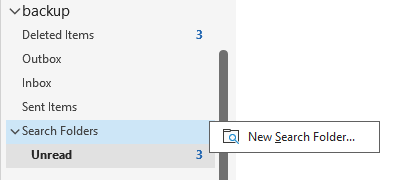
    Here I have a PST file, I will right click on Search Folder, choose New Seach Folder.
    User's image

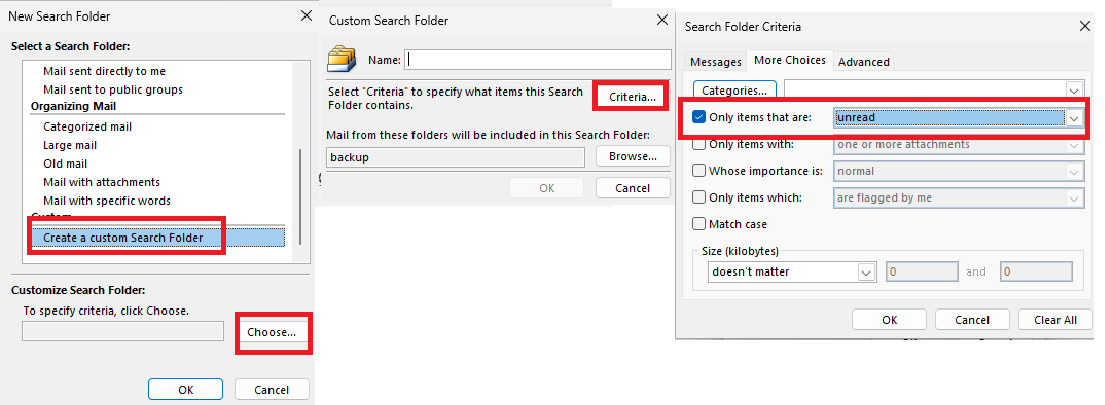
    Scroll to the bottom and choose Create a custom Search Folder > Choose > Criteria > Set the criteria like below (Only items that are Unread) > Then click Save.
    User's image

    Now it will show a folder that only return unread items.

    However, New Outlook is web-based (OWA-backed) and does not Search Folder in PST file. You still can add a search folder for primary mailbox, just not in your PST.

    I hope this information helps.


    If the answer is helpful, please click "Accept Answer" and kindly upvote it. If you have extra questions about this answer, please click "Comment".

    Note: Please follow the steps in our documentation to enable e-mail notifications if you want to receive the related email notification for this thread.

    Was this answer helpful?

    1 person found this answer helpful.

  2. AI answer

    2026-02-12T10:02:35.54+00:00

    Outlook 365 does not have a specific "Unread" folder feature like some other email clients. However, you can easily view all unread emails by using the Search feature. Here’s how you can do it:

    1. Open Outlook 365.
    2. In the search bar at the top, type is:unread and press Enter. This will filter your emails to show only unread messages.
    3. You can also create a Search Folder for unread emails:
      • Right-click on Search Folders in the navigation pane.
      • Select New Search Folder.
      • In the dialog that appears, scroll down and select Create a custom Search Folder.
      • Click on Choose and give your folder a name (e.g., "Unread Emails").
      • Click on Criteria and set the condition to show unread items.
      • Click OK to create the folder.

    This way, you can easily access all unread emails in one place without needing a dedicated "Unread" folder.

    AI-generated content may be incorrect. Read our transparency notes for more information.

    Was this answer helpful?

Your answer

Answers can be marked as 'Accepted' by the question author and 'Recommended' by moderators, which helps users know the answer solved the author's problem.