Dear @Leon Oost,
Good day! Welcome to Microsoft Q&A forum!
Based on your description, I understand that you’re trying to clean up outdated Teams created during COVID while keeping Planner plans that are still in use. However, existing Planner plans remain tied to their original Teams, and some are owned by former employees. You’re looking for a way to fully migrate or copy a Planner plan: including tasks and linked documents from one Microsoft 365 group or user to another Team or group.
To understand the situation better and provide you with the most suitable support, could you confirm the following information:
- Just to make sure I guide you down the most suitable path: can you confirm what type of Planner plan this is? For example, is it a standard Planner plan attached to a Team, or something like a Project / premium plan?
- Is the Planner plan actively used today, or mostly referenced for historical information?
- Is the Planner plan tied to a Microsoft 365 Group / Team owned by a former employee?
- And do you know which Microsoft 365 / Planner subscription you’re using today? You could check it by accessing this link: https://portal.office.com/account/?ref=Harmony signed in with your account and go to Subscriptions
Your confirmation would be very helpful in ensuring you receive the most suitable support!
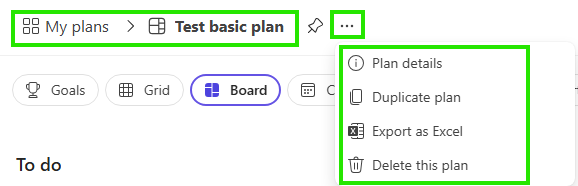
Regarding this situation, I tested with a basic plan and I had the option to Duplicate plan:
This allows you to reuse the existing structure, including buckets and tasks, create a new plan based on the original:
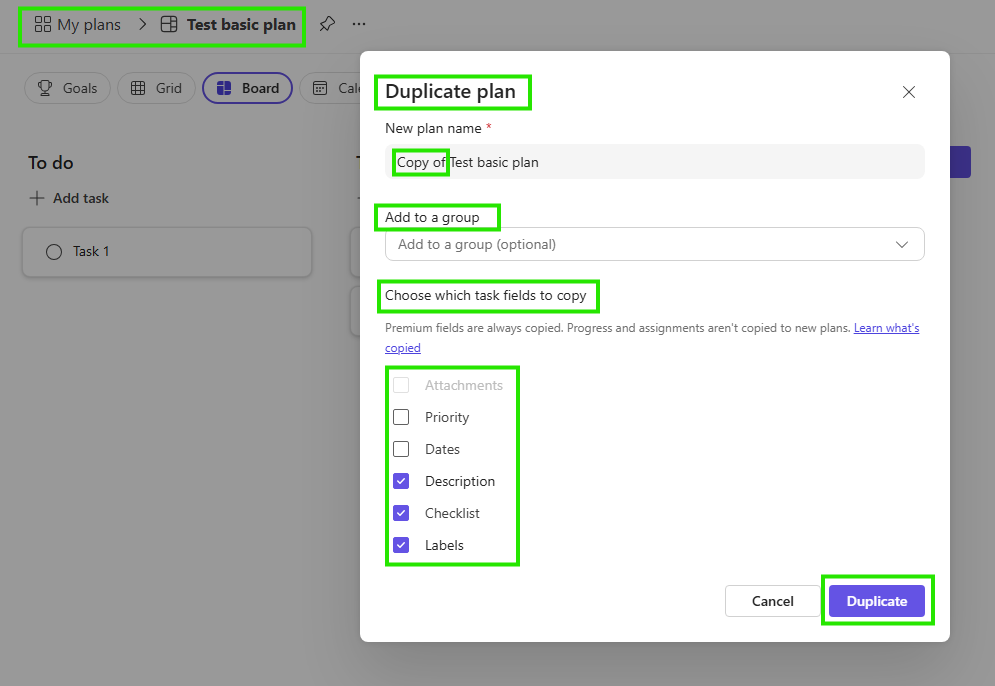
Please check if you have these options and provide with a screenshot if possible so that I could have more information on this.
If you’re able to share a bit more about your situation, I might be able to suggest some helpful next steps.
Please understand that our initial response does not always resolve the issue immediately. However, with your help and more detailed information, we can work together to find a solution.
Kindly let me know when there are updates or if you need further assistance. Any updates you’re able to share would be really helpful. I appreciate your time and look forward to hearing how things are going!
Thank you for your time and patience.
If you have extra questions about this answer, please click "Comment".
Note: Please follow the steps in [our documentation] to enable e-mail notifications if you want to receive the related email notification for this thread.
' cx='32' cy='32' r='32' /%3E%3Ctext x='50%25' y='55%25' dominant-baseline='middle' text-anchor='middle' fill='%23FFF' %3ELO%3C/text%3E%3C/svg%3E)

' cx='32' cy='32' r='32' /%3E%3Ctext x='50%25' y='55%25' dominant-baseline='middle' text-anchor='middle' fill='%23FFF' %3EV%3C/text%3E%3C/svg%3E)
' cx='32' cy='32' r='32' /%3E%3Ctext x='50%25' y='55%25' dominant-baseline='middle' text-anchor='middle' fill='%23FFF' %3EA%3C/text%3E%3C/svg%3E)
' cx='32' cy='32' r='32' /%3E%3Ctext x='50%25' y='55%25' dominant-baseline='middle' text-anchor='middle' fill='%23FFF' %3ECJ%3C/text%3E%3C/svg%3E)
' cx='32' cy='32' r='32' /%3E%3Ctext x='50%25' y='55%25' dominant-baseline='middle' text-anchor='middle' fill='%23FFF' %3EAM%3C/text%3E%3C/svg%3E)
' cx='32' cy='32' r='32' /%3E%3Ctext x='50%25' y='55%25' dominant-baseline='middle' text-anchor='middle' fill='%23FFF' %3EAE%3C/text%3E%3C/svg%3E)
' cx='32' cy='32' r='32' /%3E%3Ctext x='50%25' y='55%25' dominant-baseline='middle' text-anchor='middle' fill='%23FFF' %3EF%3C/text%3E%3C/svg%3E)