MS Project 2019 Transition to MS Planner and Project 5

Thomas Mathew 0 Reputation points
2026-03-11T20:50:47.5733333+00:00

Wanted to see if there is a way to import existing project plans in MS Desktop version of Project 2019 easily into the planner and Project 5

Microsoft 365 and Office | Project | For business | Other

2 answers

Sort by: Most helpful
  1. Ryan-N 15,030 Reputation points Microsoft External Staff Moderator
    2026-03-11T21:41:43.67+00:00

    Hi @Thomas Mathew,

    Welcome to the Microsoft Q&A forum.

    I would like to provide you with the following information.

    I understand that you want to export data from Project 2019 and import that data into Project in Planner and Project Plan 5.

    In this case, Project does not support directly importing data that is exported from Project 2019.

    Instead, you need to follow these steps:

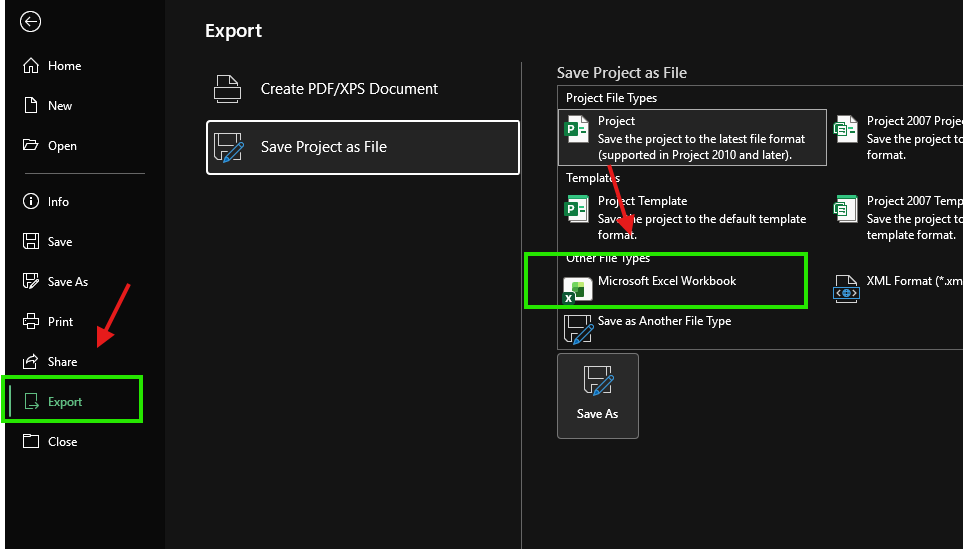
    Step 1: Open Project 2019 and select File > Export

    Step 2: Select Save Project as File > Microsoft Excel Workbook
    User's image

    Step 3: Choose the fields and information that you want to export to the Excel file

    After that, open Project in Project (Plan 5) and follow these steps:

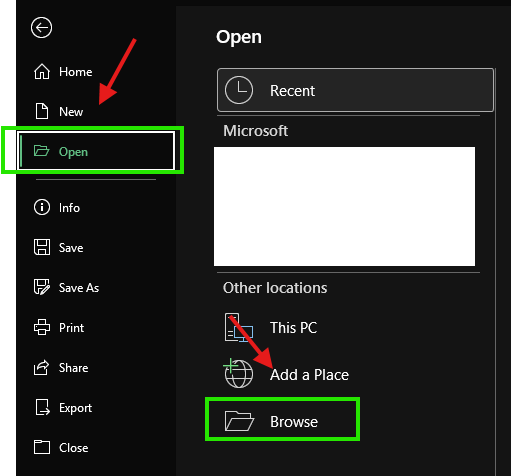
    Step 1: Select File > Open > Browse
    User's image

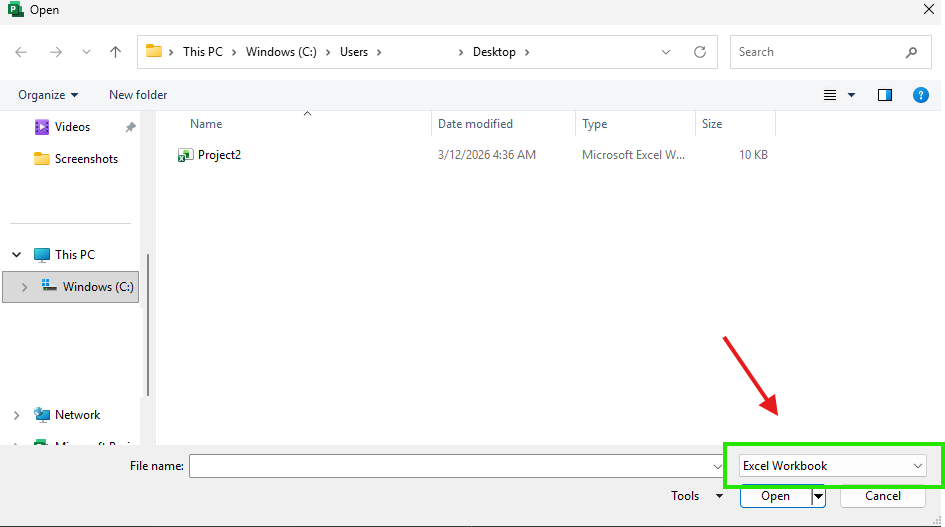
    Step 2: Select Excel Workbook > Open as a new project
    User's image

    Step 3: Select the information and data fields that you want to import into the Project

    You can refer to the following documentation: Import Excel Projects to Microsoft Project

    This is a non-Microsoft website. The page appears to be providing accurate, safe information. Watch out for ads on the site that may advertise products frequently classified as a PUP (Potentially Unwanted Products). Thoroughly research any product advertised on the site before you decide to download and install it. 

    I hope this information is helpful. Please follow these steps and let me know if it works for you. If not, we can work together to resolve this.   

    Thank you for your patience and your understanding. If you have any questions or need further assistance, please feel free to share them in the comments on this post so I can continue to support you.

    I look forward to continuing the conversation.


     If the answer is helpful, please click "Accept Answer" and kindly upvote it. If you have extra questions about this answer, please click "Comment". 

    Note: Please follow the steps in our documentation to enable e-mail notifications if you want to receive the related email notification for this thread. 

    Was this answer helpful?

    0 comments No comments

  2. AI answer

    2026-03-11T20:51:00.3833333+00:00

    Importing a plan created in the Project desktop client (such as Project 2019, which saves to .mpp) directly into Microsoft Planner is not supported in Planner itself. However, there are supported paths using the Planner/Project Power App and partner solutions:

    1. Import .mpp into Planner via Planner Power App (formerly Project Power App)
      • Planner does not natively import .mpp files, but this can be done through the Planner Power App.
      • Use the documented process to move a project from Project desktop to the Planner Power App: see "move your project from Project desktop to the Planner Power App" in the referenced article.
      • Once in the Planner Power App, the data is stored in Dataverse and can be surfaced as premium plans in Planner (covered by Planner and Project Plan 5 / premium capabilities).
    2. Use partner solutions for .mpp import and sync
      • Several Microsoft Planner partners provide solutions that:
        • Import .mpp files into Planner/premium plans.
        • Keep .mpp files and premium plans in Planner synchronized.
      • These are useful if ongoing round‑trip or synchronization between Project 2019 and Planner/Project 5 is required.
    3. Relationship to Project 5 (Planner and Project Plan 5)
      • Premium capabilities (formerly Project Plan 5) work over data in Dataverse and premium plans in Planner.
      • After importing from Project desktop into the Planner Power App, those projects can be managed using the premium capabilities associated with Planner and Project Plan 5.

    There is no one-click import directly from Project 2019 desktop into Planner alone; the supported route is via the Planner Power App or a partner tool.


    References:

    AI-generated content may be incorrect. Read our transparency notes for more information.

    Was this answer helpful?

Your answer

Answers can be marked as 'Accepted' by the question author and 'Recommended' by moderators, which helps users know the answer solved the author's problem.