Dear @Paul - Engage,
Thank you for reaching out regarding the issue with task dates reverting in Microsoft Project.
Based on your description, this behavior is expected when a task has a date constraint applied. In Project, manually entering a start or finish date can automatically set a constraint (for example, “Start No Earlier Than”), which may cause the task to revert to a specific date.
In this case, please try these steps below and check if it works:
- Open the affected task > Task > Task Information > Advanced tab
- Set Constraint Type to As Soon As Possible (or As Late As Possible, depending on your project settings)
- Make sure the Constraint date is cleared or ignored (it will show NA for ASAP/ALAP).
Additionally, you may review this setting:
- Go to File > Options > Schedule
- Uncheck “Tasks will always honor their constraint dates” (if enabled)
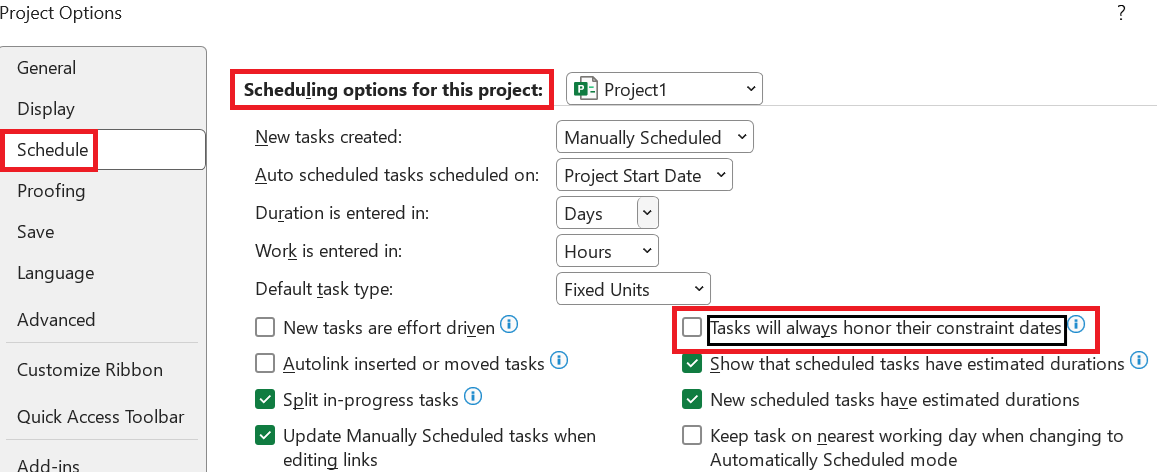
- After applying these changes, please try updating the task date again and confirm if the issue is resolved.

For more reference, please refer to:
I hope this helps. Please feel free to reply below if you have any update or further concern.
Thank you for your patience and understanding. I appreciate your continued trust. Hope you having a nice day and really much warm regards to you as well!
If the answer is helpful, please click "Accept Answer" and kindly upvote it. If you have extra questions about this answer, please click "Comment".
Note: Please follow the steps in our documentation to enable e-mail notifications if you want to receive the related email notification for this thread.
' cx='32' cy='32' r='32' /%3E%3Ctext x='50%25' y='55%25' dominant-baseline='middle' text-anchor='middle' fill='%23FFF' %3EPE%3C/text%3E%3C/svg%3E)

' cx='32' cy='32' r='32' /%3E%3Ctext x='50%25' y='55%25' dominant-baseline='middle' text-anchor='middle' fill='%23FFF' %3EJN%3C/text%3E%3C/svg%3E)