Share via

C++ Libraries

Sid Kraft 46 Reputation points
2026-06-26T19:31:56.61+00:00

Running Virtual Studio, C++, where are the library files that the system looks for, i.e. #include <math.h>, etc. Sid Kraft

Developer technologies | C++

A high-level, general-purpose programming language, created as an extension of the C programming language, that has object-oriented, generic, and functional features in addition to facilities for low-level memory manipulation.

0 comments No comments

3 answers

Sort by: Most helpful
  1. Nancy Vo (WICLOUD CORPORATION) 6,510 Reputation points Microsoft External Staff Moderator
    2026-06-29T03:26:24.4433333+00:00

    Hello @Sid Kraft ,

    Thanks for your question.

    The exact path depends on your Visual Studio version and Windows SDK. I recommend using the Visual Studio Shortcut. You can refer to following steps:

    1. Open your project in Visual Studio.
    2. Ensure #include <math.h> (or #include <cmath>) is typed at the top of your code.
    3. Please right-click on the text <math.h>.
    4. Select Go To Document (math.h) from the drop-down menu.
    5. Once the file opens in a new tab, you can hover your mouse over the tab at the top to see the exact physical path on your specific machine.

    For more information, you can refer to the C runtime library reference.

    I hope this addresses your question. If this response was helpful, please consider following the guidance to provide feedback.

    Was this answer helpful?

    0 comments No comments

  2. Darran Rowe 2,616 Reputation points
    2026-06-27T20:26:56.3666667+00:00

    You can get Visual Studio to give you the exact paths that it uses in the C++ project settings.

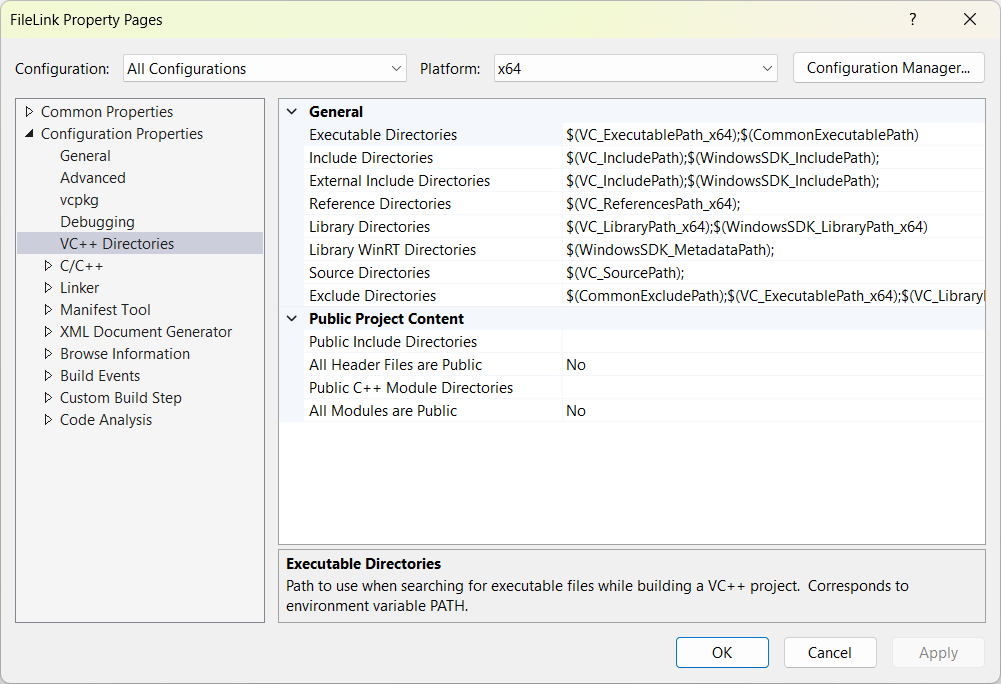
    If you go into the project settings, you can find VC++ Directories.
    Screenshot 2026-06-27 211254

    The individual property has a little down arrow that you can click on the right. If you click this, you can edit the values by selecting Edit....
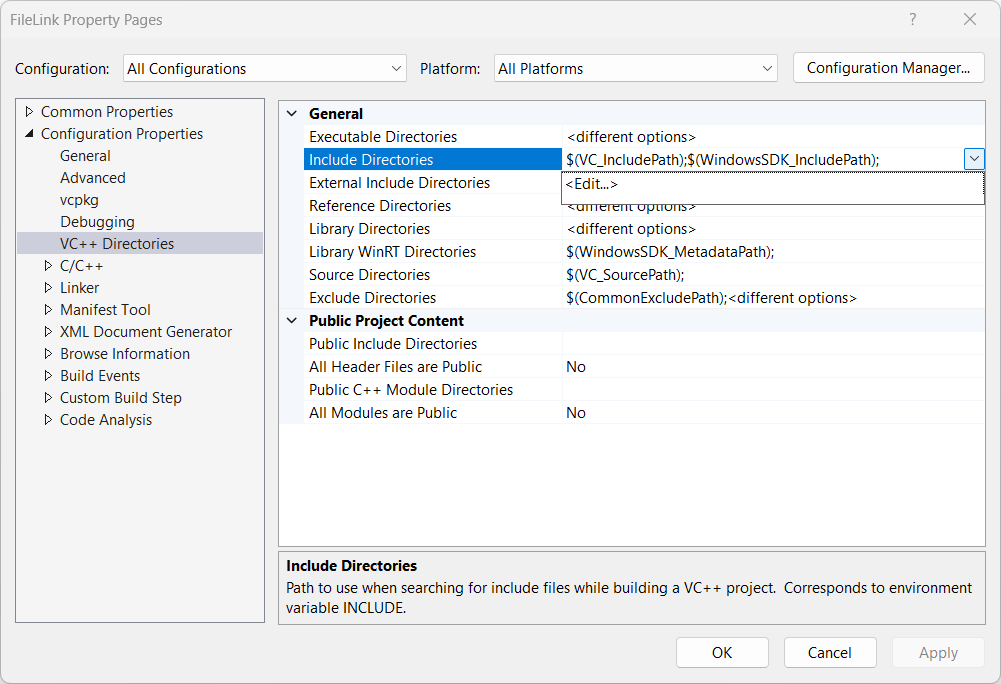
    Screenshot 2026-06-27 211641

    You don't have to make changes and save them, so it is useful to see the current values. If you click on Edit..., a new window with the values will appear.
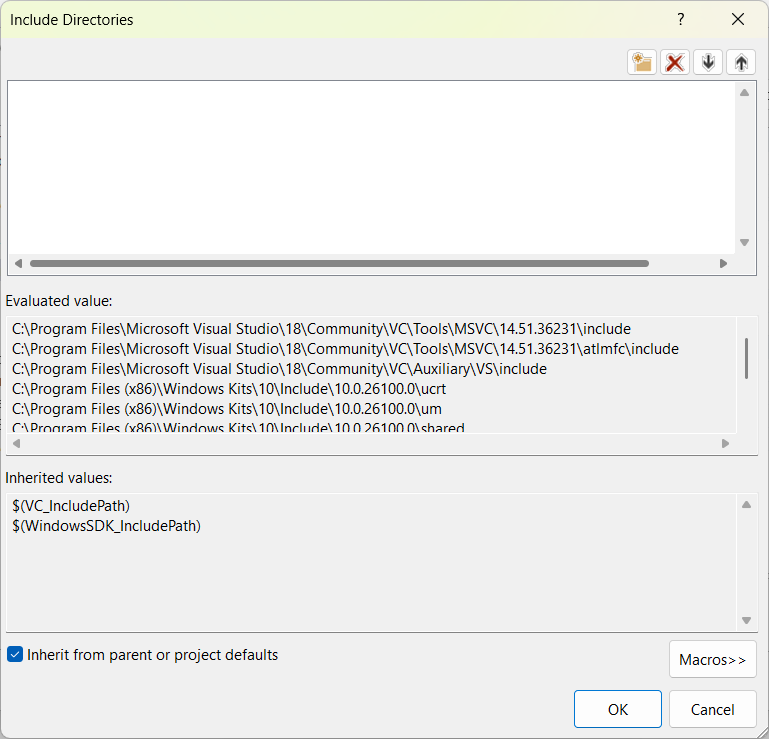
    Screenshot 2026-06-27 211651

    This shows the paths that the compiler uses, and the order that they are used. It is also possible to use this same property to add your own.

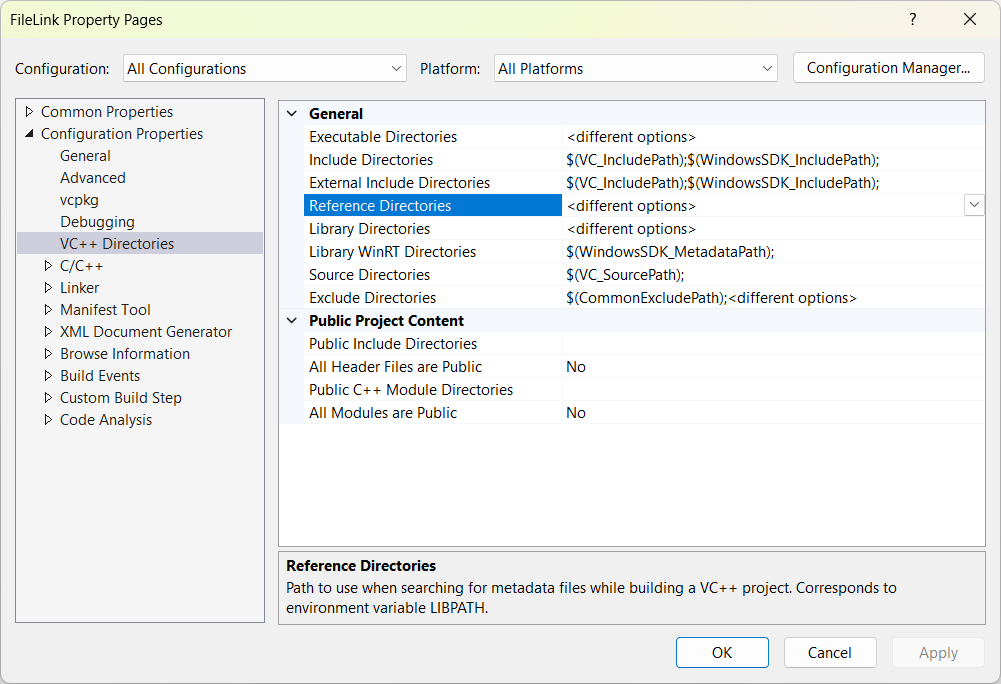
    In the case where there are different options based upon platforms, like the library directories that the linker looks for, it is possible to change the platform in the options to give you the settings for that specific platform.
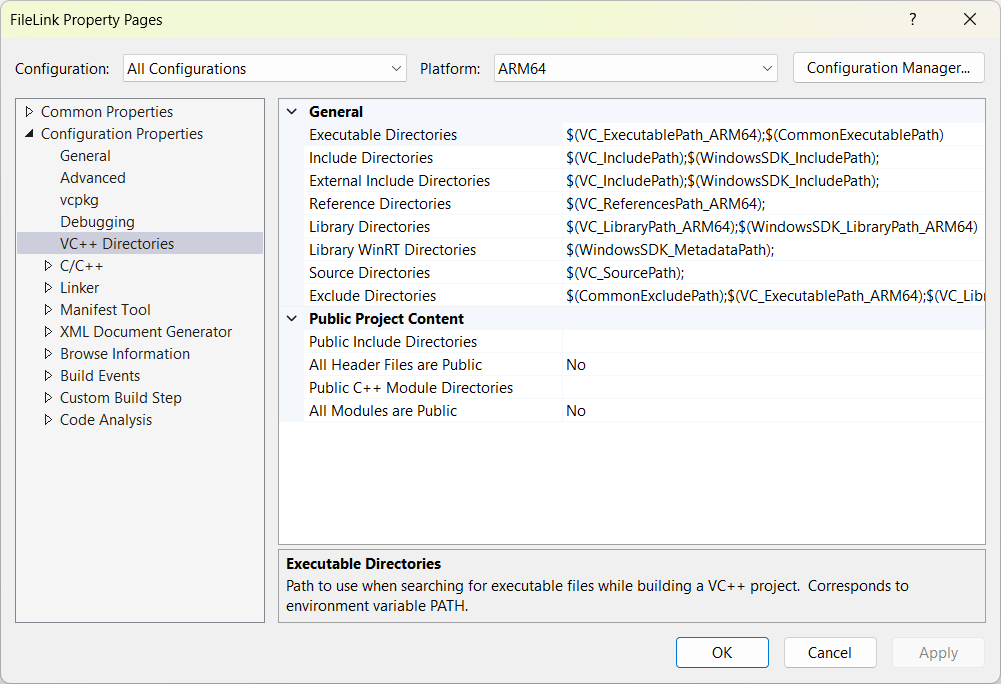
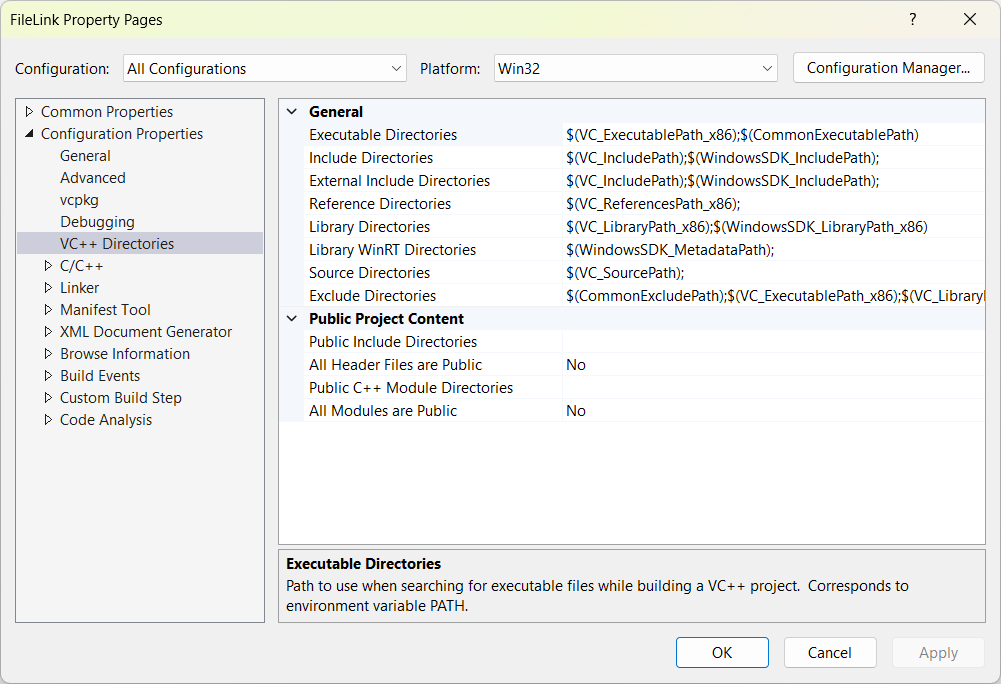
    Screenshot 2026-06-27 212240

    Screenshot 2026-06-27 212246

    Screenshot 2026-06-27 212253

    It is also possible to have values specific to the configuration if you want.

    For the command line, this is controlled by environment variables. It is mostly the INCLUDE, LIB, LIBPATH and PATH environment that is important here.

    Was this answer helpful?

    0 comments No comments

  3. AI answer

    2026-06-26T19:32:24.5766667+00:00

    In a typical Visual Studio C++ installation, the headers and libraries for #include <math.h> and other standard C/C++ headers are installed in two main places: the Visual Studio toolset and the Windows SDK.

    1. Universal CRT (UCRT) and standard C headers (like <math.h>)

    These are part of the Windows SDK:

    • Headers (including math.h and other C standard headers):
      • Typically under:
        • C:\Program Files (x86)\Windows Kits\10\Include\[sdk-version]\ucrt\
      • [sdk-version] is a Windows SDK version such as 10.0.22621.0 or similar.
    • UCRT libraries:
      • Typically under:
        • C:\Program Files (x86)\Windows Kits\10\Lib\[sdk-version]\ucrt\[architecture]\
      • [architecture] is x86, x64, or ARM64.

    Visual Studio automatically adds these include and library paths to projects and to the Developer Command Prompt environment, so #include <math.h> is found without manual configuration when default settings are used.

    2. Visual C++ toolset (vcruntime and C++ Standard Library)

    The compiler-specific runtime and C++ Standard Library headers and libs are under the Visual Studio installation directory:

    • Headers (C++ Standard Library, vcruntime headers, etc.):
      • Visual Studio 2017–2022:
        • C:\Program Files\Microsoft Visual Studio\[year]\[edition]\VC\Tools\MSVC\[lib-version]\include\
      • Visual Studio 2026 and later:
        • C:\Program Files\Microsoft Visual Studio\[version]\[channel]\VC\Tools\MSVC\[lib-version]\include\
    • Link libraries (CRT, vcruntime, etc.):
      • C:\Program Files\Microsoft Visual Studio\[version]\[edition]\VC\Tools\MSVC\[lib-version]\lib\[architecture]\

    3. Visual Studio integration

    • When a C++ project uses default settings, the IDE and build system automatically:
      • Add the Windows SDK UCRT include and lib paths.
      • Add the MSVC toolset include and lib paths.
    • When building from a Developer Command Prompt, environment variables are set so that the compiler and linker find these locations automatically.

    References:

    AI-generated content may be incorrect. Read our transparency notes for more information.

    Was this answer helpful?

Your answer

Answers can be marked as 'Accepted' by the question author and 'Recommended' by moderators, which helps users know the answer solved the author's problem.