Microsoft Security | Microsoft Entra | Other
Additional Microsoft Entra services and features related to identity, access, and network security

This browser is no longer supported.
Upgrade to Microsoft Edge to take advantage of the latest features, security updates, and technical support.
' cx='32' cy='32' r='32' /%3E%3Ctext x='50%25' y='55%25' dominant-baseline='middle' text-anchor='middle' fill='%23FFF' %3EJR%3C/text%3E%3C/svg%3E)
Bonjour à tous,
J'essai en vain de crée une instance LDAP sur Azure AD via l'un de nos locataires.
Mais je n'ai pas l'onglet secure LDAP qui apparaît et donc aucune possibilité de crée un accès LDAP liée à notre AD Azure directement.
Je sais que nous avons l'abonnement Niv 1 est-ce à cause de ceci ?
Merci à tous pour votre suivi.
' cx='32' cy='32' r='32' /%3E%3Ctext x='50%25' y='55%25' dominant-baseline='middle' text-anchor='middle' fill='%23FFF' %3ESS%3C/text%3E%3C/svg%3E)
The QnA forum currently only supports English language . I tried converting the details into English using the Bing translator and found the query to be following.
   Hi all

   I try in vain to create an LDAP instance on Azure AD through one of our tenants.
   But I do not have the secure LDAP tab that appears and therefore no possibility to create ldap access related to our Azure AD directly.
   I know we have the Niv 1 subscription is it because of this?

   Thank you all for your follow-up.
Azure AD directly does not support LDAP connections . Azure AD has a user store which can be accessed via Microsoft Graph API and the Microsoft Identity Platform Authentication system supports modern authentication protocols like oAuth and SAML etc. The issue with . I believe you have enabled Azure AD domain services instance over your Azure AD tenant . Azure AD tenant and azure AD domain services instance are two different things. Azure AD domain Services requires you to have an azure subscription associated with it as it operates as a service on the Azure Resource manager control plane.
When you enable Azure AD domain services two traditional windows domain controllers are created which are managed completely by Microsoft . So you can add a azure VM to connect remotely to those domain controllers but can not logon interactively on the console session/RDP session on these machine. You can sync the azure AD users to this domain however you need to enable Password hash syncing for the users to the new domain . Azure AD is a modern solution and does not support legacy authentication protocols like NTLM/Kerberos natively. It also does not provide a way to connect to it using LDAP natively however this functionality is provided by Azure AD domain services.
I hope the above information provided you with the differences in Azure AD and Azure AD domain services. The secure LDAP tab should be present in the Azure AD domain services instance as shown below.
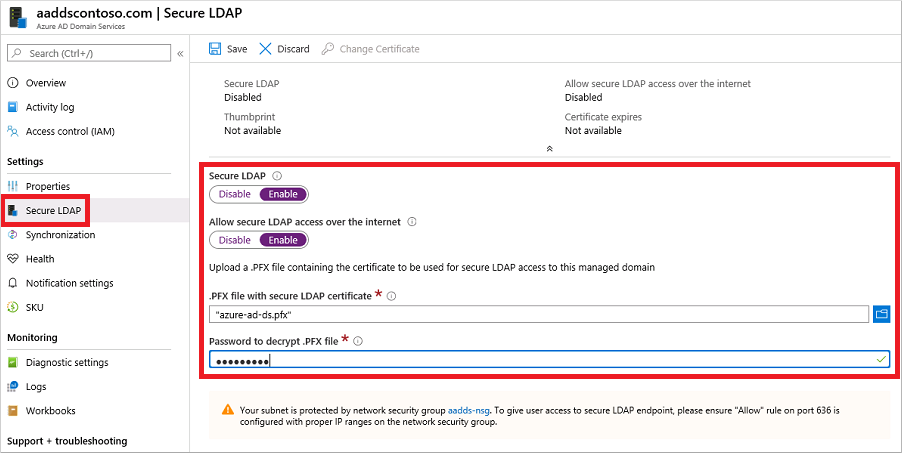
I would suggest you to check the article related to creating a Managed domain (Azure AD domain Services instance) and enabling Secure LDAP within it. It does not depend upon the subscription you have . even if your azure subscription is pay as you go , it will continue to work and you will be able to enable it . I would suggest you to go through the portal and try to create it again . In case you face any trouble , please reply to us in English along with detailed screenshots and we will be happy to help you further on this.
Thank you.
----------------------------------------------------------------------------------------------------------------------------------------------------------
 or upvote
  button whenever the information provided helps you. Original posters help the community find answers faster by identifying the correct answer. Here is how