Outlook Management
Outlook: A family of Microsoft email and calendar products.Management: The act or process of organizing, handling, directing or controlling something.
4,911 questions
This browser is no longer supported.
Upgrade to Microsoft Edge to take advantage of the latest features, security updates, and technical support.
' cx='32' cy='32' r='32' /%3E%3Ctext x='50%25' y='55%25' dominant-baseline='middle' text-anchor='middle' fill='%23FFF' %3EJ3%3C/text%3E%3C/svg%3E)
Hi Team,
One of my users lost all his text notes under "notes" columns in outlook. Please provide us with steps to restore the text notes.
The user also created a custom column, which also disappeared as well, how can we restore it?
Thank you for your help,
' cx='32' cy='32' r='32' /%3E%3Ctext x='50%25' y='55%25' dominant-baseline='middle' text-anchor='middle' fill='%23FFF' %3ECM%3C/text%3E%3C/svg%3E)
Hi @J-3804 ,
Welcome to our forum!
Do you mean the custom column shown in the below figure, which is added in the view settings?
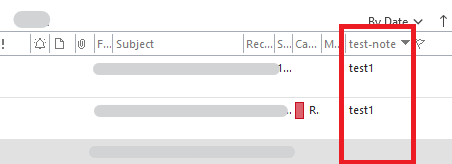
If so, have you done any specific operations before this issue occur? Such as resetting view?
As I know, you can readd the custom column in view settings. Please go to View settings>click Columns…>choose the custom column you lost>click Add>Click OK. Then the previously lost columns will be restored.
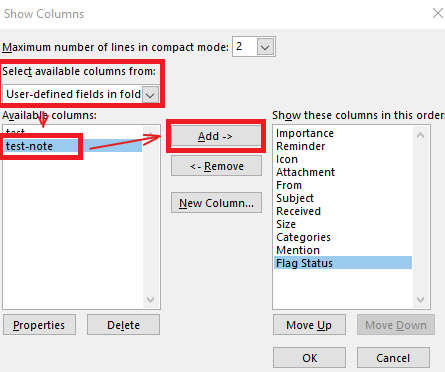
Hope the above help! If it's not your case, please provide more information about your case, such as an screenshots.(In order to avoid the disclosure of your privacy, please remember to hide your personal information)
If the answer is helpful, please click "Accept Answer" and kindly upvote it. If you have extra questions about this answer, please click "Comment".
Note: Please follow the steps in our documentation to enable e-mail notifications if you want to receive the related email notification for this thread.
Hi @J-3804 ,
Just checking in to see if above information was helpful. If you have any further updates on this issue, please feel free to post back. If you think my reply is helpful to you, please remember to mark it as an answer. Warm thanks.