Microsoft Security | Intune | Configuration Manager | Updates
Managing and deploying updates via Configuration Manager

This browser is no longer supported.
Upgrade to Microsoft Edge to take advantage of the latest features, security updates, and technical support.
' cx='32' cy='32' r='32' /%3E%3Ctext x='50%25' y='55%25' dominant-baseline='middle' text-anchor='middle' fill='%23FFF' %3EA%3C/text%3E%3C/svg%3E)
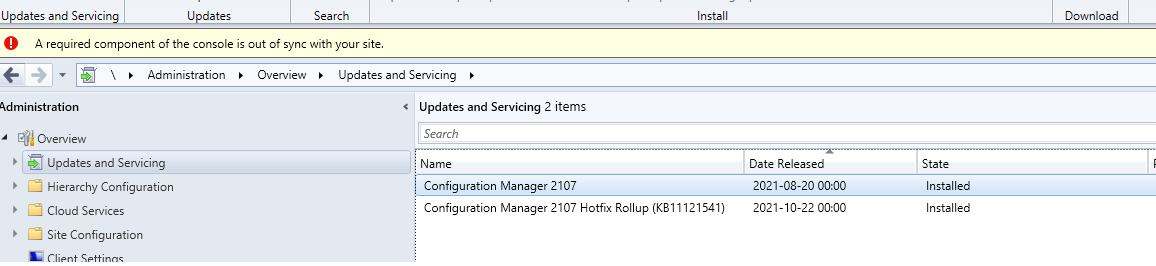
I just installed KB11121541 into my Endpoint Manager and am getting the message "A required component of the console is out of sync".
I tested runnig the setup file as Admin, renamed the console folder and ran the installer again. seems none of the solutions out there works for me. I am running the console on the server directly and not on my pc. any help would be greatly appreciated

Hi, @AMA
Thank you for posting in Microsoft Q&A forum.
You may check if the latest versions of the following files are added to the listed console installation sources? You may check the data modified of these two files.
ConfigMgr.AC_Extension.amd64.cab
ConfigMgr.AC_Extension.i386.cab
C:\Program Files\Microsoft Configuration Manager\bin\i386
C:\Program Files\Microsoft Configuration Manager\tools\ConsoleSetup
If they are not updated, you may need to open a support case.
Refer below link for more details:
https://learn.microsoft.com/en-us/answers/questions/172869/microsoft-endpoint-configuration-manager-console-b.html
If the answer is helpful, please click "Accept Answer" and kindly upvote it. If you have extra questions about this answer, please click "Comment".
Note: Please follow the steps in our documentation to enable e-mail notifications if you want to receive the related email notification for this thread.
had a case with microsoft and after a couple of hours working on it we get the issue sorted out. it seems the upgrade didnt change the two files mentioned and they sent me those files and the message disappeard.
ConfigMgr.AC_Extension.amd64.cab
ConfigMgr.AC_Extension.i386.cab