Azure Data Factory
An Azure service for ingesting, preparing, and transforming data at scale.
This browser is no longer supported.
Upgrade to Microsoft Edge to take advantage of the latest features, security updates, and technical support.
' cx='32' cy='32' r='32' /%3E%3Ctext x='50%25' y='55%25' dominant-baseline='middle' text-anchor='middle' fill='%23FFF' %3EA%3C/text%3E%3C/svg%3E)
Hi,
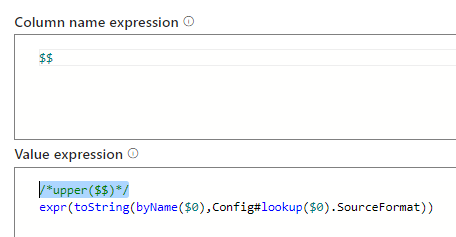
I am trying to pull the expression string from a cash table but error is:
Error:
Cannot evaluate constant value with this type
What am I doing wrong in the value expression?
An Azure service for ingesting, preparing, and transforming data at scale.
In th escreen-shot above, inside the value expression I should have placed: Config#lookup($0).Expression
in value expression if I use the following expression then it shows as just the text which is upper($$) which is what is stored inside Expression in cache table
Config#lookup($0).Expression
I tried expr(Config#lookup($0).Expression) but it errors with java nullpointer exception
I basically would like to execute the expression once it is evaluated as upper($$) in this case which is really converting my text string to expression
' cx='32' cy='32' r='32' /%3E%3Ctext x='50%25' y='55%25' dominant-baseline='middle' text-anchor='middle' fill='%23FFF' %3ESM%3C/text%3E%3C/svg%3E)
Hello @arkiboys ,
Thanks for the question and using MS Q&A platform.
From my testing looks like of expr ('<dynamic content>') may not work - I'll check with my team further and get back to you.
This video shows it is possible but I am trying it in derived column - column pattern which does not seem to work.
https://www.youtube.com/watch?v=q7W6J-DUuJY&t=1s
' cx='32' cy='32' r='32' /%3E%3Ctext x='50%25' y='55%25' dominant-baseline='middle' text-anchor='middle' fill='%23FFF' %3EGS%3C/text%3E%3C/svg%3E)
Hi @arkiboys . Have you solved this problem. Today i am facing same problem. My requirement is same as your this requirement.
Please help.
Hello @arkiboys ,
Thanks for the question and using MS Q&A platform.
I had checked internally, the below are possible :
expr(string returning function) – NOT SUPPORTED
Now coming back to your scenario and considering your above constraints. (I am assuming this is a follow up query of what you had in this thread https://learn.microsoft.com/en-us/answers/questions/617827/index.html )
I came with an alternative which may meet your requirement.
You could pass the expression and table name as a parameter to the dataflow. Details of the implementation are below :
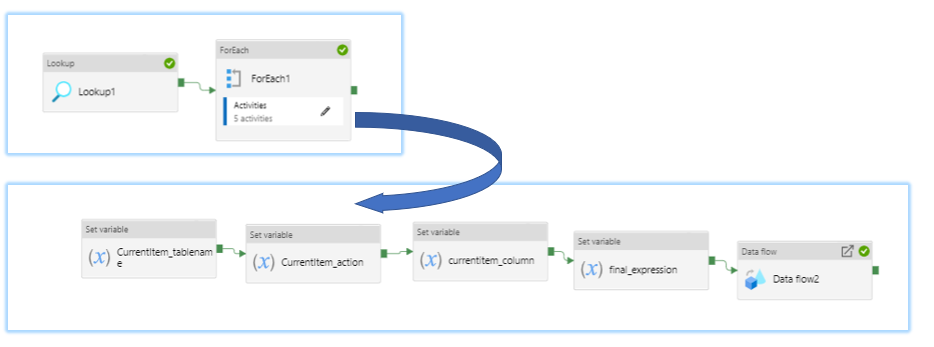
You could do a lookup to the table (csv) - which contains the TableName, columnName, ApplyExpr
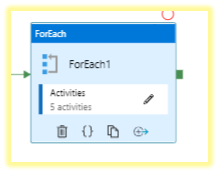
Now for each Row (within foreach activity),
I am setting the variable associated with each column so that I could process the TableName, columnName, ApplyExpr. (Note : You could also - directly used item().<value> - This is for convenience & not a mandate step)
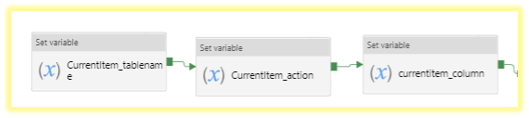
This is the Set Variable of the FinalExprr
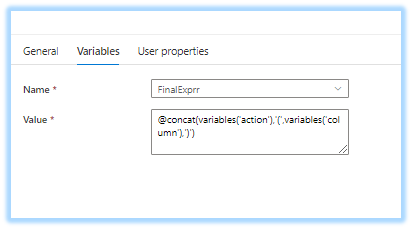
This basically does this transformation string operation - converts to Apply Expression and column name to necessary expression format that can be processed at the data flow end
action(columname). (Note : If your transformation doesn't follow this format, you could do an if condition - format it as per each action. )
You could pass the parameter to the dataflow - tableName and Final expression (this is combination of the columnName & ApplyExpr)
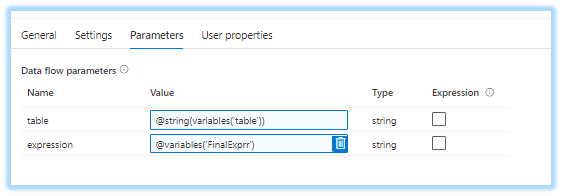
For instance, if your table had the below row
table1.csv,value,upper
Then the parameter to the dataflow will be
table : table1.csv
expression : upper(value)
Now inside the Dataflow , I am evaluating the parameter as an expression below.
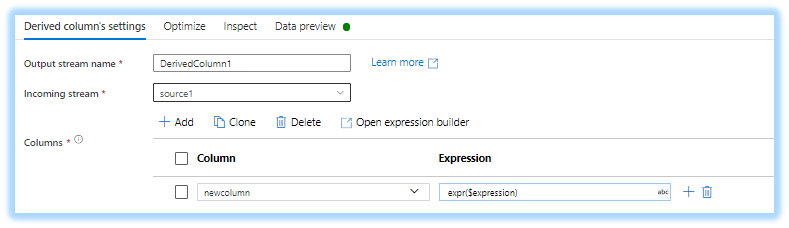
I am dynamically setting the source using the $table parameter.
Hope this will help. Please let us know if you have any further queries.
------------------------------
 or upvote
  button whenever the information provided helps you. Original posters help the community find answers faster by identifying the correct answer. Here is how
Hello @arkiboys ,
Just checking in to see if the above answer helped. If this answers your query, do click Accept Answer and Up-Vote for the same. And, if you have any further query do let us know.
Hi,
Need more time to get back to you.
Thank you
Hello again,
Your solutions seems to be applying an expression for a table and a column, whereas I am trying to execute different expressions for several different tableColumns if any.
Thank you
Hello @arkiboys ,
Thanks for getting back. As per the above logic - the table and column name are dynamic parameters to the Mapping dataflow.
Every time the dataflow runs - the column and table is passed dynamically. So, dataflow operates on the different table/column - based on the row input - that is passed through the foreach activity.
Hello @arkiboys ,
Following up to see if the above suggestion was helpful. And, if you have any further query do let us know.
Thank you for the explanation, however your solution does not seem to satisfy my requirement.
As mentioned previously, my existing csv config file, reads the names of the tables to load. So far so good....
The bit I need help with is that some of these tables, have columns which require different expressions to be applied to.
For example:
Table1, needs separate expressions for columnWeight, i.e. weight*2, and a separate one for columnName, i.e. upper and a separate one for columnAccount, i.e. 3.14*-2, etc.
Table2, columns do not need expressions applied
Table3, columns do not need expressions applied
Table4, columns do not need expressions applied
Table5, needs separate expressions for columngender, i.e. if make then 1 else 0, and a separate one for columnBook, i.e. capitalize first letter, etc.
Table6, needs separate expressions for columnBuilding, i.e. replace Name with name+buildingName, etc.
Hope you see what I mean.
Thank you
Hello @arkiboys ,
You would need additional step( more like if condition) which will actually process the second column and evaluate a transformation and pass this as a parameter to the dataflow.
In the above screenshot, set final expression - that is the step that will be achieving this.
apparently you can not use expr() inside the column pattern of derivedcolumn as expression