Microsoft Security | Microsoft Entra | Microsoft Entra ID
A cloud-based identity and access management service for securing user authentication and resource access

This browser is no longer supported.
Upgrade to Microsoft Edge to take advantage of the latest features, security updates, and technical support.
' cx='32' cy='32' r='32' /%3E%3Ctext x='50%25' y='55%25' dominant-baseline='middle' text-anchor='middle' fill='%23FFF' %3ESH%3C/text%3E%3C/svg%3E)
When I log in using "az.cmd login" I get this error message
az.cmd login
You have logged in. Now let us find all the subscriptions to which you have access...
The following tenants don't contain accessible subscriptions. Use 'az login --allow-no-subscriptions' to have tenant level access.

...
several guids here
...
So what does this mean? I see that one of the GUIDs is a AAD tenant that I want to use (that was working last time I tried it last spring).
When I use the portal it looks fine: I can switch directories and see my applications in this AADB2C tenant.
I suspect I need to (re)connect my tenant to my subscription? How do I do that?
Could this be related to this other issue : aadsts7000222-the-provided-client-secret-keys-are.html?
Thanks
Siegfried
A cloud-based identity and access management service for securing user authentication and resource access

Hi @Siegfried Heintze • Thank you for reaching out.
I am suspecting that the user account you are trying to sign in with, has access to multiple tenants, where the account is added as a guest. When you are trying to sign in by running az login command, it is connecting to a tenant where this user doesn't have access to the subscription.
Please try below steps:
az login --tenant your_tenant.onmicrosoft.com command and you should no longer encounter The following tenants don't contain accessible subscriptions. Use 'az login --allow-no-subscriptions' to have tenant level access. message. Note: The above steps are for standard Azure AD tenant and not for B2C tenant, because in case of B2C tenant, subscription is linked to the B2C service and not to the tenant. In B2C tenant, you must use --allow-no-subscriptions switch.
It doesn't seem to be related to aadsts7000222-the-provided-client-secret-keys-are.html
-----------------------------------------------------------------------------------------------------------
Please "Accept the answer" if the information helped you. This will help us and others in the community as well.
I need some more guidance please...
When I navigate to the tenant where I have my applications registered by switching to that tenant, then going to home and click subscriptions, it says I don't have any subscriptions...
I don't see any place to add users...
I see "My Role" (8 selected) and "Status" 3 selected. I tried clicking apply but nothing happens.

Then I see "To view subscriptions for which you have billing access, click here" and I click and I see "Cost Management + Billing" and "None of the entries matched the given filter". I tried clicking on "Pay-As-You-Go" select offer and apparently I created a new subscription instead of adding my existing subscription.
Please confirm that I need to add my existing subscription to this tenant or guide me to add a user.
Here is my login attempt:
az.cmd login --tenant enterprisedemoorg.onmicrosoft.com
You have logged in. Now let us find all the subscriptions to which you have access...
No subscriptions found.
@Siegfried Heintze • As I mentioned in the Note of my above answer, in case of B2C tenant, subscription is linked to the B2C service and not to the tenant. So, you won't be able to see the subscription associated to B2C tenant under subscriptions blade.
To see the subscription associated with B2C, you need to navigate to Azure AD B2C blade and under the Overview tab, you can see the associated subscription as highlighted below:
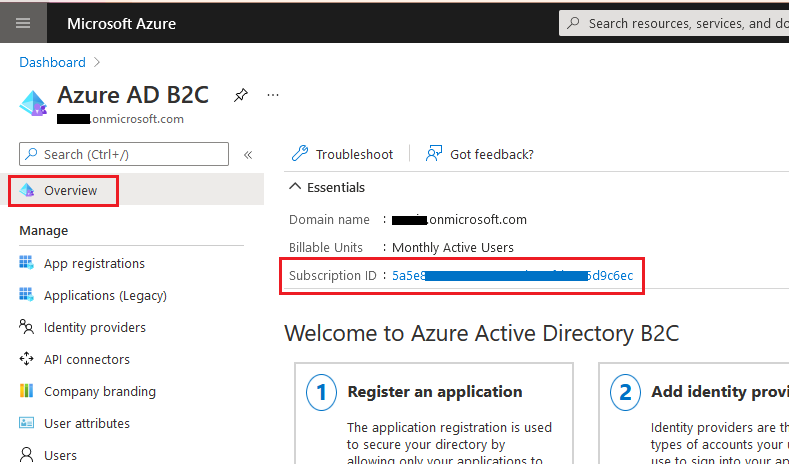
As the tenant you are using is B2C, you are required to use the --allow-no-subscriptions switch because you cannot use the subscription associated with B2C to create resources. It is just for billing purposes & to allow access to advance features like custom policy.
' cx='32' cy='32' r='32' /%3E%3Ctext x='50%25' y='55%25' dominant-baseline='middle' text-anchor='middle' fill='%23FFF' %3ERD%3C/text%3E%3C/svg%3E)