Azure Data Factory
An Azure service for ingesting, preparing, and transforming data at scale.
This browser is no longer supported.
Upgrade to Microsoft Edge to take advantage of the latest features, security updates, and technical support.
' cx='32' cy='32' r='32' /%3E%3Ctext x='50%25' y='55%25' dominant-baseline='middle' text-anchor='middle' fill='%23FFF' %3EA%3C/text%3E%3C/svg%3E)
Hello,
My connection to on-prem sql server is as follows:
server name: server1\instance1
Authentication: sql server Authentication
Login: user1
Password: pass1
Question:
What is the connectionstring to be placed inside the keyvault?
I tried the following but it can not connect
Server=server1\instance1;Database=dbName;User Id=user1;Password=pass1;
Thank you

Hello @arkiboys ,
Thanks for the question and using MS Q&A platform.
Step1: Before you create the Azure Key Vault secret, you need to test the connection with the details provided (Server Name, Database Name, User Name and Password).
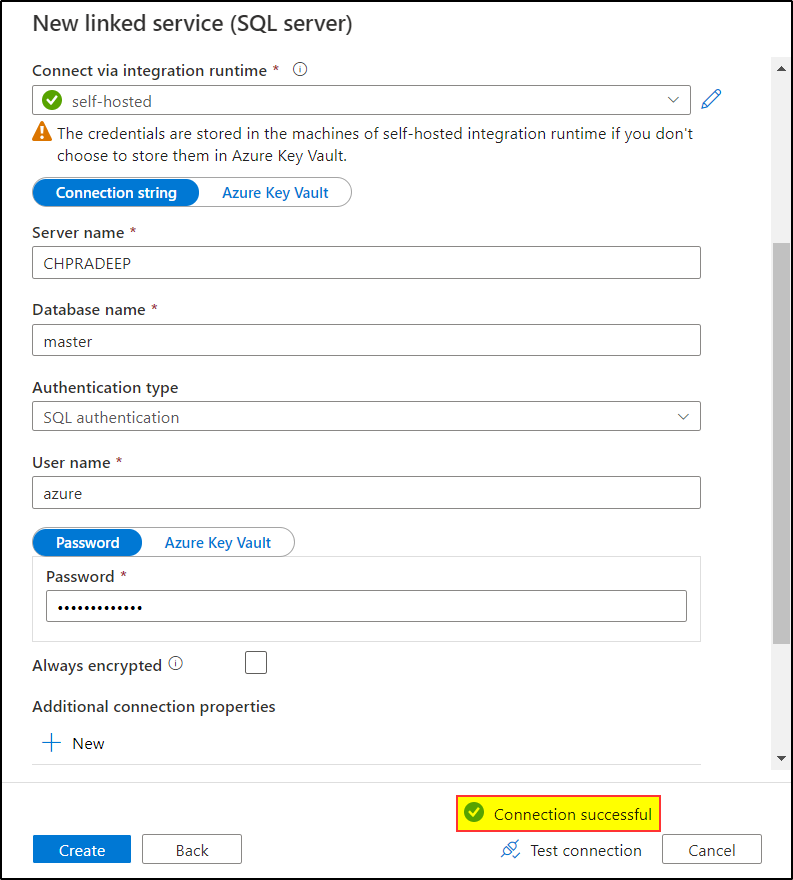
Step2: In Azure Key Vault, create a secret:
Sample On-premise SQL Server Connection String: server=CHPRADEEP;database=master;user=azure;password=password@12345

Step3 Let create the on-premise linked service using the secret created in the Azure Key Vault.
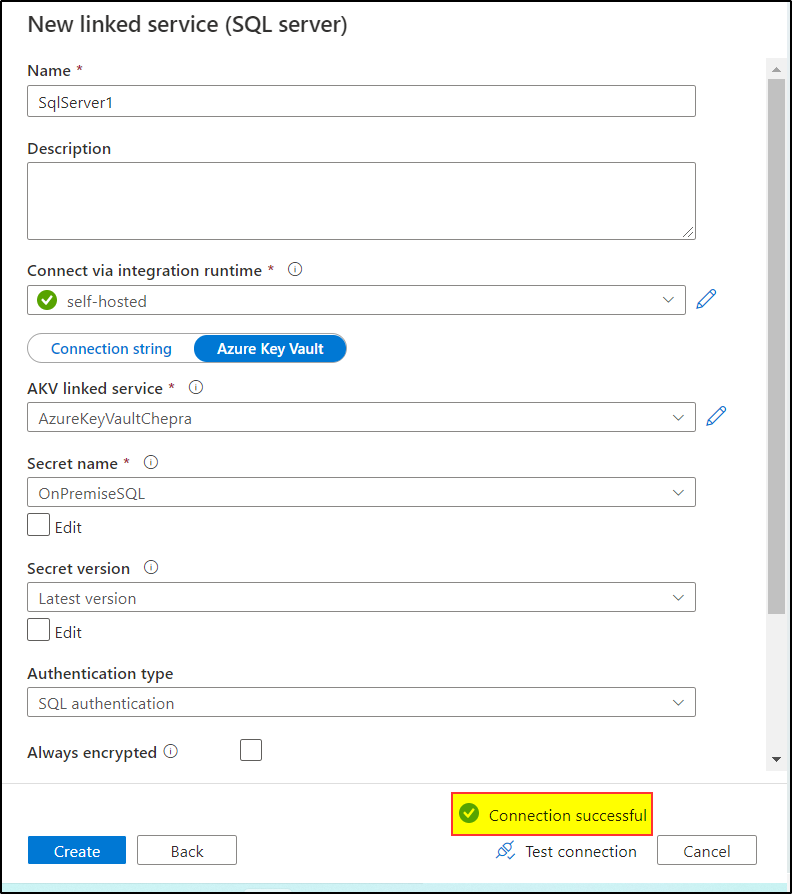
Hope this will help. Please let us know if any further queries.
 or upvote
  button whenever the information provided helps you. Original posters help the community find answers faster by identifying the correct answer. Here is how
' cx='32' cy='32' r='32' /%3E%3Ctext x='50%25' y='55%25' dominant-baseline='middle' text-anchor='middle' fill='%23FFF' %3EHL%3C/text%3E%3C/svg%3E)
This sql method works, is there way to make this works for windows authetication accounts
CREATE LOGIN [domain\user] FROM WINDOWS WITH DEFAULT_DATABASE = [master], DEFAULT_LANGUAGE = [us_english]
GO
CREATE USER [user] FOR LOGIN [domain\user] WITH DEFAULT_SCHEMA=[dbo]
GO
Because it doesn't seem to want to work this way, when i use the above connection string, but the connection works when I use this :
with windows authentication. Should I update the connection string?