Roles in SSAS tabular model

Samir abdelmalek 21 Reputation points
2021-11-29T23:02:09.683+00:00

Hi All,

I'm using SSAS tabular model to create a cube.

I have a fact table Calls and 2 dimensions Région & Employé - CSR
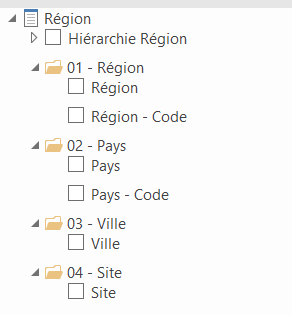
153475-dim-region.png

153492-dim-employe.png

I want to create role(s) in order to have this PivotTable like this
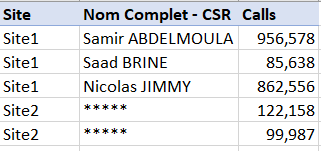
153429-pivottable.png

Explication :

when I break down the KPI Calls (from fact table Calls), with the columns Site (from dimension Région) and Nom Complet - CSR (from dimension Employé - CSR), i want that the members of the role will see data of the site "Site1" with the real employee names, and will see data of the site "Site2" with anonymous employee names or to put some text like "******".

Is there any way to create such a role(s) ? if yes, please help.
I would be thankful.

SQL Server Analysis Services
A Microsoft online analytical data engine used in decision support and business analytics, providing the analytical data for business reports and client applications such as Power BI, Excel, Reporting Services reports, and other data visualization tools.
{count} votes

2 answers

Sort by: Most helpful
  1. CarrinWu-MSFT 6,891 Reputation points
    2021-11-30T01:39:40.987+00:00

    Hi @Samir abdelmalek ,

    Welcome to Microsoft Q&A!

    You could implement Dynamic Security by Using Row Filters. Dynamic security provides row-level security based on the user name or login id of the user currently logged on. For example, users of a specific department can only see sales data for Europe, while users from another department can only view sales data for the United States. When a user views the data, it will be already pre-filtered by the model. If another user takes a look at the same report, he/she will see another set of data, depending on the privileges. For more information, please refer to Supplemental Lesson - Implement Dynamic Security by Using Row Filters and this blog.

    Best regards,
    Carrin


    If the answer is the right solution, please click "Accept Answer" and kindly upvote it. If you have extra questions about this answer, please click "Comment".
    Note: Please follow the steps in our documentation to enable e-mail notifications if you want to receive the related email notification for this thread.

    0 comments No comments

  2. Alexei Stoyanovsky 3,416 Reputation points
    2021-11-30T20:54:00.487+00:00

    Renaming a dimension member on the fly is not a feature of SSAS Tabular. This level of control is available only for values returned by measures. Dimension values can be either shown or altogether hidden. So one possible workaround would be to replace the name with some id in the rows part of output visual, and return the name, with any amount of masking, as another measure.


Your answer

Answers can be marked as 'Accepted' by the question author and 'Recommended' by moderators, which helps users know the answer solved the author's problem.