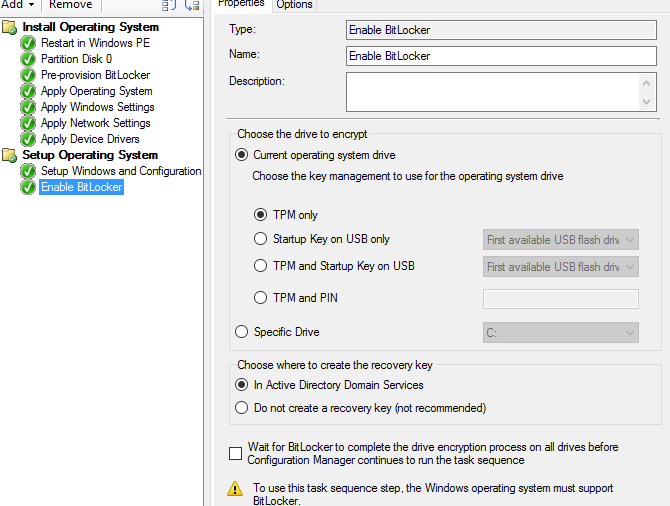
Enable Bitlocker Task Sequence Missing

D Wang 1 Reputation point
2021-12-01T17:02:41.153+00:00

Windows 2019 Standard server with MDT installed. We are looking at enabling Bitlocker with a PIN in a Task Sequence. However, the "TPM and PIN" option is missing in our Task Sequences! Under the "Choose the key management to use for the operating system drive" section we just have:

TPM only
Startup Key on USB only
TPM and Startup Key on USB

I have downloaded and installed the latest version of MDT. Windows is fully updated. What am I missing??

We have Bitlocker storing keys in AD and it is all working if done manually. Just haven't figured out the MDT/imaging way yet.

Windows for business | Windows Client for IT Pros | Devices and deployment | Set up, install, or upgrade
Windows for business | Windows Server | User experience | Other
{count} votes

1 answer

Sort by: Most helpful
  1. Limitless Technology 40,076 Reputation points
    2021-12-08T08:44:26.813+00:00

    Hi there,

    If you can not enable Bitlocker then you can then try troubleshooting MDT .
    Troubleshooting Reference for the Microsoft Deployment Toolkit
    https://learn.microsoft.com/en-us/troubleshoot/mem/configmgr/troubleshooting-reference

    You can also try enabling the Bitlocker suing the Windows intune .Use one of the following policy types to configure BitLocker on your managed devices

    -Endpoint security disk encryption policy for BitLocker.
    -Device configuration profile for endpoint protection for BitLocker.

    You can dig more info from here https://learn.microsoft.com/en-us/mem/intune/protect/encrypt-devices#silently-enable-bitlocker-on-devices

    ------------------------------------------------------------------------------------------------------------------------------------------------------------------
    !

    --If the reply is helpful, please Upvote and Accept it as an answer--

    0 comments No comments

Your answer

Answers can be marked as 'Accepted' by the question author and 'Recommended' by moderators, which helps users know the answer solved the author's problem.