Azure Data Factory
An Azure service for ingesting, preparing, and transforming data at scale.
This browser is no longer supported.
Upgrade to Microsoft Edge to take advantage of the latest features, security updates, and technical support.
' cx='32' cy='32' r='32' /%3E%3Ctext x='50%25' y='55%25' dominant-baseline='middle' text-anchor='middle' fill='%23FFF' %3ERD%3C/text%3E%3C/svg%3E)
Greetings!!!
I am using the ADF azure management api (https://management.azure.com/) to capture pipeline run information. When using the GET method in the web activity I get the below error.
GET: https://learn.microsoft.com/en-us/rest/api/datafactory/pipeline-runs/get
Fail Due to - Invoking Web Activity failed with HttpStatusCode - 'NotFound', message - 'The requested resource does not exist on the server. Please verify the request server and retry'
When using the POST method in the web activity I get no response in the value[].
POST: https://learn.microsoft.com/en-us/rest/api/datafactory/pipeline-runs/query-by-factory
I'm using the below request body for the POST method.
{
  "lastUpdatedAfter": "@{adddays(utcnow(),int(activity('pipelineactivity').output.firstRow.PropertyValue))}",
  "lastUpdatedBefore": "@{utcnow()}",
  "filters": [
    {
      "operand": "PipelineName",
      "operator": "Equals",
      "values": [
        "@{pipeline().parameters.PipelineName}"
      ]
    }
  ]
}
Thank you
' cx='32' cy='32' r='32' /%3E%3Ctext x='50%25' y='55%25' dominant-baseline='middle' text-anchor='middle' fill='%23FFF' %3ESM%3C/text%3E%3C/svg%3E)
Hello @Raj D ,
Welcome to the Microsoft Q&A platform.
As mentioned in the question. https://learn.microsoft.com/en-us/rest/api/datafactory/pipeline-runs/get , you are using the endpoint to query the pipeline.
This will only query the non-debug pipeline runs - meaning triggered runs.
I encountered the issue when I ran the pipeline using the Debug option
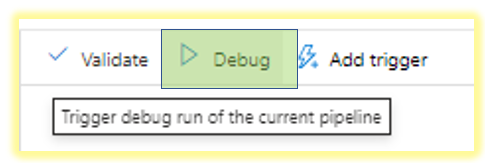
And did not occur when in the prod/triggered run or simply when I click on the trigger now after publishing the latest changes. I was able to run the activity successfully.
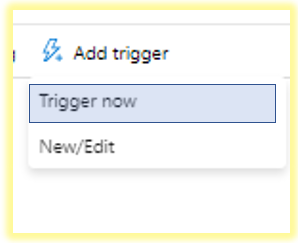
If this is not your case, you can choose ignore the below answer and help me understand whether issue is persistent even in client tools like POSTMAN.
If you want to get the data for the current debug pipeline run. From my testing you will have to tweak your endpoint slightly to query the debug runs.
Just a minor change ........<FACTORYNAME>/debugpipelineruns..... instead of ......<FACTORYNAME>/pipelineruns.....
https://management.azure.com/subscriptions/<YOUR SUBSCRIPTION>/resourceGroups/<RESOURCE GROUP>/providers/Microsoft.DataFactory/factories/<FACTORYNAME>/debugpipelineruns/@{pipeline().RunId}?api-version=2018-06-01
Method : GET
Output:
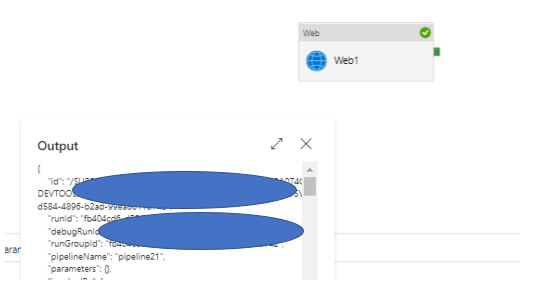
Hope this will help. Please let us know if any further queries.
------------------------------
 or upvote
  button whenever the information provided helps you. Original posters help the community find answers faster by identifying the correct answer. Here is how
Hi @svijay-MSFT Thanks very much for your response. The GET method works now but still have a problem with the POST method as I get an empty object for value.
Also, when I try to use to use the GET api for the resource group name gives me same empty object for the value. I'm using the below api to get the name of the Resource Group from my Azure Data Factory pipeline.
Is an authorization header required? If so, could you please guide me which and how to use?
GET https://management.azure.com/subscriptions/<mysubscriptionid>/resourcegroups?api-version=2020-06-01
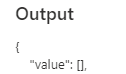
Thank you
Are you trying to query the triggered pipeline runs or debug pipelines - Are you looking for an endpoint to query the debug pipelines ?
Or you encountering this issue while querying the triggered pipeline runs ?
If Yes , In the below snippet ?
"lastUpdatedAfter": "@{adddays(utcnow(),int(activity('pipelineactivity').output.firstRow.PropertyValue))}",
"lastUpdatedBefore": "@{utcnow()}",
What is the output of int(activity('pipelineactivity').output.firstRow.PropertyValue))
Hi @svijay-MSFT
Pardon my ignorance I'm a newbie trying to understand the nuances of Azure Data Factory management api.
Please find my answers below.
Are you trying to query the triggered pipeline runs or debug pipelines - Are you looking for an endpoint to query the debug pipelines ?
Debug pipelines for now but looks like I'll have to change the api querystring when I create the scheduled triggers for my pipeline. Is that right?
Or you encountering this issue while querying the triggered pipeline runs ?
No, In debug only. I don't have any scheduled triggers created yet.
If Yes , In the below snippet ?
I have since changed to "lastUpdatedAfter": "@{adddays(utcnow(),-1)}" to capture the last 24 hours from current time.
Thank you
Hi @svijay-MSFT , I am doing the authentication using Managed Identity.
"authentication": {
        "type": "MSI",
        "resource": " https://management.core.windows.net/ "
    }
If you are querying debug pipeline runs then the endpoint should be like below
https://management.azure.com/subscriptions/@{variables('subscriptionid')}/resourceGroups/@{variables('resourcegroup')}/providers/Microsoft.DataFactory/factories/@{pipeline().DataFactory}/queryDebugPipelineRuns?api-version=2018-06-01

......queryDebugPipelineRuns.............
Hello @Raj D ,
Just checking in if you have had a chance to see the previous response. If this answers your query, do click Accept Answer and Up-Vote for the same. And, if you have any further query do let us know.