Azure Databricks
An Apache Spark-based analytics platform optimized for Azure.
This browser is no longer supported.
Upgrade to Microsoft Edge to take advantage of the latest features, security updates, and technical support.
' cx='32' cy='32' r='32' /%3E%3Ctext x='50%25' y='55%25' dominant-baseline='middle' text-anchor='middle' fill='%23FFF' %3EDJ%3C/text%3E%3C/svg%3E)
Hello MS support:
I have 2 question about databricks data ETL via ADF.
Thanks,
Jacky
An Apache Spark-based analytics platform optimized for Azure.
A family of Microsoft spreadsheet software with tools for analyzing, charting, and communicating data


Hello @Dong, Jacky ,
Following up to see if the below suggestion was helpful. And, if you have any further query do let us know.
------------------------------
 or upvote
  button whenever the information provided helps you.
 Answer accepted by question author

For the first part, does this post answer your question about Excel files (https://learn.microsoft.com/en-us/answers/questions/239732/excel-as-a-source-in-adf.html)?
From an on-premises source you may also need a Data Gateway installed (https://learn.microsoft.com/en-us/data-integration/gateway/)
You can then save the content to Azure Data Lake Storage in Parquet format which Databricks will then be able to access.
For the second part, look at the SQL connector available in Azure Databricks (https://learn.microsoft.com/en-us/azure/databricks/data/data-sources/sql-databases) and then update your notebook code so that when you populate the table in Databricks you also write a copy of the dataframe to SQL Server.
Thank you for your reply.
The first question has test passed per guide. Thank you.
The second one, May I know if the notebook code is connect to Azure sql server or local sql server? I want to connect local sql server, but don't know how to pass the firewall...
For the second part, I would look at using Azure Data Factory to move the data table back to your on-premises SQL Server.
You will need a Self-Hosted Integration Runtime installed that can communicate with your on-premises network. If you have a Data Factory PIpeline then you can run that from a RESTR API call as mentioned here.
Hello @Dong, Jacky ,
In additional to @Martin Cairney response.
Note: You can connect to SQL databases using JDBC and Apache Spark connector.
If you are using JDBC connector you no need to import any packages.
Reference: SQL databases using JDBC
If you are using Apache Spark Connector you need to import the below packages as per the Databricks Runtime which you are using:
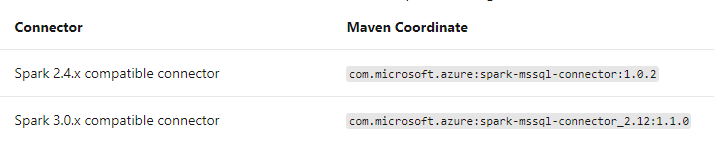
Reference: SQL Databases using the Apache Spark connector and Process & Analyze SQL Server Data in Azure Databricks
Hope this will help. Please let us know if any further queries.
------------------------------
or upvote button whenever the information provided helps you. Original posters help the community find answers faster by identifying the correct answer. Here is how