Microsoft 365 and Office | Development | Other
Building custom solutions that extend, automate, and integrate Microsoft 365 apps.

This browser is no longer supported.
Upgrade to Microsoft Edge to take advantage of the latest features, security updates, and technical support.
' cx='32' cy='32' r='32' /%3E%3Ctext x='50%25' y='55%25' dominant-baseline='middle' text-anchor='middle' fill='%23FFF' %3EAH%3C/text%3E%3C/svg%3E)
Hi all,
I am trying to create my first office script today and unfortunately run into some problems right away.
I have an Excel file where in column L are file names and in column M are links to these files in a SharePoint site.
I now want to set the formula for a hyperlink with a For loop with the file name and the file link in column N.
After that I want to either hide or delete the columns L and M.
The For-loop I have already managed so far, but I have not yet understood how I have to make the setting of the formula for the hyperlink syntactically correct.
Here are my first attempts to set the file name from the L column as the link description:
function main(workbook: ExcelScript.Workbook) {
let currentWorksheet = workbook.getActiveWorksheet();
let usedRange = currentWorksheet.getUsedRange();
let rowCount = usedRange.getRowCount();
  for (var i = 1; i <= rowCount; i++) {
    if (usedRange.getCell(i, 11).getValue()) {
      // usedRange.getCell(i, 13).setFormulaLocal("=HYPERLINK(\"https://xxx.sharepoint.com/sites/CS-Reisekostenabrechnung//Freigegebene Dokumente/ Positionen/number9.png\"; \"' usedRange.getCell(i, 11).getValue() '\")");

      // usedRange.getCell(i, 13).setFormulaLocal("=HYPERLINK(\"https://xxx.sharepoint.com/sites/CS-Reisekostenabrechnung//Freigegebene Dokumente/ Positionen/number9.png\"; \"usedRange.getCell(i, 11).getValue()\")");

      // usedRange.getCell(i, 13).setFormulaLocal("=HYPERLINK(\"https://xxx.sharepoint.com/sites/CS-Reisekostenabrechnung//Freigegebene Dokumente/ Positionen/number9.png\"; \" & usedRange.getCell(i, 11).getValue() & \")");

      usedRange.getCell(i, 13).setFormulaLocal("=HYPERLINK(\"https://xxx.sharepoint.com/sites/CS-Reisekostenabrechnung//Freigegebene Dokumente/ Positionen/number9.png\"; \" ${usedRange.getCell(i, 11).getValue()} \")");

      console.log(`The current cell's value is ${usedRange.getCell(i, 11).getValue()}`);

    }
  }
}
All 4 attempts show then in the column N only the command as string, but not the file name. What would be the correct syntax here?
For deleting or hiding the columns I used the macro recorder. Unfortunately, the macro recorder shows me a syntax error in its own generated code in both cases.
function main(workbook: ExcelScript.Workbook) {
  let backup = workbook.getTable("Backup");
  // Delete range L:M on backup
  backup.getRange("L:M").delete(ExcelScript.DeleteShiftDirection.left);
}
Expected 0 arguments, but got 1 (2554).
If I start the script anyway, then all columns from A to M are either completely deleted or all hidden.
Can anyone help me further here?
Regards
Herb
' cx='32' cy='32' r='32' /%3E%3Ctext x='50%25' y='55%25' dominant-baseline='middle' text-anchor='middle' fill='%23FFF' %3EPR%3C/text%3E%3C/svg%3E)
Thanks for the question! For the hyperlink syntax, formatting your code to look like this should work:
workbook.getActiveWorksheet().getRange("A1").setFormulaLocal('=HYPERLINK("https://www.bing.com/", "Name of Link")');
Notice the ' instead of the " in the line above.
Also, in order to delete the columns, I believe the recorder generated code to delete them from a worksheet object, not a table object. The below example should delete columns L and M from the active worksheet but you can specify a specific worksheet like so: let selectedSheet = workbook.getWorksheet("Sheet1");
function main(workbook: ExcelScript.Workbook) {
    let selectedSheet = workbook.getActiveWorksheet();
    // Delete range L:M on selectedSheet
    selectedSheet.getRange("L:M").delete(ExcelScript.DeleteShiftDirection.left);
}
Let me know if you have any other questions and hope this helps!
Hi @Petra Ronald ,
first of all, happy new year 2022 and thank you for your feedback.
With your syntax suggestions I could now solve the problem with deleting or hiding columns, but unfortunately,
I still have the problem with setting the hyperlink.
I think I already do it syntactically as you suggest.
The main difference is only that I call a For loop with dynamic values.
As a link description I only get to see the command and not the file name from the column to the left of it.
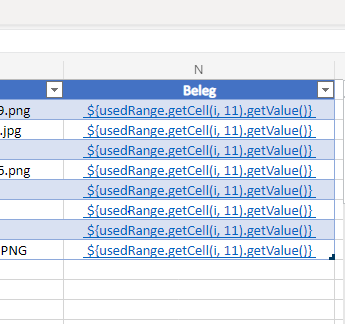
Do you have another idea what I am doing wrong here?
I just hope that the problem is with me and it is not a bug, because I really need this.
Regards
Herb
Happy New Year to you too!
I would first set a variable with the hyperlink's value. So for instance, if B1 has the hyperlink, you would do something like the below in the for loop:
let hyperlinkValue = workbook.getActiveWorksheet().getRange("B1").getValue();
Then, for the range with the formula (in this case A1), try something like this line.
workbook.getActiveWorksheet().getRange("A1").setFormulaLocal('=HYPERLINK("'+hyperlinkValue+'", "Name of Link")');
Hope this helps!
Hi @Petra Ronald ,
I have now tried to implement your suggestion. In the first step, I did without the For loop and tried to set the hyperlink formula for a single cell. However, this does not work as I had imagined. In the tool tip for the command "setFomulatLocal" it also says:
„If the range contains multiple cells, each cell in the given range will be updated with the input data”.
Here's my little test script:
function main(workbook: ExcelScript.Workbook) {

	let hyperlinkAddr = workbook.getActiveWorksheet().getRange("M2").getValue();
	let hyperlinkDesc = workbook.getActiveWorksheet().getRange("L2").getValue();

	workbook.getActiveWorksheet().getRange("N2").setFormulaLocal('=HYPERLINK("' + hyperlinkAddr + '";"' + hyperlinkDesc + '")');
}
This now results in the formula being set for the complete Used range within the column, although I only want to set the formula for a clearly defined cell.
Here is the result:
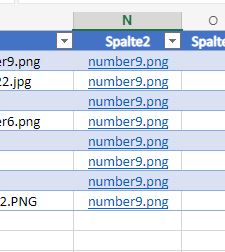
In the For loop, the formula is then also set four times for all cells and not individually for each cell.
After the run of the For loop, the column is empty again.
Do you have an idea how I can set the formula individually for each cell ?
I am already looking forward to your feedback.
Regards
Herb
Can you share your script?
With the for loop, the code should look something like this:
  let usedRange = workbook.getActiveWorksheet().getUsedRange();
  let rowCount = usedRange.getRowCount();
  let values = usedRange.getValues(); //I suggest getting the values for the entire range outside of the for loop to make your script run faster
  for (var i = 0; i < rowCount; i++) { //is there any reason you are skipping the first row? the first row has index 0
    if (values[i][11]!="") { //this would be how you get the value of a specific cell now since you got the values outside of the for loop
      let hyperlinkDesc = values[i][11]; //this is the L column for each row assuming your used range starts in column A
      let hyperlinkValue = values[i][12]; //this is the M column with the hyperlink value
      usedRange.getCell(i, 13).setFormulaLocal('=HYPERLINK("' + hyperlinkValue + '", "'+hyperlinkDesc+'")'); //setting column N
    }
  }