SQL Server Integration Services
A Microsoft platform for building enterprise-level data integration and data transformations solutions.
This browser is no longer supported.
Upgrade to Microsoft Edge to take advantage of the latest features, security updates, and technical support.
' cx='32' cy='32' r='32' /%3E%3Ctext x='50%25' y='55%25' dominant-baseline='middle' text-anchor='middle' fill='%23FFF' %3EF%3C/text%3E%3C/svg%3E)
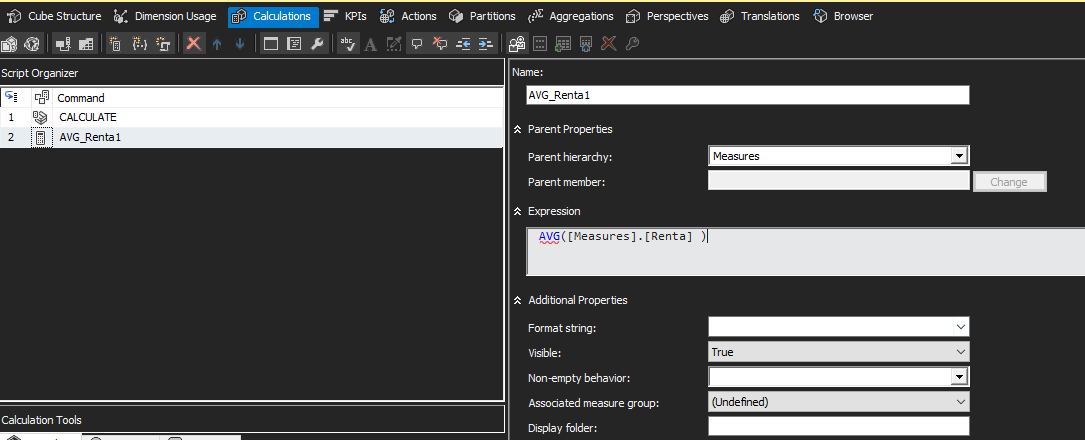
I have a cube in SSAS, I need to get the average of a field, the values of this field are all positive values, when I create a calculated member in SSAS:
"AVG ([Measures]. [Rent])"
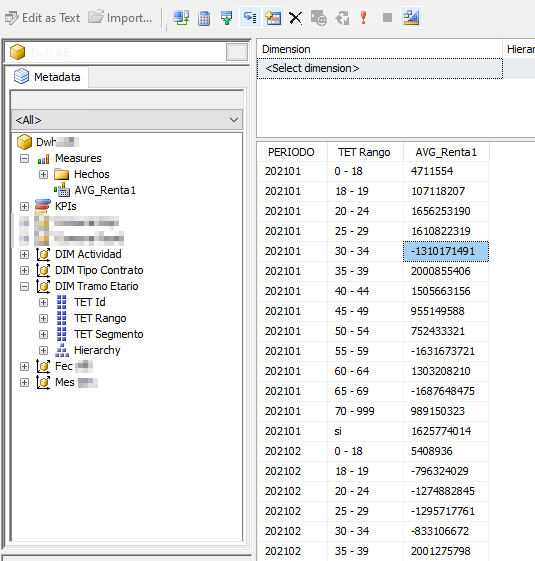
The results are negative values (not always, they change as I add dimensions)
When I do the calculation in T-SQL the results are correct:
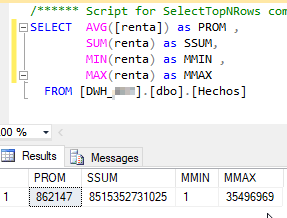
But when I do the calculation in SSAS the results are random:
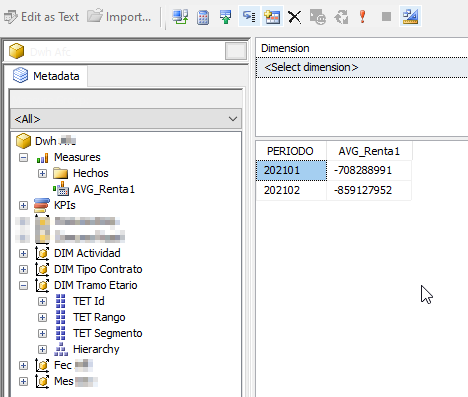
When I add another dimension the results start to change:
When you started the problem I changed the data type from int to bigint but I have not had good results either, this is the calculated member:

Hi @FernandoCar ,
Welcome to Microsoft Q&A!
From the T-SQL, you were calculate average values for one column. However, in SSAS cube, you were created a calculated member. A Calculated Member is a custom MDX expression that defines a member in any hierarchy in the cube. When you create a calculated member, it’s better to create two physical measures [Sum] and [Count] and then create a calculated measure to calculate average. If you would like to calculate average value for one coulumn, please try to create a measure. For more information, please refer to below links:
Average aggregation in measures – SSAS Cube
this thread
Create Measures and Measure Groups in Multidimensional Models
Best regards,
Carrin
If the answer is the right solution, please click "Accept Answer" and kindly upvote it. If you have extra questions about this answer, please click "Comment".
Note: Please follow the steps in our documentation to enable e-mail notifications if you want to receive the related email notification for this thread.