Microsoft Security | Microsoft Authenticator
A Microsoft app for iOS and Android devices that enables authentication with two-factor verification, phone sign-in, and code generation

This browser is no longer supported.
Upgrade to Microsoft Edge to take advantage of the latest features, security updates, and technical support.
' cx='32' cy='32' r='32' /%3E%3Ctext x='50%25' y='55%25' dominant-baseline='middle' text-anchor='middle' fill='%23FFF' %3EL%3C/text%3E%3C/svg%3E)
I recently got a new iPhone and now have to register my account anew on the Microsoft authenticator app. So I asked the administrator on this shared email account to send me a new QR code and I got the error message "device token is empty".
After looking into this issue, I thought that the problem might be that there are too many devices on this account. So the administrator removed one device. I received the same error message with the new QR code.
Then I saw that there seem to be issues with the authenticator app and the new IOS software, so I took my old iphone, reset it back to its old settings (unfortunately I had already wiped the phone), and tried to set up the Microsoft authenticator app anew. I got the same "device token is empty" error message.
I do not know what to do at this point to rectify the situation. I have also tried entering the token number manually rather than scanning the QR code but this has also not been successful.
Thank you for your help.
L
' cx='32' cy='32' r='32' /%3E%3Ctext x='50%25' y='55%25' dominant-baseline='middle' text-anchor='middle' fill='%23FFF' %3EGC%3C/text%3E%3C/svg%3E)
I have a few users experiencing this same issue and can only use SMS method now (they are using ios15 device OS where their authenticator app is installed). Everyone is working remote so I cannot get access to the personal device. Some kind of guidance on this would be great.
' cx='32' cy='32' r='32' /%3E%3Ctext x='50%25' y='55%25' dominant-baseline='middle' text-anchor='middle' fill='%23FFF' %3ED%3C/text%3E%3C/svg%3E)
I just got an e-mail from a coworker having the same issue. Never occured before, is this a new problem? How to solve it?
' cx='32' cy='32' r='32' /%3E%3Ctext x='50%25' y='55%25' dominant-baseline='middle' text-anchor='middle' fill='%23FFF' %3EFH%3C/text%3E%3C/svg%3E)
I have faced the same issue, does anyone have a solution?
' cx='32' cy='32' r='32' /%3E%3Ctext x='50%25' y='55%25' dominant-baseline='middle' text-anchor='middle' fill='%23FFF' %3EPT%3C/text%3E%3C/svg%3E)
please select without notification option in IOS devices bro.You can now fix it
' cx='32' cy='32' r='32' /%3E%3Ctext x='50%25' y='55%25' dominant-baseline='middle' text-anchor='middle' fill='%23FFF' %3EF%3C/text%3E%3C/svg%3E)
Can you expand on this solution? I'm not sure what you mean by this answer. I also do not have an iphone so a more detailed response would be much appreciated.
i mean to choose sign-in method to authenticator app or hardware token instead of sign in with notification bro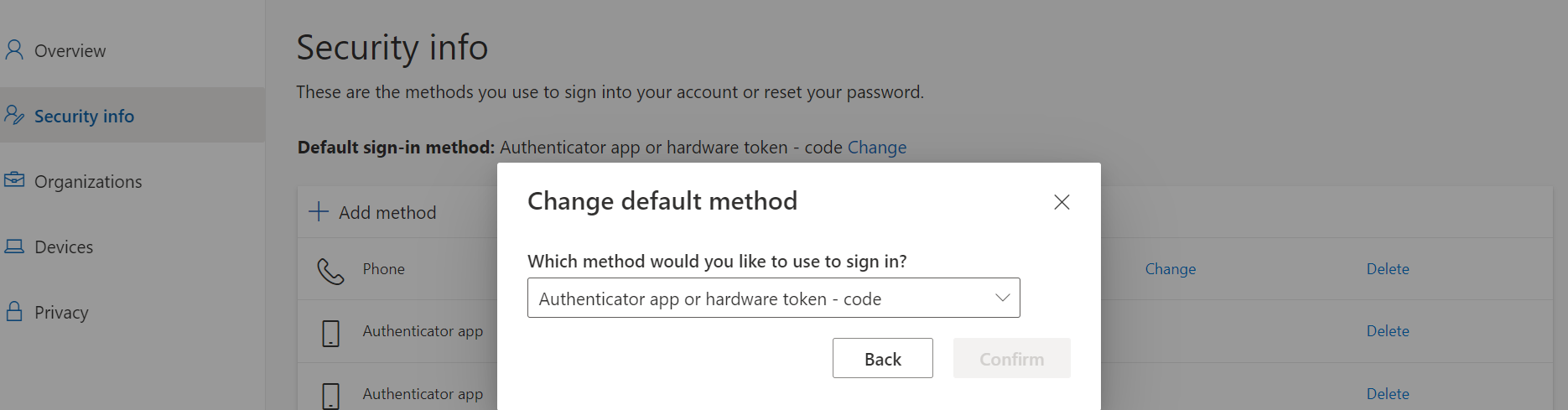
Yeah, that doesn't resolve the issue that OP is describing though. In order to get to the point you are showing, you must have already scanning the QR code. The OP is stuck at scanning the QR code therefore they cannot get the Authenticator App to show up as an option.
' cx='32' cy='32' r='32' /%3E%3Ctext x='50%25' y='55%25' dominant-baseline='middle' text-anchor='middle' fill='%23FFF' %3EDC%3C/text%3E%3C/svg%3E)
Just had my first user with this issue today. iPhone 8 with Authenticator version 6.5.90.
' cx='32' cy='32' r='32' /%3E%3Ctext x='50%25' y='55%25' dominant-baseline='middle' text-anchor='middle' fill='%23FFF' %3EM%3C/text%3E%3C/svg%3E)
Just found the solution : click on "use a different authentificator app" and use the ios app called "Authentificator" - DONE.
Seems like the war between apple and microsoft isn't over just yet...
Hope this helps.
Cheers
' cx='32' cy='32' r='32' /%3E%3Ctext x='50%25' y='55%25' dominant-baseline='middle' text-anchor='middle' fill='%23FFF' %3EGM%3C/text%3E%3C/svg%3E)
I’m reviving a authenticated code to my iPhone in Blanc
' cx='32' cy='32' r='32' /%3E%3Ctext x='50%25' y='55%25' dominant-baseline='middle' text-anchor='middle' fill='%23FFF' %3EDS%3C/text%3E%3C/svg%3E)
The solution is to have the user uninstall then reinstall Microsoft Authenticator, then scan the QR code again. Because Apple transfer the software with the same token from the previous device, it causes an authentication issue.
Be sure to first go into Azure, then choose the users, the select Require re-register multifactor authentication. Also, in the Microsoft Admin portal I would suggest resetting multi-factor authentication for said user.
' cx='32' cy='32' r='32' /%3E%3Ctext x='50%25' y='55%25' dominant-baseline='middle' text-anchor='middle' fill='%23FFF' %3EOC%3C/text%3E%3C/svg%3E)
Thank you!!!!, It works now.
' cx='32' cy='32' r='32' /%3E%3Ctext x='50%25' y='55%25' dominant-baseline='middle' text-anchor='middle' fill='%23FFF' %3EIS%3C/text%3E%3C/svg%3E)
I had the same issue with a co-worker. We deleted the app, the account in the app, deleted all the info in Azure. Tried to register the phone again and nothing worked!! When we were really out of options, the only thing I could come up with, was to reset the iPhone. After we've done that, IT WORKED!!! I wish I've come up with this idea earlier, that would have saved us some time and annoyance.
' cx='32' cy='32' r='32' /%3E%3Ctext x='50%25' y='55%25' dominant-baseline='middle' text-anchor='middle' fill='%23FFF' %3ERM%3C/text%3E%3C/svg%3E)
Deleting the app (after checking recovery is working and iCloud back up is on) then restarting recovery worked!