Share via

Aggreagtion showing under wrong attribute

Amy Jandreau 61 Reputation points
2022-01-12T19:33:39.09+00:00

Hi All,
In my cube i have a location dimension. It has the following attributes
LocationKey>EntityKey>UnitKey>LocationName>City>State.
LocationKey is unique.
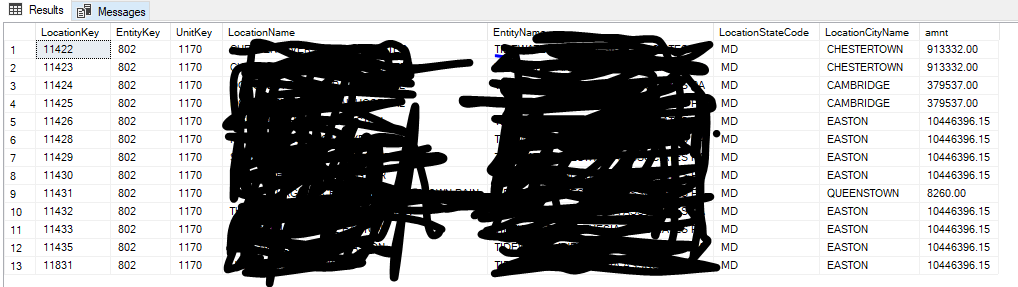
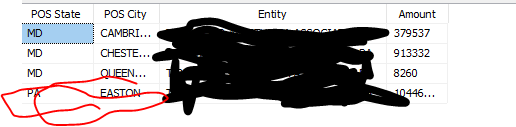
The Issue is there is a city with the same name under two different states. When i browse and want to see the amount paid, it is showing one state's city's amount under a different state's city. Please advice.
Thanks

SQL Server Analysis Services

A Microsoft online analytical data engine used in decision support and business analytics, providing the analytical data for business reports and client applications such as Power BI, Excel, Reporting Services reports, and other data visualization tools.


3 answers

Sort by: Most helpful
  1. Amy Jandreau 61 Reputation points
    2022-01-14T14:20:10.953+00:00

    Any help or advice please?
    Thanks

    Was this answer helpful?

    0 comments No comments

  2. Alexei Stoyanovsky 3,416 Reputation points
    2022-01-13T19:14:20.98+00:00

    Editing new info into an earlier comment isn't exactly convenient for structuring the discussion :(
    From the samples it seems that you use LocationCityName as the single key column for the POS City attribute, and then you must have the KeyDuplicate option within ErrorConfiguration set to IgnoreError. PA happened to win over MD as the state into which Easton aggregates, so you don't even have an Easton -> MD pair in the dimension data.
    If that's the case, the easiest solution is to add LocationStateCode as the second key column for the POS City attribute. And, I'm yet to see a case where ignoring key duplicate errors is the correct setting.

    Was this answer helpful?

    0 comments No comments

  3. CarrinWu-MSFT 6,891 Reputation points
    2022-01-13T02:57:07.217+00:00

    Hi @Amy Jandreau ,

    Welcome to Microsoft Q&A!

    Does the data displayed in cube different from that in data source table? First, please check the data is correct in data source table. If it's correct, the issue can be caused by that the relationship setting are incorrect. To find out whether a dimension and measure group are related, we can use the "Dimension Usage" tab of the cube designer. For more information, please refer to Handle wrong results in SSAS for unrelated dimension and measure groups.

    Best regards,
    Carrin


    If the answer is the right solution, please click "Accept Answer" and kindly upvote it. If you have extra questions about this answer, please click "Comment".
    Note: Please follow the steps in our documentation to enable e-mail notifications if you want to receive the related email notification for this thread.

    Was this answer helpful?


Your answer

Answers can be marked as 'Accepted' by the question author and 'Recommended' by moderators, which helps users know the answer solved the author's problem.