Azure Data Explorer
An Azure data analytics service for real-time analysis on large volumes of data streaming from sources including applications, websites, and internet of things devices.
This browser is no longer supported.
Upgrade to Microsoft Edge to take advantage of the latest features, security updates, and technical support.
' cx='32' cy='32' r='32' /%3E%3Ctext x='50%25' y='55%25' dominant-baseline='middle' text-anchor='middle' fill='%23FFF' %3EMK%3C/text%3E%3C/svg%3E)
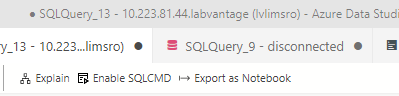
can't figure it out in the the documentation. Please explain how to use the feature(s) after SQL statements are executed.
don't need the explain part, just the SQLCMD part

Other than running T-SQL queries in SSMS studio or Azure Data studio, SQLCMD utility can be used. We can go to Run > CMD and open Command prompt and run the queries from there using SQLCMD.
Using SQLCMD, you can run a single query or bunch of queries stored in a text file. Please see the use cases and the examples of SQLCMD here: https://learn.microsoft.com/en-us/sql/ssms/scripting/sqlcmd-use-the-utility?view=sql-server-ver15
The same option is enabled in Azure Data Studio that you have shared in the screenshot. This blog talks about the same - https://cloudblogs.microsoft.com/sqlserver/2019/09/10/the-september-release-of-azure-data-studio-is-now-available/
----------
Please don't forget to Accept Answer and Up-vote if the response helped -- Vaibhav
I would need an example from the UI in Azure Data Studio and how to invoke the SQLCMD from that thing in the screen shot
I I already have select statements of the form:
select stuff from table where condition = condition 1;
select stuff from table where condition = condition 2;
and the statements return the expected result, but the only UI construct is an icon for each statement's result to save it to one file. I have 24K statements, so that will not work. I need a flat file of all results
please provide detailed steps to invoke SQLCMD from Azure data Studio. I have no other SQL tools installed.
' cx='32' cy='32' r='32' /%3E%3Ctext x='50%25' y='55%25' dominant-baseline='middle' text-anchor='middle' fill='%23FFF' %3EH%3C/text%3E%3C/svg%3E)
Hello @Madsen, Ken ,
Thanks for the ask and using Microsoft Q&A platform .
You can invoke sqlcmd by opening the terminal
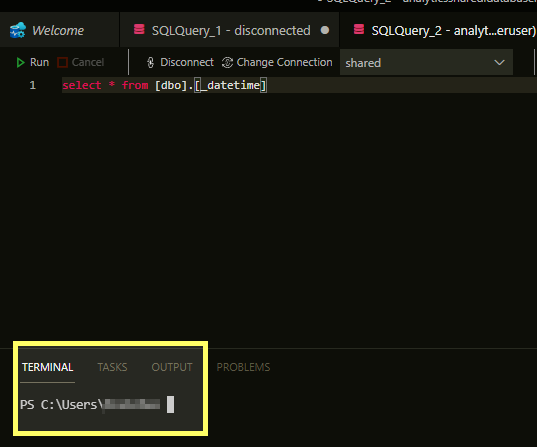

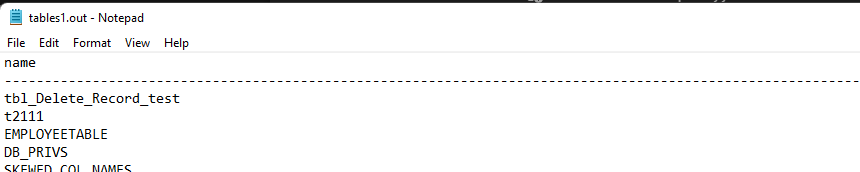
Please do let me know how it goes .
Thanks
Himanshu
-------------------------------------------------------------------------------------------------------------------------
 or upvote
  button whenever the information provided helps you. Original posters help the community find answers faster by identifying the correct answer. Here is how
I can't get it to work. I had installed the odbc drivers but I could not make a connection like in Azure studio. I uninstalled odbc and some other ms tools, and now It wont invoke sqlcmd on the terminal. Is it safe to reinstall azure data studio to restore what I uninstalled.
Hello @Madsen, Ken ,
Just curious as to what is the source database here , are you using SQL Server or something else ?
Reinstall should be fine . Do let me know how it goes .
Please send an email to azcommunity@microsoft.com if you are still facing issues .
Subject : Attn Himanshu
Thanks
Himanshu
I installed SSMS but shelling out to the CMD prompt will not invoke SQLCMD
There was a measure of improvement, but the rpt file is a merge of results and the messages
My conclusion is there are missing install steps or the tools don't work as advertised
the db is SQL Server. The application supports Oracle and SQL Server dbs (only one is in use), and the customer is using SQL Server
here is the rpt data for a few results
(1 row affected)
sampleqty batchid
NULL B-20170403-00005
Warning: Null value is eliminated by an aggregate or other SET operation.
(1 row affected)
sampleqty batchid
NULL B-20170403-00004
Warning: Null value is eliminated by an aggregate or other SET operation.
(1 row affected)
sampleqty batchid
NULL B-20170403-00003
Warning: Null value is eliminated by an aggregate or other SET operation.
(1 row affected)
sampleqty batchid
NULL B-20170403-00002
Warning: Null value is eliminated by an aggregate or other SET operation.
in azure data studio the results and messages are in different tabs
other rows with better data
sampleqty batchid
(0 rows affected)
sampleqty batchid
765.00 mL 5007422013
(1 row affected)
sampleqty batchid
(0 rows affected)
sampleqty batchid
NULL 1052122001
Warning: Null value is eliminated by an aggregate or other SET operation.
(1 row affected)
sampleqty batchid
845.00 mL 5007422012
(1 row affected)