SQL Server Reporting Services
A SQL Server technology that supports the creation, management, and delivery of both traditional, paper-oriented reports and interactive, web-based reports.
This browser is no longer supported.
Upgrade to Microsoft Edge to take advantage of the latest features, security updates, and technical support.
' cx='32' cy='32' r='32' /%3E%3Ctext x='50%25' y='55%25' dominant-baseline='middle' text-anchor='middle' fill='%23FFF' %3ET%3C/text%3E%3C/svg%3E)
Hello,
I originally presented this as a follow-up question in my thread about importing and using SQL Server Reporting Services 2014 reports on SQL Server Reporting Services 2019.
After repeated failed attempts to get an answer to my question in the aforementioned thread, I decided to post a new one in hopes it might get some attention.
The original thread can be found here: https://learn.microsoft.com/en-us/answers/questions/553566/reporting-services-2014-reports-reporting-services.html
The question:
Is it possible to use the Reporting Services 2014 with SQL server 2019? Currently our environment consists of two servers. A SQL server and a Reporting Services server.
Could we just restore the current Reporting Services 2014 databases to the new SQL Server 2019 -server, install the SQL Server Reporting Services 2014 to the new Reporting services -server, make the necessary configurations to Reporting Services and continue using the Reporting Services 2014?
This arrangement would reduce the risk with reports possibly breaking down or having compatibility issues when converting to new Reporting Server 2019.
Best regards,
Tunkkari

Hi @Tunkkari , we haven't get any reply from you, does any update for this thread?
Hi @Tunkkari ,
Thank you for your post.
Could we just restore the current Reporting Services 2014 databases to the new SQL Server 2019 -server
The report server database contains published reports, models, shared data sources, schedules, resources, subscriptions, and folders. It also contains system and item properties, and permissions for accessing report server content. If your migration includes using a different Database Engine instance, you must move the report server database to the new Database Engine instance. For more information, please refer to Move the Report Server Database.
install the SQL Server Reporting Services 2014 to the new Reporting services -server, make the necessary configurations to Reporting Services and continue using the Reporting Services 2014?
I made a test as below:
1.Install SQL Server Reporting Services 2014 with SQL Server 2019

2.Change the data source to SQL Server 2019
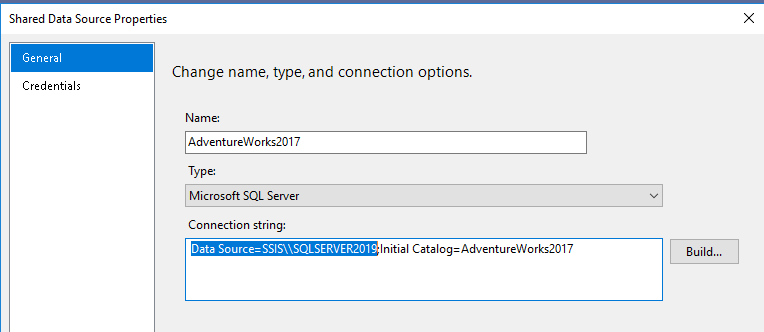
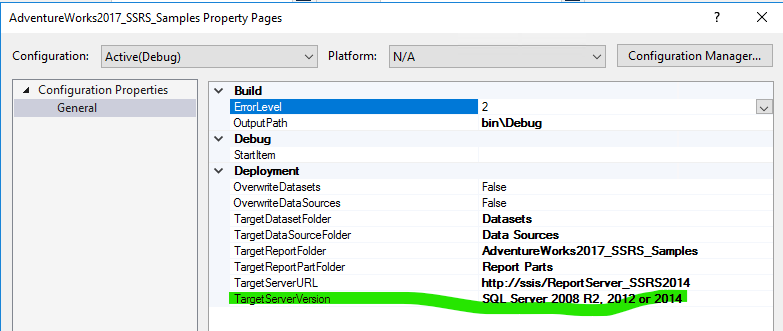
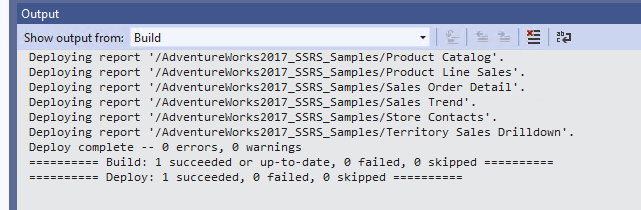
3.Change the TargetServerVersion to SQL Server 2008 R2, 2012 or 2014, and then deploy project. It's succeeded.
In addition, some SQL Server components or services are specific to an instance of SQL Server. These are also known as instance-aware. They share the same version as the instance that hosts them, and are used exclusively for that instance. Examples: Database Engine, Analysis Services, and Reporting Services. For more information, please refer to Work with multiple versions and instances of SQL Server.
Best regards,
Carrin
If the answer is the right solution, please click "Accept Answer" and kindly upvote it. If you have extra questions about this answer, please click "Comment".
Note: Please follow the steps in our documentation to enable e-mail notifications if you want to receive the related email notification for this thread.

is an earlier version than the one specified in the TargetServerVersion property
@CarrinWu-MSFT , the TargetServerVersion property is a setting in the SSDT project and have to match with the SSRS you want to deploy the report to, but it's just a setting.
You can use any supported SQL Server version as data sources for a report and to host the ReportServer database.
See Data Sources Supported by Reporting Services (SSRS) => SQL Server relational database => SQL Server 2012 and later.
Hi @CarrinWu-MSFT !
Thank you for your reply.
Few follow-up questions.
1. About the instance-aware components or services you mentioned.
They share the same version as the instance that hosts them, and are used exclusively for that instance.
What exactly does this mean in the context of using a SSRS 2014 with SQL Server 2019?
2. What Visual Studio version to use if we end up having to go with SSRS 2019?
If for some reason we are forced to update the SSRS 2014 to SSRS 2019 anyways, do we need to update our current development environment as well?
Currently I'm using Visual Studio 2012 with the same 2012 version of SQL Server Data Tools to develop the reports. Can we continue to use Visual Studio 2012
when developing reports for the SSRS 2019 or should we install a for example Visual _Studio 2019 and the SQL Server Data Tools etc. for that?
Best regards,
Tunkkari
Hi @CarrinWu-MSFT ,
can you please comment on the question number 2 in previous message?
Best regards,
Tunkkari