Microsoft Security | Microsoft Entra | Microsoft Entra ID
A cloud-based identity and access management service for securing user authentication and resource access

This browser is no longer supported.
Upgrade to Microsoft Edge to take advantage of the latest features, security updates, and technical support.
' cx='32' cy='32' r='32' /%3E%3Ctext x='50%25' y='55%25' dominant-baseline='middle' text-anchor='middle' fill='%23FFF' %3EVP%3C/text%3E%3C/svg%3E)
i am taking as an reference the below doc for creating and Computer object in an AD
in the example 1 it's shows -path OU=ApplicationServers,OU=ComputerAccounts,OU=Managed,DC=USER02,DC=COM.
if we need to use the existing OU where we need to specify it and what does the DC means how we need to specify the DC values
for each VM we need to create an SAM account or we can use same for the multiple VM's?
' cx='32' cy='32' r='32' /%3E%3Ctext x='50%25' y='55%25' dominant-baseline='middle' text-anchor='middle' fill='%23FFF' %3ESS%3C/text%3E%3C/svg%3E)
I understand that you have two different queries in the question you have posted where you would like to understand the DN nomenclature used by active directory and whether we can use same name for multiple VMs or not within the same active directory domain.
The DC in the path refers to a Key called domain container used to represent domain name objects within the active directory in the form of Distinguished Name (DN) . It is a naming system that Active Directory follows as per the hierarchical structure of LDAP DN name and is defined as per RFC 2256 . For detailed protocol level reference do check Windows protocols technical reference about Microsoft Implementation of LDAP DN naming and RFC 1779 in Active Directory .
So the following OU structure which will be called as Distinguished name (or DN in short) for the ApplicationsServers OU. It would represent the hierarchical structure of the OU within the domain user02.com as shown in the picture below. We can also say in simple words that the DN of an object in active directory is the DN of its parent, preceded by the RDN of the object. So DN of ApplicationServers organizational Unit
OU=ApplicationServers,OU=ComputerAccounts,OU=Managed,DC=USER02,DC=COM.
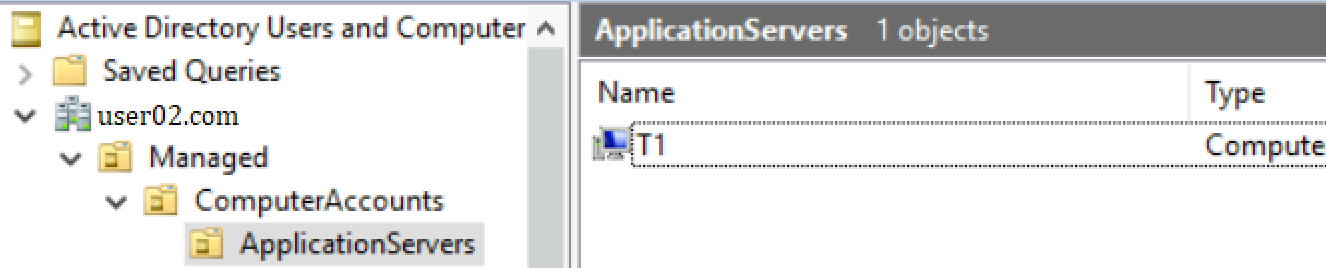
In any distinguished name or DN you can figure out the hierarchical structure by checking from the end of the string . There are multiple Keys that we use in active directory canonical nomenclature. The most used are below :-
DC = Domain container
Anything with a DC refers to part of your domain name . For example DC=asia,DC=MS,DC=com would signify the domain name to be asia.ms.com and anything else that precedes this will be present within the hierarchy in Active directory .

CN = Container
CN is a container which is not an OU .

OU = Organizational Unit
Organizational Unit is a specialized container where you can apply group policies within active directory .
The easiest way to specify the DC value is to find out the Distinguished name attribute for the OU where you would like to create the computer object . You can check it manually within the active directory by right-clicking on the object within Active directory Users and computers console. you will need RSAT tools installed on your windows machine for the same. It is installed by default on the Windows server where you have active directory role installed.
Go to the AD domain controller server > start > Search for Active directory Users and Computers > Enable the Advanced features in the ADUC console as shown below.
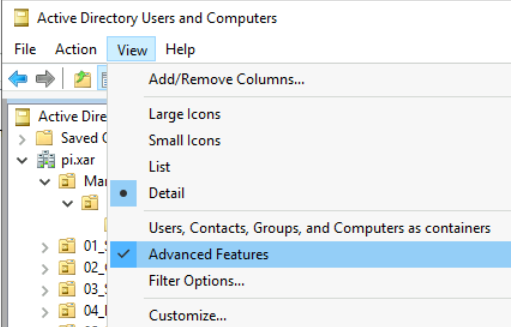
This will allow you to see the attribute editor within the console. where you can check the distinguishedName attribute value for any container in your directory and use the same in the -path variable within your cmdlet while creating the computer object as per the powershell cmdlet New-ADComputer .

While running this cmdlet you would be connecting to your domain controller server. You cannot use same name for multiple VMs in the same Active directory Domain . It has to be unique. Once you run the command it will create a computer object within the path specified in the domain .
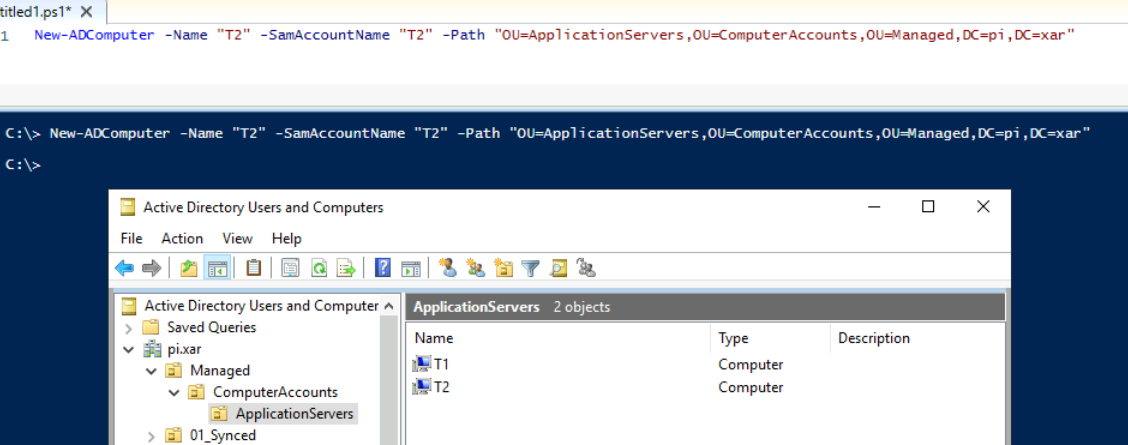
PS C:\> New-ADComputer -Name "T2" -SamAccountName "T2" -Path "OU=ApplicationServers,OU=ComputerAccounts,OU=Managed,DC=pi,DC=xar"

PS C:\> New-ADComputer -Name "T2" -SamAccountName "T2" -Path "OU=ApplicationServers,OU=ComputerAccounts,OU=Managed,DC=pi,DC=xar"
New-ADComputer : The specified account already exists
At line:1 char:1
+ New-ADComputer -Name "T2" -SamAccountName "T2" -Path "OU=ApplicationS ...
+ ~~~~~~~~~~~~~~~~~~~~~~~~~~~~~~~~~~~~~~~~~~~~~~~~~~~~~~~~~~~~~~~~~~~~~
    + CategoryInfo          : ResourceExists: (CN=T2,OU=Applic...ed,DC=pi,DC=xar:String) [New-ADComputer], ADIdentityAlreadyExistsException
    + FullyQualifiedErrorId : ActiveDirectoryServer:1316,Microsoft.ActiveDirectory.Management.Commands.NewADComputer
As you can see below, trying to run the command to create a VM with same name T2 gives error so the computer name has to be unique within the domain . Hope this answer helps clarify your queries and provided the answer you were looking for. If the information provided in the post was useful , please feel free to accept the post as answer as it will help other members in the community searching for similar queries.
Thank you .
----------------------------------------------------------------------------------------------------------------------------------------------------------
 whenever the information provided helps you. Original posters help the community find answers faster by identifying the correct answer. Here is how