You can try this: In the View menu, select Registered Servers. Add the servers you are querying in Local Server Groups, or create a new group and the servers to that group. Then right-click the group and select New Query. This permits you to run queries on all servers in the group at once.
Combine SQLCMD Outputs In One Window
' cx='32' cy='32' r='32' /%3E%3Ctext x='50%25' y='55%25' dominant-baseline='middle' text-anchor='middle' fill='%23FFF' %3EP%3C/text%3E%3C/svg%3E)
possibilities
41
Reputation points
I am using SQLCMD Mode in SSMS v18.9.1. When I run a query across multiple unlinked servers, the results from each server display in their own separate window. I then have to copy each set of results out of my virtual machine into Excel on my actual pc, which is time consuming. I want to know if there is a way to combine the results from each output window in SSMS into one final output so that I can copy all records out into Excel at one time. Thank you!
SQL Server | Other
4 answers
Sort by: Most helpful
-
 Erland Sommarskog 128.7K Reputation points MVP Volunteer Moderator
2022-02-10T22:21:49.063+00:00 -
possibilities 41 Reputation points
2022-02-11T14:36:48.39+00:00 Thank you for replying. I successfully created a Local Server Group, but I cannot figure out how to add the servers to the group. Do you click and drag from another window into the folder?
-
' cx='32' cy='32' r='32' /%3E%3Ctext x='50%25' y='55%25' dominant-baseline='middle' text-anchor='middle' fill='%23FFF' %3ENN%3C/text%3E%3C/svg%3E) Naomi Nosonovsky 8,881 Reputation points
Naomi Nosonovsky 8,881 Reputation points2022-02-11T15:25:53.297+00:00 Did you try to right click on the 'Local Server Group', select 'New Server registration' and specify all details about connection to your server(s)? This is how I have them setup.
-
possibilities 41 Reputation points
2022-02-11T15:52:04.51+00:00 I will try. Do you have to be an admin to be able to set up the servers? I do not have admin permissions.
-
Erland Sommarskog 128.7K Reputation points MVP Volunteer Moderator
2022-02-11T15:54:28.38+00:00 You don't have to be admin on these servers. This registration is something you set up locally on your own machine. The servers knows nothing about it.
-
possibilities 41 Reputation points
2022-02-11T19:44:26.14+00:00 I got the servers registered, so thank you for your help with that. I am uncertain about the query syntax now. In my query window, do I just write one query? How does it know to query against each server in the server group? Do you have an example please? I looked at @CathyJi-MSFT example below, and the select @@version works, but I am unclear as to how you run one query against multiple tables. An example of a simple query for me would be
set rowcount 10
select clientid from dbo.client
How would I execute that statement against every server in the server group?
-
Erland Sommarskog 128.7K Reputation points MVP Volunteer Moderator
2022-02-11T19:50:00.74+00:00 As I said in my original post: right-click the server, select New Query, and the try whatever query you like in the window that opens! It's not any different from running a query in a window connected to a single server. (Well, at least not as long as there are error messages.) You will get one column extra that has the server name in question.
-
possibilities 41 Reputation points
2022-02-11T20:09:32.893+00:00 Ok I will try. Thanks :)
Sign in to comment -
-
 CathyJi-MSFT 22,401 Reputation points Microsoft External Staff
2022-02-11T02:48:03.017+00:00 Hi @possibilities ,
If the query run on the multiple SQL server instance are same, you can try the method that Erland mentioned. Below is a test in my environment.
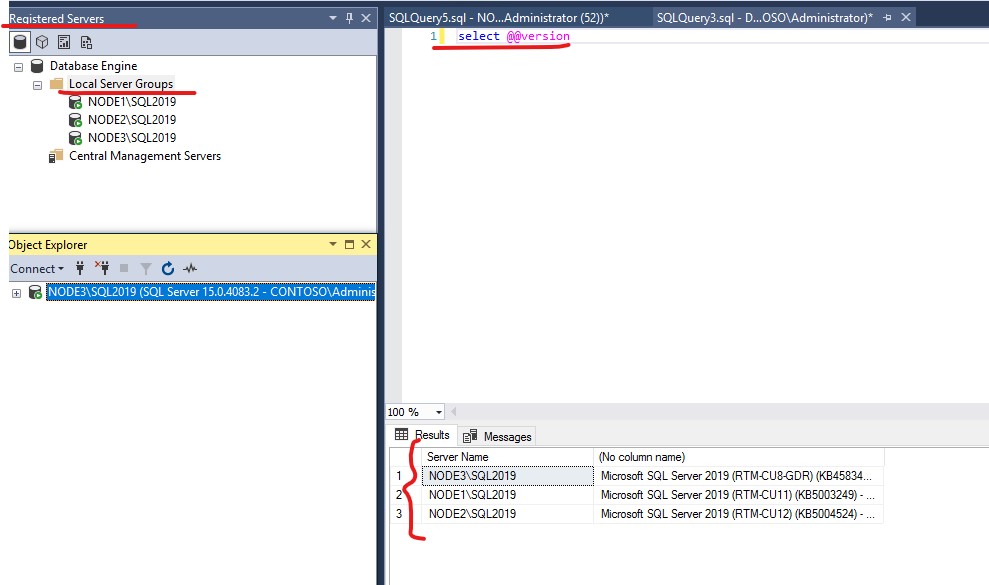
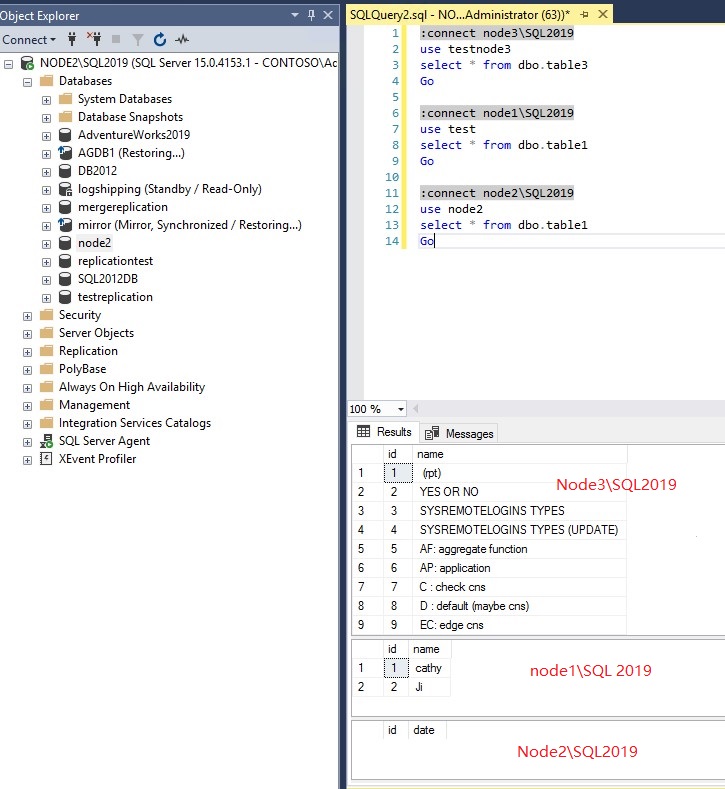
If the query run on the multiple SQL server instance are different, you can open a Query windows type “:connect” syntax to multiple instance as below screenshot.
If the answer is helpful, please click "Accept Answer" and kindly upvote it. If you have extra questions about this answer, please click "Comment".
-
possibilities 41 Reputation points
2022-02-11T19:45:59.083+00:00 Thank you for your example. I do notice that each output in your second picture is in it's own separate output window. That is what I am trying to avoid. I would like all results from the three separate windows in one output window so that I can copy those results out at one time. That is what I am trying to accomplish.
-
Naomi Nosonovsky 8,881 Reputation points
2022-02-11T19:50:26.357+00:00 In sqlcmdmode you can specify :OUT file to get the output from all these queries.
-
possibilities 41 Reputation points
2022-02-11T20:08:57.88+00:00 I will try this. Thank you so much :)
Sign in to comment -
-
possibilities 41 Reputation points
2022-02-11T20:25:01.27+00:00 Thank you both for your help. I am still not getting the code to work but don't want to waste your time any further.
-
possibilities 41 Reputation points
2022-10-21T18:28:15.197+00:00 I wanted to let all of you know that I did get Linked Server Groups to work. Thanks again for all of your help.