Developer technologies | ASP.NET | Other
A set of technologies in .NET for building web applications and web services. Miscellaneous topics that do not fit into specific categories.
This browser is no longer supported.
Upgrade to Microsoft Edge to take advantage of the latest features, security updates, and technical support.
' cx='32' cy='32' r='32' /%3E%3Ctext x='50%25' y='55%25' dominant-baseline='middle' text-anchor='middle' fill='%23FFF' %3EMM%3C/text%3E%3C/svg%3E)
I have a form that captures general user information like FirstName, LastName etc.
When user is done entering all information and clicks on the button Button1; I need to export the entire form to PDF.
Is there a way to do it?
First Name: <user Input> City: <user Input>
Last Name: <user Input> State: <user Input>
Address: <user Input> Zip: <user Input>
[Button1]

I do not see iText7.pdfhtml anywhere in your references screenshot.
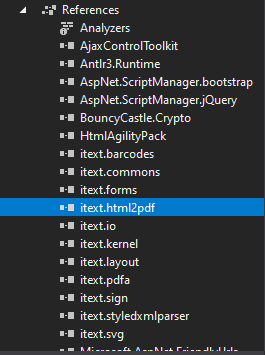
As far as I can tell you still have not installed the NuGet package. It's possible that there are build errors which stops the package installation. Usually build errors are very clear. Anyway, fix the build errors first. Once the project builds successfully then install iText7.pdfhtml.
Pay closer attention to the details.
Yes, understand iTextSharp is deprecated but VS 2017 shows that when I select "Show potential fixes".
I am just not been able to resolve these issues for some reasons. The code "using iText.Html2pdf;" gives error "using directive is not necessary.
Which .Net Framerwork is needed to use iText7? I googled but couldn't find the answer.
Yes, understand iTextSharp is deprecated but VS 2017 shows that when I select "Show potential fixes".
I honestly have no idea what you're doing at this point.
Which .Net Framerwork is needed to use iText7?
According to information in Visual Studio when installing iText7 v 4.0.1 NuGet package, iText7 depends on at least .NET 4.6.1. My sample project is 4.8. You can always go back a few versions if need. iText7 v 3.0.5 needs at least .NET 4.5. v 3.0.0 needs at least .NET 4. All this information is available in Visual Studio.
The code "using iText.Html2pdf;" gives error "using directive is not necessary.
Did you install the itext7.pdfhtml NuGet Package as specified in my post?
' cx='32' cy='32' r='32' /%3E%3Ctext x='50%25' y='55%25' dominant-baseline='middle' text-anchor='middle' fill='%23FFF' %3EYS%3C/text%3E%3C/svg%3E)
Hi @Malam Malam
The prerequisites for installing iText7:
According to your error,I think you could check if you installed the NuGet package correctly and quote it right.
Best regards,
Yijing Sun
Error: HtmlConverter does not exist in the current context
HtmlConverter.ConvertToPdf(htmlStream, pdfStream);
HtmlConverter exists in the itext.html2pdf assembly.
Either you did not install the iText7.pdfhtml NuGet packages or you are missing the using statement.
using iText.Html2pdf;
I did install the iText7.pdfhtml NuGet packages and also tried with using iText.Html2pdf; which errors "using directive is unnecessary". And the HtmlConverter still errors "The name HtmlConverter does not exist in the current context"
.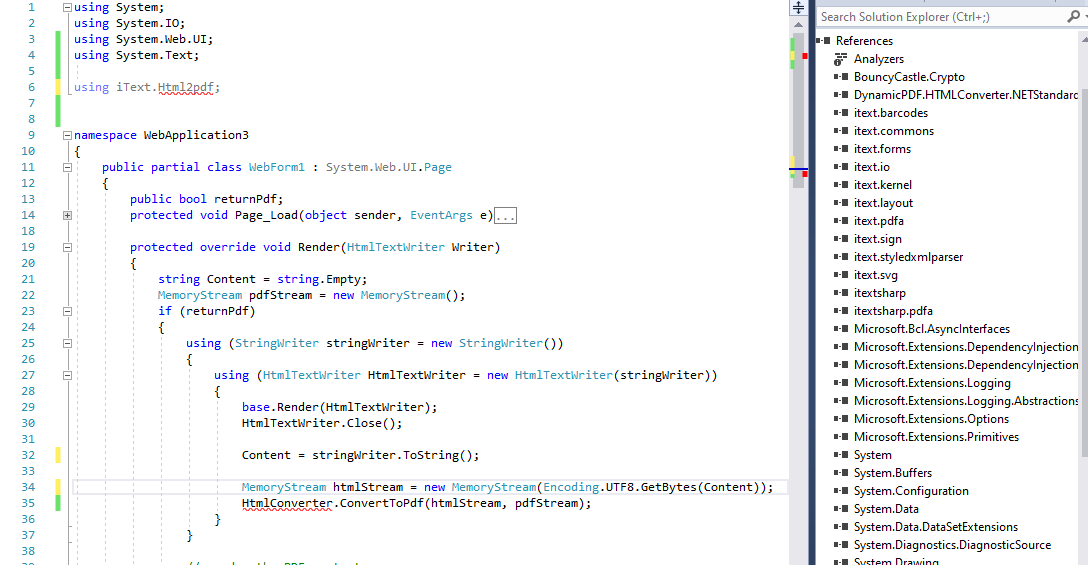
You were right; install failed and I didn't catch it since the panel was small. It has been fixed and I see it in References.
I am still getting errors when I click on button:
Error loading entities resource: I/O error occurred.
Description: An unhandled exception occurred during the execution of the current web request. Please review the stack trace for more information about the error and where it originated in the code.
Exception Details: iText.StyledXmlParser.Jsoup.MissingResourceException: Error loading entities resource: I/O error occurred.
Source Error:
Line 41: MemoryStream htmlStream = new MemoryStream(Encoding.UTF8.GetBytes(Content));
Line 42: HtmlConverter.ConvertToPdf(htmlStream, pdfStream);
I have copied and pasted your code and haven't made any changes to it.
        public bool returnPdf;
        protected void Page_Load(object sender, EventArgs e)
        {

        }

        protected void Button1_Click(object sender, EventArgs e)
        {
            returnPdf = true;
        }

        protected override void Render(HtmlTextWriter Writer)
        {
            string Content = string.Empty;
            MemoryStream pdfStream = new MemoryStream();
            if (returnPdf)
            {
                using (StringWriter stringWriter = new StringWriter())
                {
                    using (HtmlTextWriter HtmlTextWriter = new HtmlTextWriter(stringWriter))
                    {
                        base.Render(HtmlTextWriter);
                        HtmlTextWriter.Close();

                        // get the page content
                        Content = stringWriter.ToString();

                        //Get a PDF stream
                        MemoryStream htmlStream = new MemoryStream(Encoding.UTF8.GetBytes(Content));
                        HtmlConverter.ConvertToPdf(htmlStream, pdfStream);
                    }
                }

                // render the PDF content
                Response.ContentType = "application/pdf";
                Response.BinaryWrite(pdfStream.ToArray());
                Response.End();
                Response.Flush();
                Response.Clear();
            }
            else
            {
                //Render HTML content
                using (StringWriter stringWriter = new StringWriter())
                {
                    using (HtmlTextWriter HtmlTextWriter = new HtmlTextWriter(stringWriter))
                    {
                        base.Render(HtmlTextWriter);
                        HtmlTextWriter.Close();
                        Content = stringWriter.ToString();
                    }
                }
                Writer.Write(Content);
            }
        }
I assume the error has something to do with malformed HTML. Contact iText support for assistance.
ok, I will contact iText support for this issue.
But, I have one last question for you....
When a button is clicked to export to PDF; it beings up a dialogbox at the botton of the page to 'Save" or "Open" or "Cancel" pdf. How do I save it without this dialogbox?
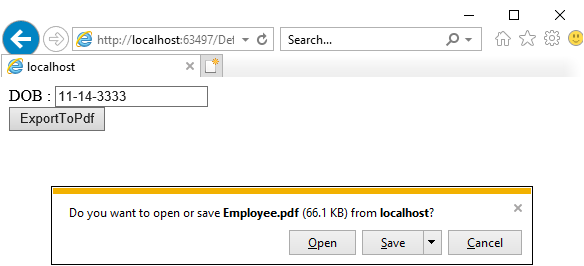
That's how Internet Explorer works. There's not much you can do about it. Try Chrome or Edge and the results will be different.
This slight change will request the file is downloaded rather than opened within the browser. But, it does not change how IE works.
                Response.Headers.Add("Content-Disposition", "attachment; filename='filename.jpg'");
                Response.ContentType = "application/pdf";
                Response.BinaryWrite(pdfStream.ToArray());
                Response.End();
                Response.Flush();
                Response.Clear();
AgaveJoe, thank you so much for your outstanding support.