Azure Data Factory
An Azure service for ingesting, preparing, and transforming data at scale.
This browser is no longer supported.
Upgrade to Microsoft Edge to take advantage of the latest features, security updates, and technical support.
' cx='32' cy='32' r='32' /%3E%3Ctext x='50%25' y='55%25' dominant-baseline='middle' text-anchor='middle' fill='%23FFF' %3EJC%3C/text%3E%3C/svg%3E)
I retrieve some JSON due to previous paging in REST APIs with multiple array elements in which there is content that I would like to filter. The JSONPath to do so would be $.value[*].data, but the filter activity's specification for the value seems not to allow for a wildcard in value. Below you find the kind of JSON that is returned by the Lookup activity (called 'Lookup Respondents'):
{
    "count": 2,
    "value": [
        {
            "data": [
                {
                    "uuid": "bdc0b51c-9888-4a2c-831d-744edb55d9fb",
                    "status": "open"
                },
                {
                    "uuid": "1a79036b-84c7-4232-8585-31be3775d95c",
                    "status": "closed"
                }
            ],
            "pagination": {
                "currentPage": 1,
                "totalCount": 4,
                "nextPage": 2               }
        },
            "data": [
                {
                    "uuid": "8da907f6-b8a5-4119-b671-1be501e83bf0",
                    "status": "closed"
                },
                {
                    "uuid": "d0faf159-a712-47db-a7ab-83e44591a2c6",
                    "status": "open"
                }
            ],
            "pagination": {
                "currentPage": 2,
                "totalCount": 4         }
        }
    ],
    "effectiveIntegrationRuntime": "SelfHostedIR-prd(SelfHostedIR-prd)",
    "billingReference": {
        "activityType": "PipelineActivity",
        "billableDuration": [
            {
                "meterType": "SelfhostedIR",
                "duration": 0.016666666666666666,
                "unit": "Hours"
            }
        ]
    },
    "durationInQueue": {
        "integrationRuntimeQueue": 7
    }
}
So part of the ADF source I would like to use
            "name": "Filter respondents",
            "type": "Filter",
            "dependsOn": [
                {
                    "activity": "Retrieve respondents",
                    "dependencyConditions": [
                        "Succeeded"
                    ]
                }
            ],
            "userProperties": [],
            "typeProperties": {
                "items": {
                    "value": "@activity('Retrieve respondents').output.value[*].data",
                    "type": "Expression"
                },
                "condition": {
                    "value": "@equals(item().status,'closed')",
                    "type": "Expression"
                }
            }
As previously indicated the wildcard in output.value[].data* is not allowed. output.value[0].data is working, but obviously misses records in the filter. Any suggestions how to approach this challenge?

Hi @Jan Cirpka ,
Just following up to see if you got a chance to see previous response. If the suggested response helped you, please consider accepting the answer by clicking Accept Answer as accepted answer helps community as well.
Hi @Jan Cirpka ,
Welcome to Microsoft Q&A platform and thanks for posting your query in the forum.
As I understand your query, you are trying to filter out the data for which status parameter is 'closed' after the lookup activity returns the Output JSON .
The challenge here is that the value array is having data field which is also an array . You want to check the value of status parameter in each of the data fields. This can't be done using filter activity as it doesn't support wildcard. Also , we need to flatten the output JSON first in order to filter the underneath data.
For this scenario, my recommendation would be to use Data flow which gives us the ability to perform lots of transformations which is not possible using ADF activities.
Here is the gif you can refer to for implementation:
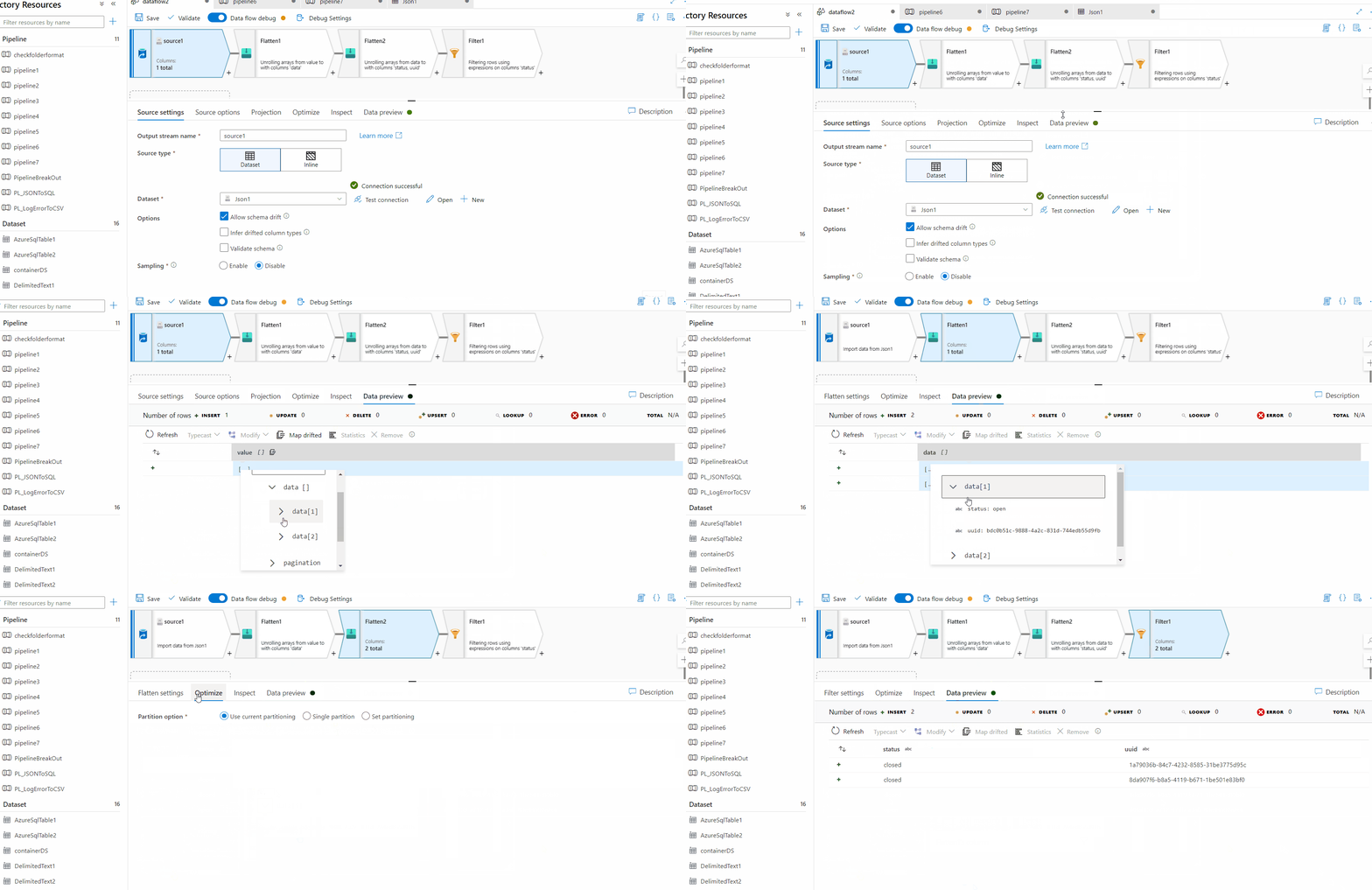
Hope this will help. Please let us know if any further queries.
------------------------------
 or upvote
  button whenever the information provided helps you.
Hi @Jan Cirpka ,
Just checking in to see if you got a chance to see previous response. If the suggested response helped you, please click Accept Answer and kindly upvote the same. If you have extra questions about this answer, please do Comment.
Thank you @AnnuKumari-MSFT ,
I have not tried your suggestion as I have found other ways to solve my problem. At this point I have nowhere used Data Flows but got stuck to the 'old' Copy activities. Obviously I need to take a closer look into the new capabilities, at least to widen my horizon.
That said, it still might be an interesting option to extend the capabilities of the filter activity, or better to say the input from previous steps to include more JSONPath options. In fact, the 'restriction' is not really documented if one assumes the syntax to be JSONPath.
Hi @Jan Cirpka ,
Apologies for getting back late to you. If you want to handle it via ADF pipelines itself rather than using dataflow and flattening the JSON, then you need to loop through the array and apply filter .
Please refer to the attached gif for more details:
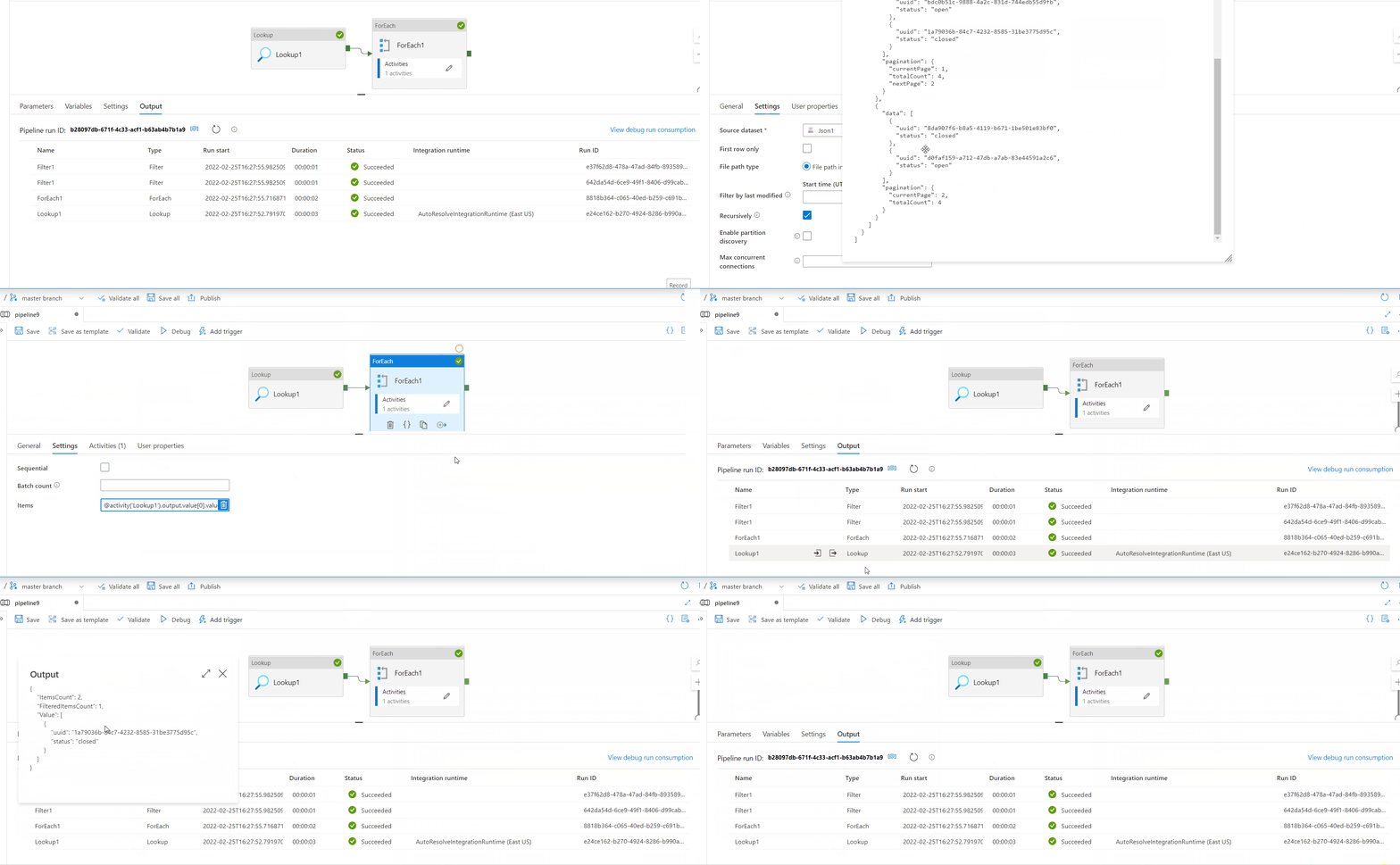
If this answers your query, do click Accept Answer and Up-Vote for the same as accepted answers help community as well.
Hi @Jan Cirpka ,
Just following up to see if you got a chance to see previous response. If the suggested response helped you, please consider accepting the answer by clicking Accept Answer as accepted answer helps community as well.
' cx='32' cy='32' r='32' /%3E%3Ctext x='50%25' y='55%25' dominant-baseline='middle' text-anchor='middle' fill='%23FFF' %3EVR%3C/text%3E%3C/svg%3E)
I have a similar requirement where my json looks like below. How can i filter the items basd oon the rule name?

[
    {

		"id": "6355",

		"ruleResults": [

			{
				"rule": "ADDITIONAL_PERSONAL_STATEMENT_INSURED_FEMALE",
				"reason": "Personal Statement of proposed insured has yes answer(s) and requires manual underwriting",
				"result": "FAIL"

			},

			{
				"rule": "DECLARATION_ON_PROPOSED_REPLACEMENT_OF_POLICY",
				"reason": "Declaration of replacement of proposed insured has yes answer(s) and requires manual underwriting",
				"result": "FAIL",
				"aggregateResult": {
					"details": "Premium from Existing policy"
				}
			},

		    {
                "rule": "MAX_LIMIT_FOR_REINSURER",
                "reason": "Aggregated amount within acceptable range",
                "result": "PASS",
                "aggregateResult": {
                    "details": {
                        "name": "CRITICAL_ILLNESS",
                        "policies": "[]",
                        "total amount": "500000",
                        "amount categories": "{Major Critical Illness Rider=500000}"
                    }
                }
            }
        ],
        "underwritingStatus": "FOR_MANUAL_UW"
    }
]
Hi Venkata Ramareddy ,
Kindly check if the below video helps: How to filter out records based on pipeline parameter using mapping dataflow
If you need further assistance, kindly create a new thread . Thankyou