Developer technologies | Windows Presentation Foundation
A part of the .NET Framework that provides a unified programming model for building line-of-business desktop applications on Windows.
This browser is no longer supported.
Upgrade to Microsoft Edge to take advantage of the latest features, security updates, and technical support.
' cx='32' cy='32' r='32' /%3E%3Ctext x='50%25' y='55%25' dominant-baseline='middle' text-anchor='middle' fill='%23FFF' %3EV%3C/text%3E%3C/svg%3E)
176484-booleaninotifypropertychanged1.pdf
I'm new to WPF, as a learning project I'm attempting to create a Windows' app that (1) visually indicates whether or not I'm connected to the server, (2) and lists a list of Task Jobs on the server.
For (1) where I'm currently stuck, I have created:
I'm unable to get the ellipse to change color even though I'm connected. It seems to by pass my subscription to the event. The majority of examples I have read are working with UI Elements, so I'm not sure if I'm going about this the wrong way. Any guidance / suggestions that can be provided is greatly appreciated.
ObservablePropertyChange
using System.ComponentModel;
using System.Runtime.CompilerServices;

namespace UMSTasks
{
   public class ObservablePropertyChange : INotifyPropertyChanged
   {
	  public event PropertyChangedEventHandler PropertyChanged;
	  protected void NotifyPropertyChanged([CallerMemberName] string propertyName = "")
	  {
		 PropertyChanged?.Invoke(this, new PropertyChangedEventArgs(propertyName));
	  }
   }
}


StatusViewModel
public class StatusViewModel :  ObservablePropertyChange
   {
	  #region Variables
	  private bool _IsConnectedToServer = false;
	  public bool ConnectedToServer {
		 get { return _IsConnectedToServer; }
		 set {
			   if (value != _IsConnectedToServer)
				  { this._IsConnectedToServer = value;
					 NotifyPropertyChanged();
			   }
		 }
	  }

	  #endregion

	  public StatusViewModel()
	  {
		 TestServerConnection();
	  }

	  private void TestServerConnection()
	  {
		 var statusModel = new StatusModel();
		 var pingTestSuccess = statusModel.ServerPing();
		 var taskSvcTestSuccess = statusModel.TaskServiceConnected();

		 if (pingTestSuccess & taskSvcTestSuccess)
		 {
			ConnectedToServer = true;

		 }

	  }// private void TestServerConnection()


   }// public class StatusViewModel : EventArgs
}

StatusControl
public partial class StatusControl : UserControl
   {
	  #region Variables

	  public string _serverName = "";
	  internal string _userName = null;
	  internal string _pwd = null;
	  internal const string domain = "COL";
	  StatusViewModel svm = new StatusViewModel();
	  #endregion
	  //ctor
	  public StatusControl()
	  {
		 InitializeComponent();

		 this.DataContext = svm;
		 svm.PropertyChanged += UpdateLED;

	  }

	  //StatusViewModel event is true
	  public void UpdateLED(object sender, PropertyChangedEventArgs e )
	  {
		 if (e.Equals(true))
		 {
			LED.Style = (Style)Application.Current.FindResource("GreenLED");

		 }else { LED.Style = (Style)Resources["RedLED"]; }

	  }


   }// public partial class StatusControl : UserControl
}
' cx='32' cy='32' r='32' /%3E%3Ctext x='50%25' y='55%25' dominant-baseline='middle' text-anchor='middle' fill='%23FFF' %3EHL%3C/text%3E%3C/svg%3E)
Hi,@vzmon1 . What is the code of your StatusModel class? Could you show the code for the RedLED style?
Modify EllipseStyle.xaml according to your latest code and add the code.
MainWidnow.xaml:
  <StackPanel>
        <local:EllipseControl/>
        <Button Grid.Row="1" Grid.Column="3"  Content="click" Width="100" Height="50" Click="Button_Click"/>
    </StackPanel>
MainWindow.xaml.cs:
public partial class MainWindow : Window
    {
        EllipseViewModel vm = new EllipseViewModel();
        public MainWindow()
        {
            InitializeComponent();
            DataContext = vm;
        }
        private void Button_Click(object sender, RoutedEventArgs e)
        {
            if (vm.ServerConnected)
            {
                vm.ServerConnected = false;
            }
            else
            {
                vm.ServerConnected = true;
            }
        }
    }
EllipseStyle.xaml:
<ResourceDictionary xmlns="http://schemas.microsoft.com/winfx/2006/xaml/presentation"
                    xmlns:x="http://schemas.microsoft.com/winfx/2006/xaml">
    <Style x:Key="StyleLED" TargetType="{x:Type Ellipse}" >
        <Setter Property="Height" Value="20" />
        <Setter Property="Width" Value="20" />
        <Setter Property="Stroke" Value="DarkBlue" />
        <Setter Property="StrokeThickness" Value="1" />
        <Setter Property="Fill">
            <Setter.Value>
                <RadialGradientBrush Center="0.3,0.3" Opacity="1">
                    <RadialGradientBrush.GradientStops>
                        <GradientStop Color="LightSalmon" Offset=".05"/>
                        <GradientStop Color="Red" Offset=".95"/>
                    </RadialGradientBrush.GradientStops>
                </RadialGradientBrush>
            </Setter.Value>
        </Setter>
        <Style.Triggers>
            <DataTrigger Binding="{Binding Path=ServerConnected, Mode=TwoWay, UpdateSourceTrigger=PropertyChanged}" Value="true">
                <Setter  Property="Fill">
                    <Setter.Value>
                        <RadialGradientBrush Center="0.3,0.3" Opacity="1">
                            <RadialGradientBrush.GradientStops>
                                <GradientStop Color="LightGreen" Offset=".05"/>
                                <GradientStop Color="Green" Offset=".95"/>
                            </RadialGradientBrush.GradientStops>
                        </RadialGradientBrush>
                    </Setter.Value>
                </Setter>
            </DataTrigger>
        </Style.Triggers>
    </Style>
</ResourceDictionary>
The result:
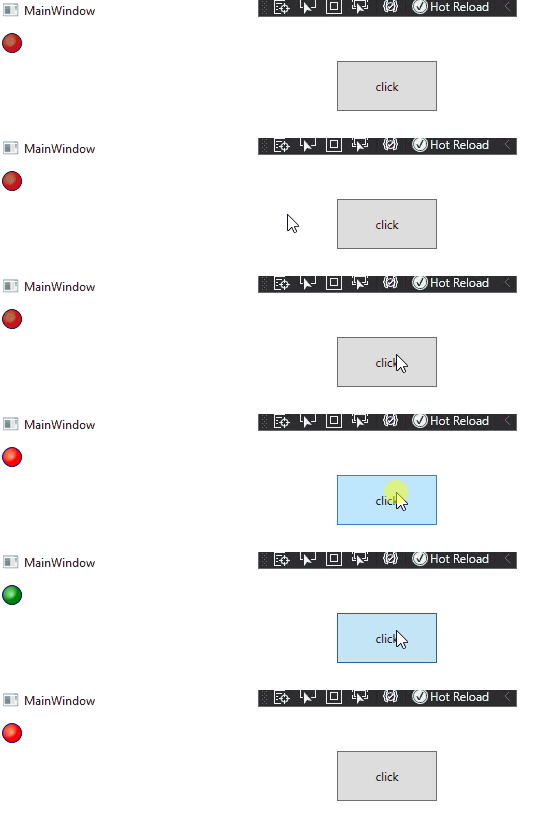
If the response is helpful, please click "Accept Answer" and upvote it.
Note: Please follow the steps in our [documentation][5] to enable e-mail notifications if you want to receive the related email notification for this thread.
[5]: https://learn.microsoft.com/en-us/answers/articles/67444/email-notifications.html
@Hui Liu-MSFT
Thank you, your recommended changes finally allowed me to get the ellipse to accept the new style based on the change to the boolean value.
From what I can tell, this final change moved the DataContext (pointing to EllispeViewModel) to the MainWindow.
Would this be the only place that the DataContext value can exist or could I move it closer to the EllipseControl? My goal is to create a WPF utility app that will have 3 UserControls, the status control being one of them, the main one will have a list of Task Jobs and I would like to use INotifyPropertyChange to help process when the associated button is switched off to stop the job; essentially. In that case, I would need another data context value I would think.
Again thank you for walking me back from the ledge.
@Peter Fleischer (former MVP)
I want to extend my appreciation for your help. Your last recommended change (modify StyleLED) didn't work for me. I also used your previous changes in conjunction, but I couldn't get it to work. Obviously I was missing the boat somewhere, but I couldn't see the forest for the trees.
I uploaded the files for others who are learning WPF.

Hi,
I take your code and change only style: 181594-x.txt