
20,221 questions
This browser is no longer supported.
Upgrade to Microsoft Edge to take advantage of the latest features, security updates, and technical support.
' cx='32' cy='32' r='32' /%3E%3Ctext x='50%25' y='55%25' dominant-baseline='middle' text-anchor='middle' fill='%23FFF' %3EA%3C/text%3E%3C/svg%3E)
I installed new windows 2022 on Dell PowerEdge server R7515
there is a Generic IPMI Compliant Device on the "remove hardware and eject media ."
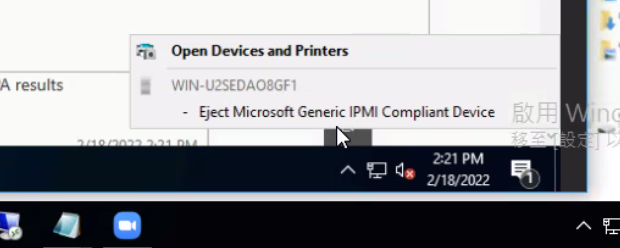
but i have another R7515 server (windows 2019).
there isn't device on this server .
I would like to confirm this is normal?
' cx='32' cy='32' r='32' /%3E%3Ctext x='50%25' y='55%25' dominant-baseline='middle' text-anchor='middle' fill='%23FFF' %3EYE%3C/text%3E%3C/svg%3E)
Hi,
You may check Device Manager (view -> show hidden devices) and try to find Microsoft Generic IPMI Compliant Device section, if it displayed with no error, then, it is normal.
As far as I know, the IPMI interface is built-in the motherboard and IPMI driver supplies the IPMI WMI provider with data from the Baseboard Management Controller (BMC). You may also contact the hardware manufacture and confirm with them about the IPMI device supportability.
Best Regards,
Eve Wang
' cx='32' cy='32' r='32' /%3E%3Ctext x='50%25' y='55%25' dominant-baseline='middle' text-anchor='middle' fill='%23FFF' %3ERM%3C/text%3E%3C/svg%3E)
Hello,
I have the same issue after upgrading to 2022 and the only thing I found about it was this article from Microsoft: