SQL Server Reporting Services
A SQL Server technology that supports the creation, management, and delivery of both traditional, paper-oriented reports and interactive, web-based reports.
This browser is no longer supported.
Upgrade to Microsoft Edge to take advantage of the latest features, security updates, and technical support.
' cx='32' cy='32' r='32' /%3E%3Ctext x='50%25' y='55%25' dominant-baseline='middle' text-anchor='middle' fill='%23FFF' %3EHJ%3C/text%3E%3C/svg%3E)
Hello everyone,
I'm working on one SSRS report which is pointing to Microsoft Dynamics 365 where we have provided a multi-select parameter for the Accounts entity. Now, clients want the searching functionality in this parameter like we usually have in custom web applications so that they can reduce the list of accounts from the selection.
Something like this:
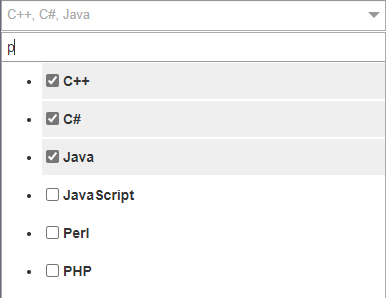
Can anyone help me out with this issue?
Any suggestions or workarounds are highly appreciated.
Thank you.
' cx='32' cy='32' r='32' /%3E%3Ctext x='50%25' y='55%25' dominant-baseline='middle' text-anchor='middle' fill='%23FFF' %3EMT%3C/text%3E%3C/svg%3E)
A true search isn't going to happen if you're using the report viewer UI (Report Manager, ASP.NET or Winforms). That kind of functionality just isn't supported. You'd need to build your own UI to do this.
Having said that, if the "search" is really just pulling distinct values from the dataset then you can do that. When you set up the report parameter there is an option to show available values. This can be a fixed list or it can be a query. You can run a query to retrieve the list of things to be "searched" by to get a close approximation to actual search. If the parameter is a multi-value parameter then you should be able to select multiple options but the report UI is responsible for how it looks.
Note that you could also use the parameter in a subsequent parameter (or query) so if you need cascading lookups (aka accounts and their orders) then you can do that as well.

Hi @Harsh Jariwala ,
Unfortunately, if you're using the web portal to browse reports, you won't be able to do this by default. I'm not familiar with Microsoft Dynamics 365.
If you want to build your own UI, please consult relevant professionals.
Best Regards,
Joy
If the answer is the right solution, please click "Accept Answer" and kindly upvote it. If you have extra questions about this answer, please click "Comment".
Note: Please follow the steps in our documentation to enable e-mail notifications if you want to receive the related email notification for this thread.