Unable to install SqlSever

XT 若水 1 Reputation point
2022-04-16T18:11:20.293+00:00

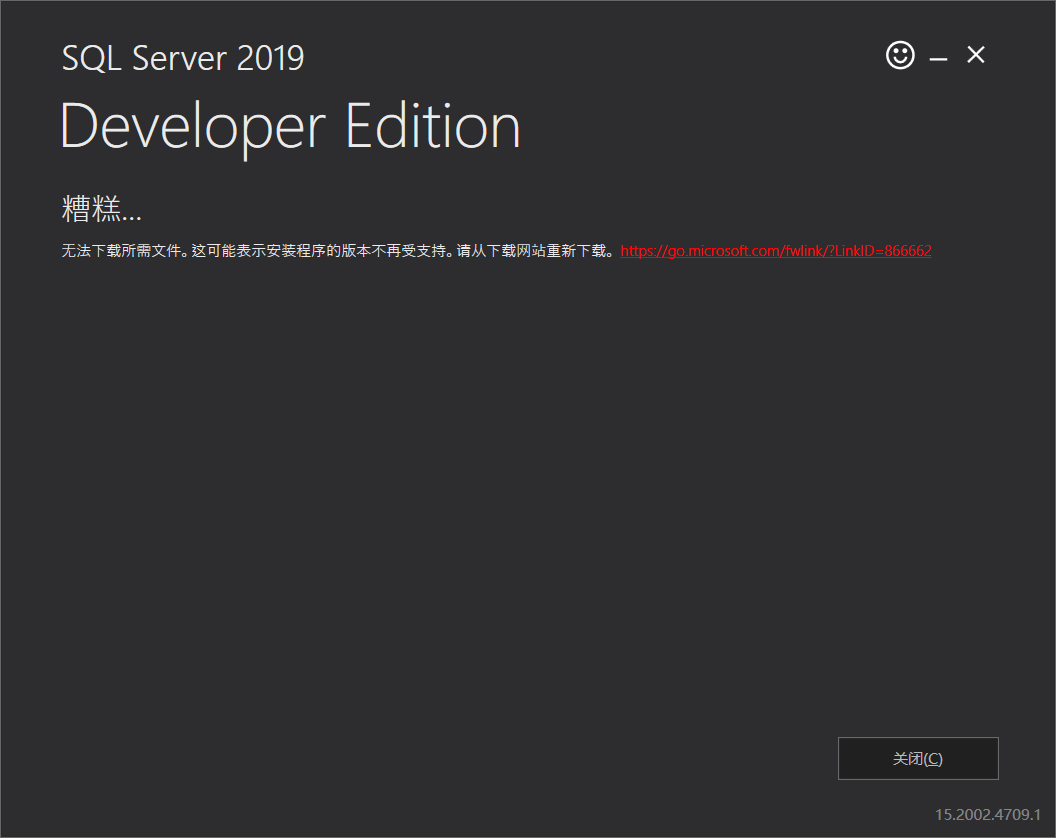
使用SQL2019-SSEI-Dev 安装就会出现下图中的情况,点击链接进去下载的SQL2019-SSEI-Dev 再继续安装也是一样的效果

193651-image.png

这是我的安装日志,它的路径是在C:\Program Files\Microsoft SQL Server\150\SSEI\LogFiles

(01) 2022-04-17 01:14:54 SSEI v15.2002.4709.1
(01) 2022-04-17 01:14:54 CorrelationId: 6b078a49-f13a-4264-a1fa-bfd9c45b0552
(01) 2022-04-17 01:14:54 Path for UserRequestedLocalAuditDirectory is null or doesn't exist: ''
(01) 2022-04-17 01:14:54 CurrentCulture.Name='zh-CN'.LCID='2052'.Parent.Name='zh-CHS'
(01) 2022-04-17 01:14:54 CurrentUICulture.Name='zh-CN'.LCID='2052'.Parent.Name='zh-CHS'
(01) 2022-04-17 01:14:54 supported culture detected ='zh-CN'.
(01) 2022-04-17 01:14:54 resolvedCulture: zh-CN
(01) 2022-04-17 01:14:54 osSupported: True, osVersion: 10.0.22000.0, osPlatform: amd64
(04) 2022-04-17 01:14:54 .NET Framework Version: 4.5
(04) 2022-04-17 01:14:54 StartupBootstrapActivity:SSEIActivityStart:Message: Starting Activity StartupBootstrapActivity
(04) 2022-04-17 01:14:54 StartupBootstrapActivity:SSEIProgressReport:ProgressPercent: 1
(04) 2022-04-17 01:14:55 Exception: IsTransientException: False, Message: 请求被中止: 未能创建 SSL/TLS 安全通道。,
(04) 2022-04-17 01:14:55 StartupBootstrapActivity:SSEIProgressReport:ProgressPercent: 100
(04) 2022-04-17 01:14:55 StartupBootstrapActivityFatalException: Message: ManifestNotFound
(04) 2022-04-17 01:14:55 StartupBootstrapActivity:SSEIActivityMessage:Message: 无法下载所需文件。这可能表示安装程序的版本不再受支持。请从下载网站重新下载。
(04) 2022-04-17 01:14:55 StartupBootstrapActivity:SSEIProgressReport:ProgressPercent: 100
(04) 2022-04-17 01:14:55 StartupBootstrapActivity:SSEIActivityEnd:Message: Finishing Activity StartupBootstrapActivity
(04) 2022-04-17 01:14:55 Activity Summaries for Scenario [InitializeBootstrapManifest]
(04) 2022-04-17 01:14:55 ActivityName Outcome WasCancelled DurationSeconds
(04) 2022-04-17 01:14:55 StartupBootstrapActivity 0 0 0.566448
(04) 2022-04-17 01:14:55 Failed to initialize application: Microsoft.Sql.Installer.Engine.FatalActivityException: 无法下载所需文件。这可能表示安装程序的版本不再受支持。请从下载网站重新下载。
在 Microsoft.Sql.Installer.Engine.StartupBootstrapActivity.RunActivity()
在 Microsoft.Sql.Installer.Engine.SetupEngine.ExecuteActivity(ActivityBase activity)
在 Microsoft.Sql.Installer.Engine.SetupEngine.ExecuteSetup()
在 Microsoft.Sql.Installer.Engine.ManifestCache.InitializeBootstrapManifest(String edition)
在 Microsoft.Sql.Installer.Engine.ManifestCache.Initialize(String edition, Boolean skipBootstrapInitialization)
在 Microsoft.Sql.Installer.UI.SSEIBusinessLogic.Initialize(String edition)
在 Microsoft.Sql.Installer.UI.ViewModels.StartPageViewModel.InitializePage()
(04) 2022-04-17 01:14:55 AppInitializationFatalException: ExceptionMessage: 无法下载所需文件。这可能表示安装程序的版本不再受支持。请从下载网站重新下载。 TypeName: FatalActivityException StackTrace: 在 Microsoft.Sql.Installer.Engine.StartupBootstrapActivity.RunActivity()
在 Microsoft.Sql.Installer.Engine.SetupEngine.ExecuteActivity(ActivityBase activity)
在 Microsoft.Sql.Installer.Engine.SetupEngine.ExecuteSetup()
在 Microsoft.Sql.Installer.Engine.ManifestCache.InitializeBootstrapManifest(String edition)
在 Microsoft.Sql.Installer.Engine.ManifestCache.Initialize(String edition, Boolean skipBootstrapInitialization)
在 Microsoft.Sql.Installer.UI.SSEIBusinessLogic.Initialize(String edition)
在 Microsoft.Sql.Installer.UI.ViewModels.StartPageViewModel.InitializePage()

SQL Server | Other
0 comments No comments
{count} votes

4 answers

Sort by: Most helpful
  1. Erland Sommarskog 129.6K Reputation points MVP Volunteer Moderator
    2022-04-16T19:13:53.89+00:00

    This is an English-language forum. Microsoft has some staff that monitors this forum, and they happen to be Chinese. However, they only work weekdays.

    In the meanwhile, you can:

    1. Click the link in the error.
    2. Tells us exactly where in the process you got his error.
    3. Attempt to translate the Chinese text.
    4. In C:\Program Files\Microsoft SQL Server\150\Setup Bootstrap\Log you find one folder per installation attempt. The most interesting files are summary.txt and details.txt.

  2. Erland Sommarskog 129.6K Reputation points MVP Volunteer Moderator
    2022-04-17T09:17:08.097+00:00

    Since I don't know Chinese, I can't read the actual error messages, but you may be hitting an issue that appeared last week for a day, went away, but seems to have come back. Check this thread from last week for a possible resolution.

    0 comments No comments

  3. Erland Sommarskog 129.6K Reputation points MVP Volunteer Moderator
    2022-04-17T11:52:21.15+00:00

    I have researched this a little more, and it's apparently the case that Microsoft has broken something. You may want to wait a few days to come back and download a new version of the installation program. (I tried both the current download as well as an old download. The old one works. The new one produces the error above directly when I start it.)

    It seems that running these updates to the registry fixes the issue:

    Set-ItemProperty -Path 'HKLM:\SOFTWARE\Wow6432Node\Microsoft\.NetFramework\v4.0.30319' -Name 'SchUseStrongCrypto' -Value '1' -Type Dword
        Set-ItemProperty -Path 'HKLM:\SOFTWARE\Microsoft\.NetFramework\v4.0.30319' -Name 'SchUseStrongCrypto' -Value '1' -Type Dword
    

    Note there are some versions of this script out there with a backslash missing, so make sure you use the above.

    0 comments No comments

  4. YufeiShao-msft 7,156 Reputation points
    2022-04-18T07:56:25.76+00:00

    Hi @XT 若水 ,

    Look at this similar thread, try this way just like Erland said:

    https://learn.microsoft.com/en-us/answers/questions/464840/unable-to-install-sql-server-2019-developer-versio.html

    -------------

    If the answer is the right solution, please click "Accept Answer" and kindly upvote it. If you have extra questions about this answer, please click "Comment".

    Note: Please follow the steps in our documentation to enable e-mail notifications if you want to receive the related email notification for this thread.

    0 comments No comments

Your answer

Answers can be marked as 'Accepted' by the question author and 'Recommended' by moderators, which helps users know the answer solved the author's problem.