Azure Spatial Anchors
An Azure service that is used to build immersive three-dimensional applications and experiences that map, persist, and restore content or points of interest at real-world scale.
88 questions
This browser is no longer supported.
Upgrade to Microsoft Edge to take advantage of the latest features, security updates, and technical support.
' cx='32' cy='32' r='32' /%3E%3Ctext x='50%25' y='55%25' dominant-baseline='middle' text-anchor='middle' fill='%23FFF' %3EMJ%3C/text%3E%3C/svg%3E)
Process.
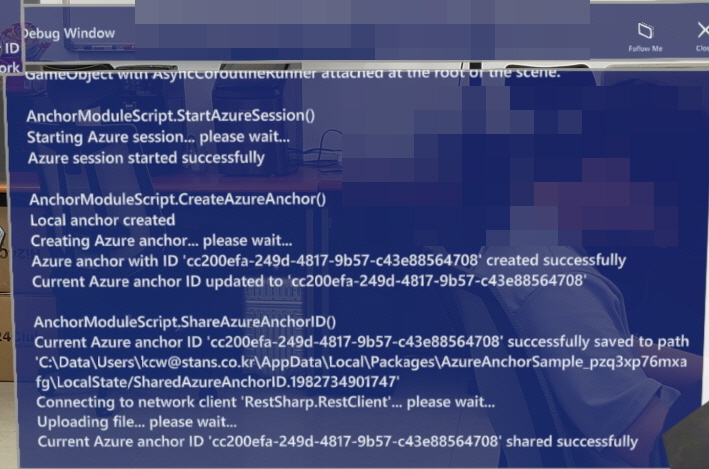
But it doesn't work to bring up anchor id.
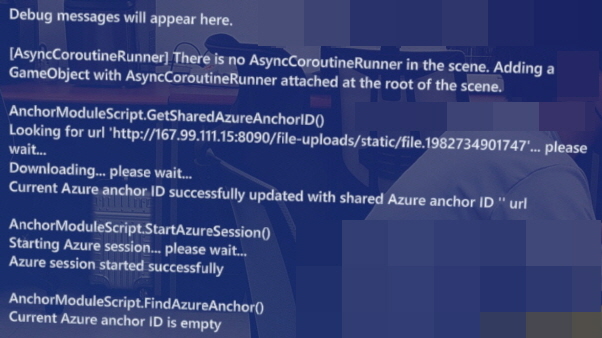

Hello @Min-Jae, Lee to help us troubleshoot, if you are following a specific tutorial can you share the link?
Thanks!
Thank you for your answer.
Below is the official guide for anchor sharing with hololens2,
https://learn.microsoft.com/en-us/learn/modules/azure-spatial-anchors-tutorials/
Below is a tutorial by a Japanese developer.
1.
https://qiita.com/ryuichi_07/items/1efb05e29d6aa98be2ef
2.
https://zenn.dev/iwaken71/articles/hololens-2022-2#%E3%82%B7%E3%83%BC%E3%83%B3%E3%81%AE%E6%BA%96%E5%82%99-(%E3%83%81%E3%83%A5%E3%83%BC%E3%83%88%E3%83%AA%E3%82%A2%E3%83%AB)
I'll be waiting for your answer. Thank you

Although I don't have the complete sample code, I believe that the issue resides in the second screen shot. Our learning module sample contains a hardcoded test IP server (167.99.111.15) to save/retrieve Anchors ID. You'll need to implement that webserver yourself.
Hi, clcheles, Thank you for reply.
Then should I save and load anchor data on the server I implemented, not on the AZURE server?
I used the sample code as it is, not my web server.
But when I share the anchor, I see the message "Current Azure anchor ID '...' shared successfully."(First screen shot)
And if I use my web server to share anchor data, why should I use Azure Spatial Anchor service?
Please explain to me the workflow of Azure Spatial Anchor service.
I believe that "Persist Azure Spatial Anchors between app sessions" title is not describing the scenario correctly. It should say "Persist Spatial Anchors between app sessions".
"Saving to disk" and "Saving to Network" implementations are not ready-to-use scripts in a production application. You should update them per your need.
CreateAnchor script contains 2 parts: 1 for creating a local anchor and 1 from uploading that anchor to Azure Spatial Anchors service.
SaveAzureAnchorIdToDisk script just grabs currentAzureAnchorID, which might be available or not, and saves it to a txt file. There isn't any check implemented, so even if it fails, you'll still see "Current azure anchor id.." text displayed. Same goes for "ShareAzureAnchorIdToNetwork"
ShareAzureAnchorIdToNetwork relies on an webserver that you need to build yourself to save and retrieve anchors, in case you don't want to use Azure Spatial Anchors service.
For the best results, I encourage you to use Azure Spatial Anchors for persistence and sharing.
You can read more about Azure Spatial Anchors here and use this tutorial and official Azure Spatial Anchors sample
Hello @Min-Jae, Lee ,
Please share with us if you have any other questions related with your original post. Otherwise could you go ahead and mark the above as answer?
Thank you so much.
Remember:
I thought the "ShareAzureAnchorIdToNetwork" method contained the ability to send anchor data to Microsoft's Azure server.
I found the cause of the problem with your help.
Thank you so much.
Have a nice day.
I accepted the answer. Thank you.