Azure Data Factory
An Azure service for ingesting, preparing, and transforming data at scale.
This browser is no longer supported.
Upgrade to Microsoft Edge to take advantage of the latest features, security updates, and technical support.
' cx='32' cy='32' r='32' /%3E%3Ctext x='50%25' y='55%25' dominant-baseline='middle' text-anchor='middle' fill='%23FFF' %3EAK%3C/text%3E%3C/svg%3E)
I have a requirement to load API data into cosmos db . So need to loop all the api pages for given period and load in cosmos db.
my pipeline has a web activity to get the api response first . then passing the page_count to foreach activity to loop through.
When there is data in API response the output looks below .
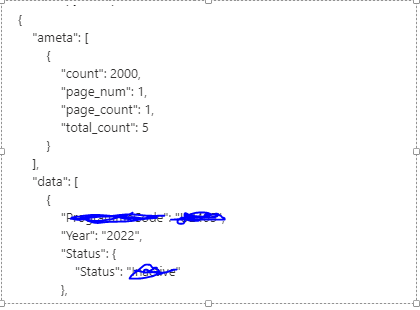
When API doesnt have data the output looks below.

I have written below condition in foreach activity for looping . Since the web activity output not same in both conditions , the below code not working .any suggestion please.
@Rover (1,if(contains(activity('WEB_GET_NUMBEROFPAGES').output.Response,'No data found'),1,activity('WEB_GET_NUMBEROFPAGES').output.ameta[0].page_count))

Hi @Abdul Kalam Mulla ,
Thankyou for the detailed description about your ask. In the above expression , one or the other property would always be missing , either 'Response' or 'ameta[]' . So, we need to first check the available properties , before using them in the expression.
Here is what you need to do:
1. Create a variable var1 of type 'String'. Use Set variable activity after the Web activity to store the output of Web activity. Use this in the value of set variable activity: @{activity('Web1').output} or @string(activity('Web1').output)
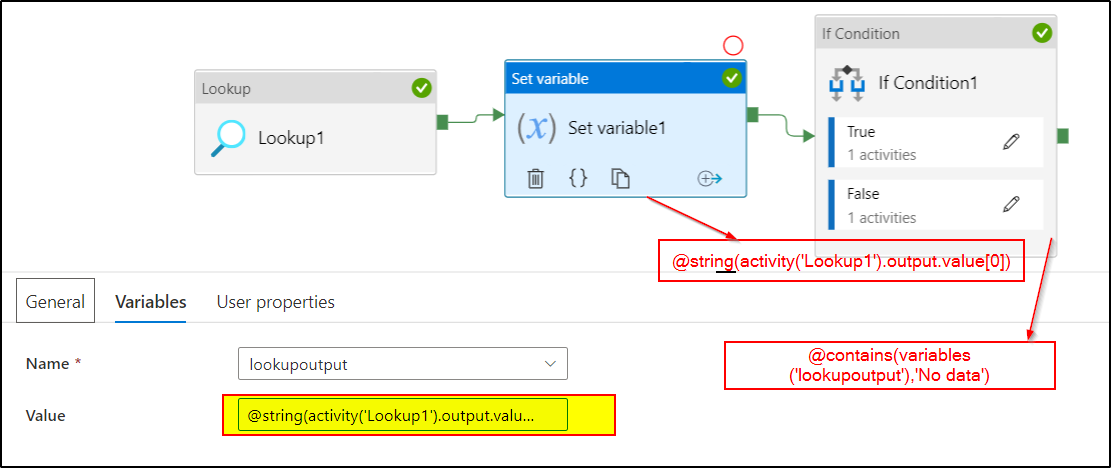
2. Use If Condition activity with expression : @contains(variables('var1'),'No data') .
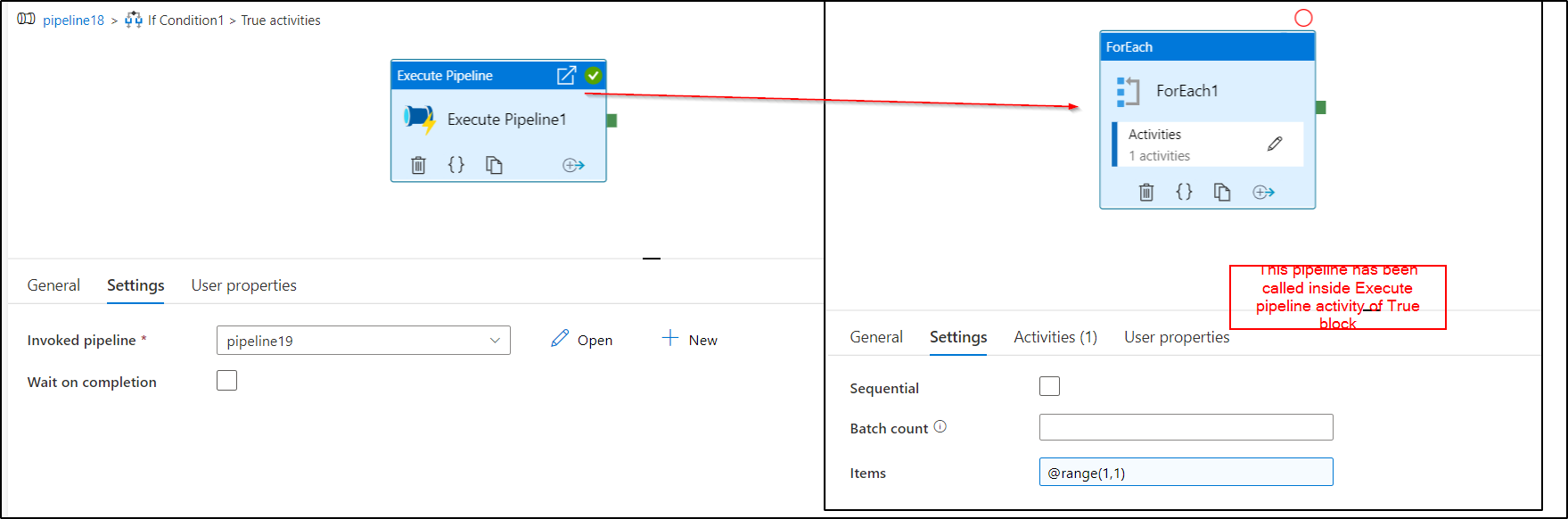
a. Inside True condition block: Use Execute Pipeline activity and create a new pipeline . In the new pipeline, Use For Each activity and have this
expression as the Items value: @range(1,1)
b. Inside False condition block: Use Execute Pipeline activity and create a new pipeline. In the new pipeline , Create a parameter named page_count and go back to the False condition block and provide activity('WEB_GET_NUMBEROFPAGES').output.ameta[0].page_count as the value for page_count variable. Use For Each activity in the new pipeline called inside False block and provide this as items value: @range(1,int(pipeline().parameters.page_count))
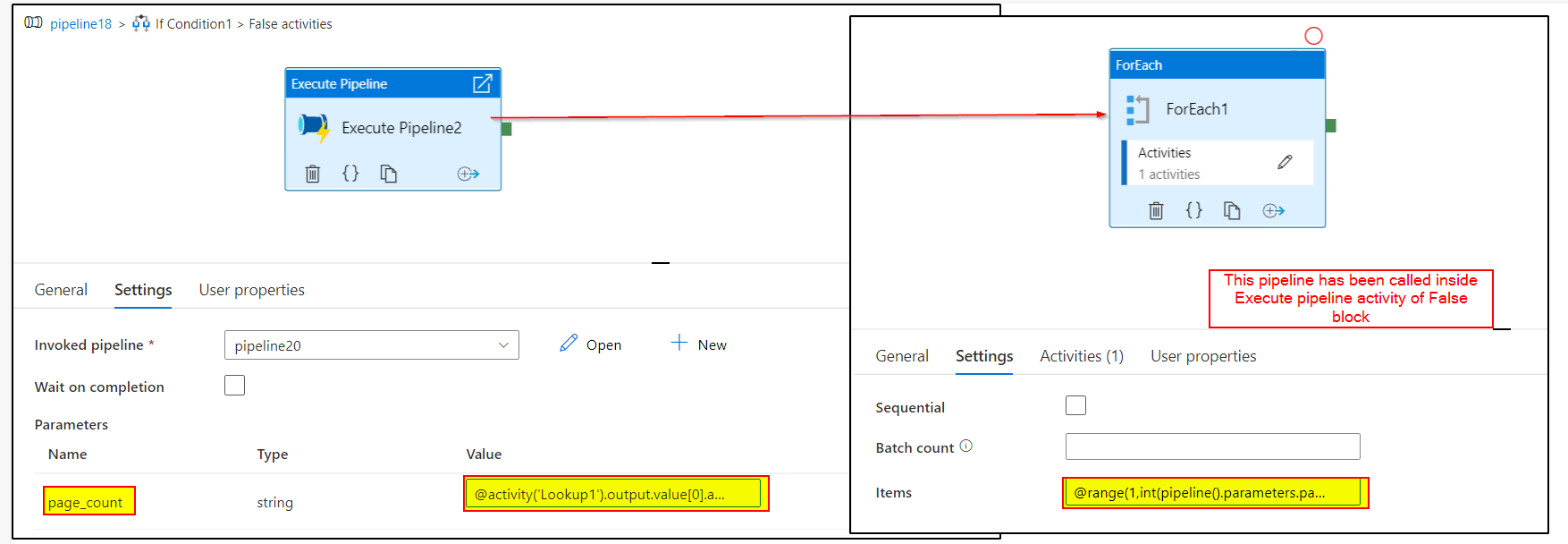
Note: In the images, I have used lookup instead of web activity to reproduce your scenario.
Hope this will help. Please let us know if any further queries.
------------------------------
 or upvote
  button whenever the information provided helps you.
Many thanks for the detailed steps and screenshot. Much appreciated... Its working as expected :).
One question on copy activity - Can we change the source datatype and inserting into sink ? My scenarios is REST api returns all fields in string want to convert few in integer and load into cosmos DB.
@Abdul Kalam Mulla ,
Glad to know it helped. Thanks for your confirmation. For the followup query, as it is not related to this thread, I would recommend you to create a new thread with the same ask. Please do consider clicking Accept Answer and take satisfaction survey for this thread as accepted answers help community as well. Thanks !
Hi @Abdul Kalam Mulla ,
Thankyou for using Microsoft Q&A platform and thanks for posting your query here.
As I understand your ask , it seems you are trying to loop through each of the responses of Web Activity inside ForEach activity based on the condition:
If Webactivity output contains 'No data found', items value should be @Rover (1,1) else @Rover (1,page_count) . However, it's not working as expected. Please correct me if my understanding is incorrect.
Please try the following expression:
@range(1,if(contains(activity('WEB_GET_NUMBEROFPAGES').output.Response.data[0],'No data found'),1,activity('WEB_GET_NUMBEROFPAGES').output.ameta[0].page_count))as 'No data found' is part of data[] array , we need to mention that to check if that string is part of the output or not.
Hope this will help. Please let us know if any further queries.
------------------------------
or upvote button whenever the information provided helps you.
Thanks for looking into this AnnuKumari .
When there is a data in the api output, the activity('WEB_GET_NUMBEROFPAGES').output.Response.data[0] becomes invalid and
when there is no data in the output the activity('WEB_GET_NUMBEROFPAGES').output.ameta[0].page_count becomes invalid.
The error from pipeline is below.
The expression 'length(range(1,if(contains(activity('WEB_GET_NUMBEROFPAGES').output.Response.data[0],'No data found'),1,activity('WEB_GET_NUMBEROFPAGES').output.ameta[0].page_count)))' cannot be evaluated because property 'Response' doesn't exist, available properties are 'ameta, data, ADFWebActivityResponseHeaders, effectiveIntegrationRuntime, executionDuration, durationInQueue, billingReference'.
It seems when data not available it is returning invalid json , i am checking this with source provider on this.
Thanks again for looking into this.
Hi @Abdul Kalam Mulla ,
Kindly have a look at the below answer.