Microsoft 365 and Office | SharePoint | Development
The process of building custom applications and tools that interact with Microsoft SharePoint, including SharePoint Online in Microsoft 365.

This browser is no longer supported.
Upgrade to Microsoft Edge to take advantage of the latest features, security updates, and technical support.
' cx='32' cy='32' r='32' /%3E%3Ctext x='50%25' y='55%25' dominant-baseline='middle' text-anchor='middle' fill='%23FFF' %3EA%3C/text%3E%3C/svg%3E)
I referred the below article to achieve disable a row in quick edit based on status change.
Its working as per the sample test script but facing an issue while finding items in the search bar “TypeError: Cannot set properties of null (setting 'disabled')”.
' cx='32' cy='32' r='32' /%3E%3Ctext x='50%25' y='55%25' dominant-baseline='middle' text-anchor='middle' fill='%23FFF' %3ETZ%3C/text%3E%3C/svg%3E)
Hi @Anonymous ,
I am currently doing some research on this issue, will let you know as soon as possible.
Yes please.
Thank you for your kind response.
Hi @Anonymous ,
I have tested with your code and it works well, I think it is a proper way. I'm glad to hear you solve the problem ,if you have any issue about SharePoint, you are welcome to raise a ticket in this forum.
By the way, since the Microsoft Q&A community has a policy that "The question author cannot accept their own answer. They can only accept answers by others." and according to the scenario introduced here: Answering your own questions on Microsoft Q&A, I would make a brief summary of this thread:
[Disable a row in Quick Edit using jQuery Based on Status Change]
Issue Symptom:
I referred the below article to achieve disable a row in quick edit based on status change.
Its working as per the sample test script but facing an issue while finding items in the search bar “TypeError: Cannot set properties of null (setting 'disabled')”.
Solutions:
Change the code as below:
document.addEventListener("click", myFunction);
sheet.disabled = true;
function myFunction() {
sheet.parentNode.removeChild(sheet);
}
Full code (See attachment)
You could click the "Accept Answer" button for this summary to close this thread, and this can make it easier for other community member's to see the useful information when reading this thread. Thanks for your understanding!
If the answer is helpful, please click "Accept Answer" and kindly upvote it. If you have extra questions about this answer, please click "Comment".
Note: Please follow the steps in our documentation to enable e-mail notifications if you want to receive the related email notification for this thread.
Hi @Anonymous ,
Per my test, I successfully achieved this function using the code in your link ,and with no error message, so I can't reproduce your issue. To help you better, can you share your full code?
However , this error seems the code is running before the DOM is ready. As troubleshooting, please try with DOMContentLoaded. (As shown in the following code)
            document.addEventListener("DOMContentLoaded", function(event) {
      var sheet = document.getElementById("quickModeCss");
                     sheet.disabled = true;
   });
Similar issues:
https://stackoverflow.com/questions/51787988/javascript-uncaught-typeerror-cannot-set-property-disabled-of-null
Hope it can help you . Thanks for your understanding and support.
Note: Microsoft is providing this information as a convenience to you. The sites are not controlled by Microsoft. Microsoft cannot make any representations regarding the quality, safety, or suitability of any software or information found there. Please make sure that you completely understand the risk before retrieving any suggestions from the above link.
update-----------------------------------------------------------------------
When I put the code into the webpart of Script Editor, I get the same error as you, please follow the steps below:
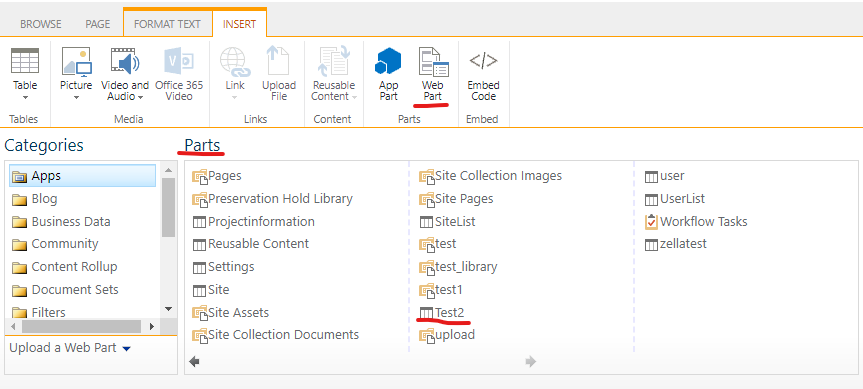
1.Go to Page ->>Web Part . In the Part section, choose the list you need. Then click Add(In my test, I chose the list named "Test2" from my site)
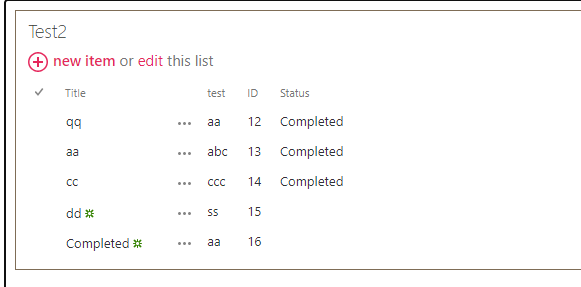
2.You will see the list in the page.(As shown in the screenshot below)
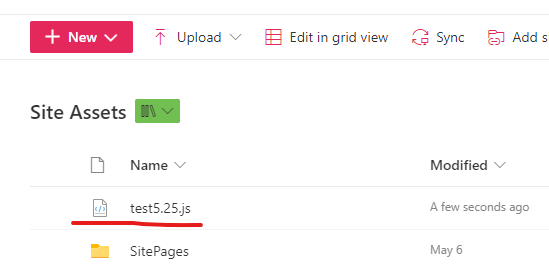
3.Put the attached code into a JS file and upload it to the library called Site Assets :

4.Click Edit Web Part

5.Expand Miscellaneous and enter \~site/SiteAssets/test5.25.js in JS Link

6.Click OK and Save the page
If the answer is helpful, please click "Accept Answer" and kindly upvote it. If you have extra questions about this answer, please click "Comment".
Note: Please follow the steps in our documentation to enable e-mail notifications if you want to receive the related email notification for this thread.
(function () {
var overrideContext = {};
overrideContext.Templates = {};
overrideContext.OnPreRender= function(ctx) {
if (!ctx.inGridMode){
                document.addEventListener("DOMContentLoaded", function(event) {
                 var sheet = document.getElementById("quickModeCss");
                     sheet.disabled = true;
           });
               sheet.parentNode.removeChild(sheet);


            }
        }
        overrideContext.OnPostRender = function (Ctx) {
            if (ctx.inGridMode) {
                var rows = ctx.ListData.Row;
                var cssStr = "";
                for (var i = 0; i < rows.length; i++) {
                    var isCompleted = rows[i]["Status"] == "Completed";
                    if (isCompleted) {
                        var rowElementId = GenerateIIDForListItem(ctx, rows[i]);
                        cssStr += "tr[iid='" + rowElementId + "']{display:none !important;}"
                    }
                }
               if ($('#quickModeCss').length < 1) {
                    $("<style id='quickModeCss' type='text/css'>" + cssStr + "</style>").appendTo("head");
                }
            }

        };
        SPClientTemplates.TemplateManager.RegisterTemplateOverrides(overrideContext);

    })();
As you said i made changes but getting below error.
ReferenceError: sheet is not defined
ReferenceError: sheet is not definedTypeError: Cannot read properties of null (reading '_events')
Hi @Anonymous ,
It looks like missing <style type="text/css" id="quickModeCss"></style> in your code.
Please copy the full code in the attachment and test again.
I didn't missed these two lines in the code <style type="text/css" id="quickModeCss"></style>
<script type="text/javascript" src="https://code.jquery.com/jquery-1.12.4.js"></script> missed to copy while sending you.
I have ran attached code still same error
Hi @Anonymous ,
I have updated my answer above, please follow the update steps to test.
I tried above update steps its not working for me, faced the same issue.
I made some changes in my code now working fine. Please review below code and let me know is this proper way or not.
Changes:
document.addEventListener("click", myFunction);
sheet.disabled = true;
function myFunction() {
sheet.parentNode.removeChild(sheet);
}
Full code:
<!DOCTYPE html PUBLIC "-//W3C//DTD XHTML 1.0 Strict//EN" "http://www.w3.org/TR/xhtml1/DTD/xhtml1-strict.dtd">
<html xmlns="http://www.w3.org/1999/xhtml">
<script src="https://code.jquery.com/jquery-1.10.1.min.js"></script>
<script type="text/javascript" src="https://code.jquery.com/jquery-1.12.4.js"></script>
<head>
<meta http-equiv="Content-Type" content="text/html; charset=utf-8" />
<title>Untitled 1</title>
</head>
<body>
<div id="quickModeCss">
</div>
</body>
<script>
(function () {
var overrideContext = {};
overrideContext.Templates = {};
overrideContext.OnPreRender= function(ctx) {
if (!ctx.inGridMode){
               var sheet = document.getElementById("quickModeCss");
               document.addEventListener("click", myFunction);
               sheet.disabled = true;
              function myFunction() {
               sheet.parentNode.removeChild(sheet);
               }

            }
        }
        overrideContext.OnPostRender = function (Ctx) {
            if (ctx.inGridMode) {
                var rows = ctx.ListData.Row;
                var cssStr = "";
                for (var i = 0; i < rows.length; i++) {
                    var isCompleted = rows[i]["Status"] == "Completed";
                    if (isCompleted) {
                        var rowElementId = GenerateIIDForListItem(ctx, rows[i]);
                        cssStr += "tr[iid='" + rowElementId + "']{display:none !important;}"
                    }
                }
               if ($('#quickModeCss').length < 1) {
                    $("<style id='quickModeCss' type='text/css'>" + cssStr + "</style>").appendTo("head");
                }
            }

        };
        SPClientTemplates.TemplateManager.RegisterTemplateOverrides(overrideContext);

    })();
</script>
</html>