Microsoft Security | Microsoft Entra | Microsoft Entra ID
A cloud-based identity and access management service for securing user authentication and resource access

This browser is no longer supported.
Upgrade to Microsoft Edge to take advantage of the latest features, security updates, and technical support.
' cx='32' cy='32' r='32' /%3E%3Ctext x='50%25' y='55%25' dominant-baseline='middle' text-anchor='middle' fill='%23FFF' %3EJD%3C/text%3E%3C/svg%3E)
I configured a node-based oauth2 authentication process using this library: passport-oauth2.
It's working when I log in with a professional account but When I try to log in with an email @harsh.com .com, I get a 403 error when I consume https://graph.microsoft.com/v1.0/me with the token I get from the login flow.
Should I use another endpoint for not-corporate domains like @Karima ben .com or @harsh.com .com?
This is the error that I get from the endpoint.
{
"error": {
"code": "ErrorInsufficientPermissionsInAccessToken",
"message": "Exception of type 'Microsoft.Fast.Profile.Core.Exception.ProfileAccessDeniedException' was thrown.",
"innerError": {
"date": "2022-06-07T22:44:52",
"request-id": "c613d639-1174-411d-9821-ac3b273dc40e",
"client-request-id": "c613d639-1174-411d-9821-ac3b273dc40e"
}
}
}
' cx='32' cy='32' r='32' /%3E%3Ctext x='50%25' y='55%25' dominant-baseline='middle' text-anchor='middle' fill='%23FFF' %3ESM%3C/text%3E%3C/svg%3E)
Hii @Jose David Rojas Aguilar ,
Just checking in to see if the below answer helped. If this answers your query, please don’t forget to click "Accept the answer" and Up-Vote for the same, which might be beneficial to other community members reading this thread. And, if you have any further query do let us know.
Thanks,
Shweta
' cx='32' cy='32' r='32' /%3E%3Ctext x='50%25' y='55%25' dominant-baseline='middle' text-anchor='middle' fill='%23FFF' %3EVK%3C/text%3E%3C/svg%3E)
Thanks for reaching out to us, could you please put your decode access token http://jwt.ms/ and see if the permission is present or not. User.Read permission is sufficient but could you please try by adding scopes User.ReadAll permission.
' cx='32' cy='32' r='32' /%3E%3Ctext x='50%25' y='55%25' dominant-baseline='middle' text-anchor='middle' fill='%23FFF' %3EMA%3C/text%3E%3C/svg%3E)
Having similar issue here. The site you posted does not decode access tokens. Only for jwt id_tokens. And the id_token does not show any scope present. I have all the openid permissions checked on GraphApi. Still getting same error about profile exception.
Hi @ MaksadAnnamuradov-9986,
https://jwt.ms allow you to decode access tokens. If you are not able to decode access token using jwt.ms, thats means your token is not valid. Please check the request parameters and permissions to get the valid access token.
Thanks,
Shweta
Hi @Jose David Rojas Aguilar ,
Thanks for reaching out.
I understand you are trying to access Graph API endpoint with personal accounts and getting "ErrorInsufficientPermissionsInAccessToken" error.
This could be due to sign-in audience is not correctly configured in "supported account types" while registering the application.
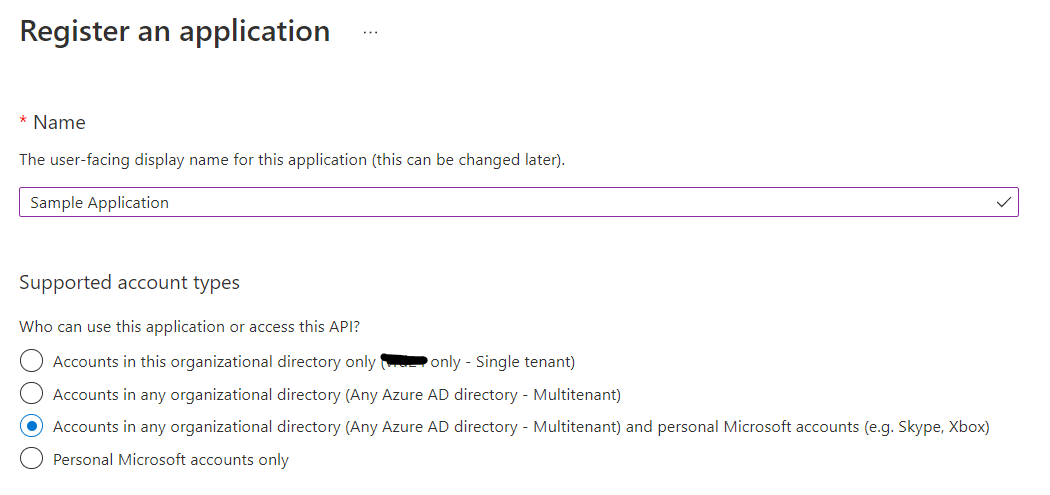
Selecting the "Accounts in any organizational directory and personal Microsoft accounts" option will allow users who have personal Microsoft accounts and users from another tenant to access the application.
You need to call common endpoint to authenticate the user which should allow both Microsoft accounts and work or school accounts to access the application
https://login.microsoftonline.com/common/oauth2/v2.0/token
Also, make sure if you have registered your application initially as single tenant but wants to allow users from another tenant or Microsoft accounts as well. I would recommend to register the new application with above option to target largest sign-in audience to access your application.
Updating the account supported by an application will sometimes not allow to update application from single-tenant to multi-tenant due to Application ID URI (App ID URI) name collisions. So it is better to avoid that and register new application as multi-tenant application.
Hope this will help.
Thanks,
Shweta
-------------------------------------
Please remember to "Accept Answer" if answer helped you.
Same issue here. I have registered applications with Supported Account types 3rd option. And calling the common endpoint to get access token. I have checked all the OpenId permissions checked on Graph API. The issue is still persisting. Do you have any other suggestions on why it could be doing this? It was working couple days ago before the weekends, and on Monday, it decided to give that error which is odd