Azure Synapse Analytics
An Azure analytics service that brings together data integration, enterprise data warehousing, and big data analytics. Previously known as Azure SQL Data Warehouse.
This browser is no longer supported.
Upgrade to Microsoft Edge to take advantage of the latest features, security updates, and technical support.
' cx='32' cy='32' r='32' /%3E%3Ctext x='50%25' y='55%25' dominant-baseline='middle' text-anchor='middle' fill='%23FFF' %3EAI%3C/text%3E%3C/svg%3E)
Hi Team,
I've got an Azure synapse pipeline for copying data from Azure Data Lake using azure synapse server less SQL pool to SQL server (using the Self-Hosted Integration Runtime). The SQL server is in Azure VM but on a different subscription.
I can preview the source data, sink data and mapping by importing schemas however when I run the pipeline it fails with the following error:
{
"errorCode": "2200",
"message": "ErrorCode=SqlFailedToConnect,'Type=Microsoft.DataTransfer.Common.Shared.HybridDeliveryException,Message=Cannot connect to SQL Database: 'Mysynapse Workspace-ondemand.sql.azuresynapse.net', Database: 'DatabaseName', User: ''. Check the linked service configuration is correct, and make sure the SQL Database firewall allows the integration runtime to access.,Source=Microsoft.DataTransfer.ClientLibrary,''Type=System.Data.SqlClient.SqlException,Message=A network-related or instance-specific error occurred while establishing a connection to SQL Server. The server was not found or was not accessible. Verify that the instance name is correct and that SQL Server is configured to allow remote connections. (provider: TCP Provider, error: 0 - A connection attempt failed because the connected party did not properly respond after a period of time, or established connection failed because connected host has failed to respond.),Source=.Net SqlClient Data Provider,SqlErrorNumber=10060,Class=20,ErrorCode=-2146232060,State=0,Errors=[{Class=20,Number=10060,State=0,Message=A network-related or instance-specific error occurred while establishing a connection to SQL Server. The server was not found or was not accessible. Verify that the instance name is correct and that SQL Server is configured to allow remote connections. (provider: TCP Provider, error: 0 - A connection attempt failed because the connected party did not properly respond after a period of time, or established connection failed because connected host has failed to respond.),},],''Type=System.ComponentModel.Win32Exception,Message=A connection attempt failed because the connected party did not properly respond after a period of time, or established connection failed because connected host has failed to respond,Source=,'",
"failureType": "UserError",
"target": "copy stg mas reports from synapse stg to ycr",
"details": []
}
I have 'Allowed Azure services and resources to access this workspace' in Synapse Workspace Networking settings from Azure portal and have added IP address as well.
Can you please advise how to fix this?
' cx='32' cy='32' r='32' /%3E%3Ctext x='50%25' y='55%25' dominant-baseline='middle' text-anchor='middle' fill='%23FFF' %3ESV%3C/text%3E%3C/svg%3E)
Hi @Awais Iqbal ,
Thanks for the ask and using Microsoft Q&A portal.
Did you try connecting to the SQL pool from SQL Server management studio in on prem server? Does it work?
Thanks
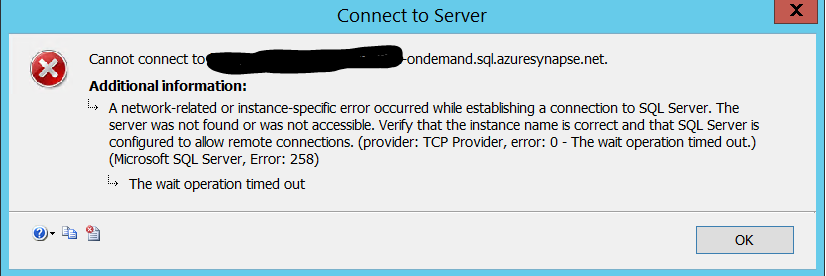
Thank you for your response
If I RDP into the VM where the server is hosted I cannot connect to the SQL pool through SSMS and I get the attached error.
However from my computer I am able to connect using SSMS
Hi @Awais Iqbal ,
By the below,
have added IP address as well.
Do you mean you have whitelisted the IP address of the on prem server in azure synapse firewall rules?
Please clarify.

Hi @Awais Iqbal ,
We haven’t heard from you on the last response and was just checking back to see if you got the resolution or not?
Hi @AnnuKumari-MSFT ,
Thank you for following up.
Yes I have whitelisted IP address of the server in Azure Synapse firewall rule
Hi @Awais Iqbal ,
Welcome to Microsoft Q&A platform and thanks for posting your query here.
As I understand your issue, you are trying to copy data from ADLS to serverless SQL pool but are facing connection errors. Please let me know if my understanding is incorrect.
Kindly try creating Managed private end point within your synapse workspace to mitigate the issue.
Please refer to the following document for more details on how to do the same : Synapse Managed private endpoints
Hope this will help. Please let us know if any further queries.
------------------------------
 or upvote
  button whenever the information provided helps you.
Hi @Awais Iqbal ,
Just checking in to see if the above answer helped. Please do consider clicking Accept Answer and Up-Vote for the same as accepted answers help community as well. If you have any further query do let us know.