Microsoft Security | Microsoft Entra | Microsoft Entra ID
A cloud-based identity and access management service for securing user authentication and resource access

This browser is no longer supported.
Upgrade to Microsoft Edge to take advantage of the latest features, security updates, and technical support.
' cx='32' cy='32' r='32' /%3E%3Ctext x='50%25' y='55%25' dominant-baseline='middle' text-anchor='middle' fill='%23FFF' %3ENN%3C/text%3E%3C/svg%3E)
Status Failure
Sign-in error code 530031
Failure reason Access policy does not allow token issuance.
Client app Browser
User is still Block and cannot sign in.
User is dismissed from all (Conditional Access) Policies.
How to resolve this Issue?

Hello @Nimrod Nieuwpoort , the error is being caused by a Conditional Access blocking the access token issuance due a matching policy. To find which policy caused the blocking please follow the steps detailed in Troubleshooting sign-in problems with Conditional Access - Azure AD sign-in events.
Alternatively come back to us with the correlation id and timestamp of the error, as displayed in the following image:
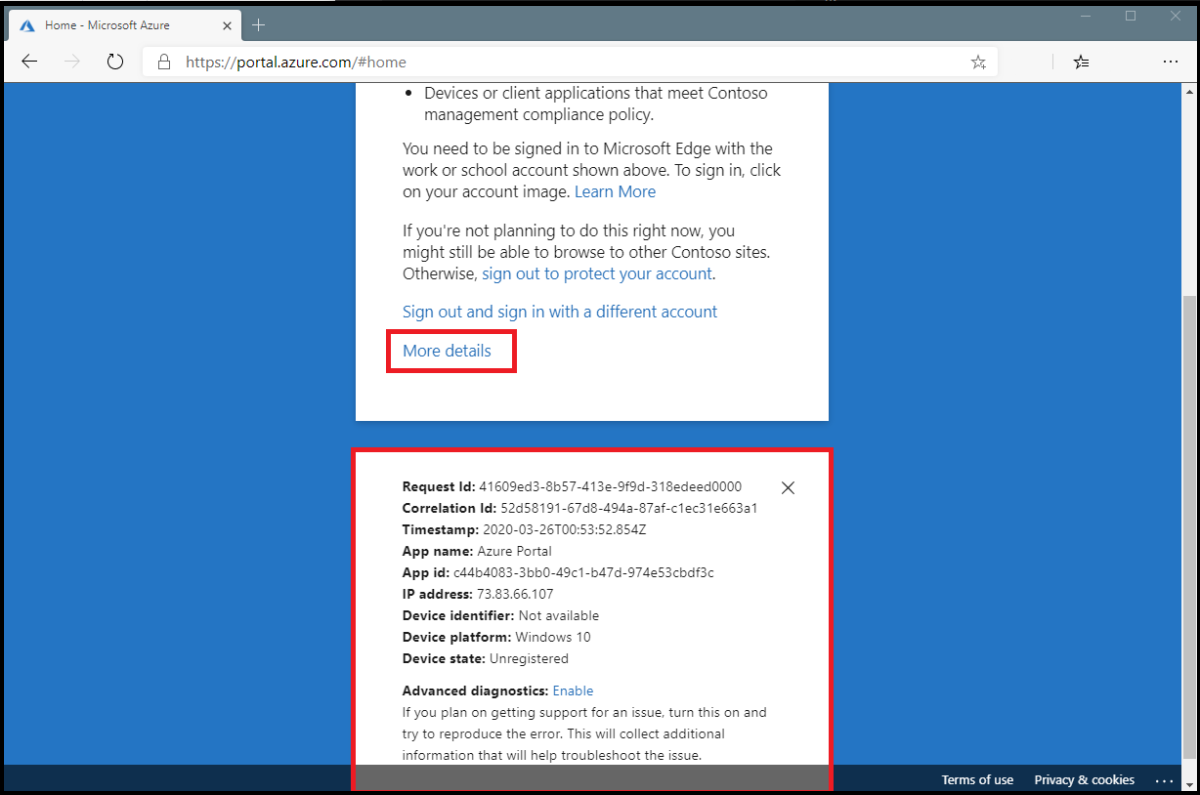
Let us know if this answer was helpful to you or if you need additional assistance. If it was helpful, please remember to accept it so that others in the community with similar questions can more easily find a solution.
' cx='32' cy='32' r='32' /%3E%3Ctext x='50%25' y='55%25' dominant-baseline='middle' text-anchor='middle' fill='%23FFF' %3EDB%3C/text%3E%3C/svg%3E)
@Alfredo - ALFREDO REVILLA my sign-in for a power bi lab is being blocked and I don't know how to get past this so I can continue with training?? Here is a copy of the details, including the correlation ID and timestamp. Can you help me with this? Attempted our internal IT group with this issue, but they couldn't figure out. When I started digging around, I came across this post. Error Code: 530031 Request Id: c9272381-9b6b-47ce-8b84-f70223841700 Correlation Id: 8e9212f0-8920-48d2-91de-40a59fce53fa Timestamp: 2023-04-25T21:39:45.511Z App name: Power BI Community - Prod App id: 0f75ad3b-3af2-4c72-ba6f-e4f80172b128 IP address: 163.47.101.120 Device identifier: Not available Device platform: Windows 10 Device state: Unregistered