
Enabling Query Store

Mikhail Firsov 1,881 Reputation points
2022-06-24T10:45:45.173+00:00

Hello!

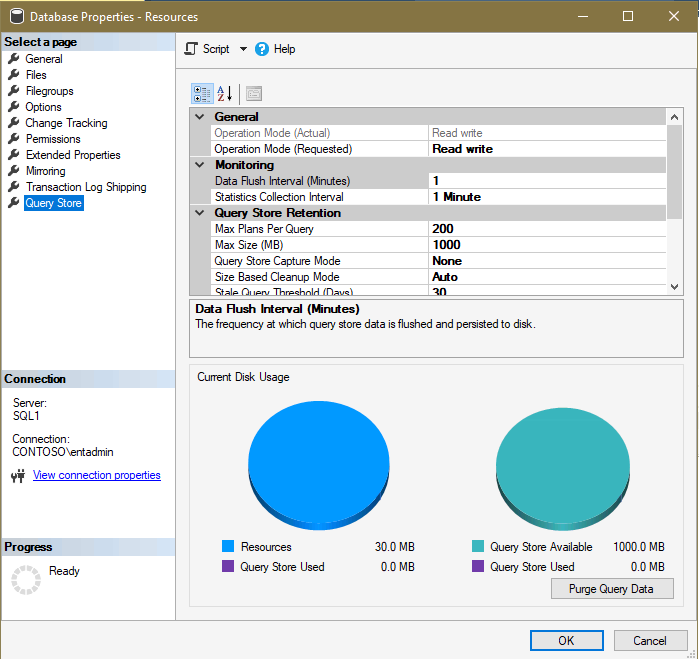
I've enabled Query Store in the Read-Write mode on my SQL Server - as a result the corresponding Query Store containers have appeared in the Management Studio, but no single query was ever added to the store even after setting the both monitoring options to 1 minutes:
214769-01.png

What should I check to make it working?

Thank you in advance,
Michael

SQL Server | Other
0 comments No comments
{count} votes

Answer accepted by question author
  1. Erland Sommarskog 128.7K Reputation points MVP Volunteer Moderator
    2022-06-27T20:27:07.943+00:00

    What you may what to change if you are only playing around is to change the capture mode to ALL. This can have detrimental effcet on a system witn lot of unparameterised queries. Then again, this was the default setting in SQL 2016 and 2017.

    The other two may not have as much effect as you think, because when you query store views, they take data both from what is on disk and what is buffered in memory. The effect of the flush parameter is how much you lose in case of a crash or a failover.

    ï also like to point that when we recommend you to stick to the defaults, we have a production scenario in mind.

    I'm afraid that I did not watch the video.

    0 comments No comments

5 additional answers

Sort by: Most helpful
  1. Jingyang Li 5,901 Reputation points Volunteer Moderator
    2022-06-24T20:09:55.853+00:00

    > setting the monitoring options to 15 minutes (Data flush Interval)and 60 minutes(Statistics Collection interval).

    0 comments No comments

  2. Erland Sommarskog 128.7K Reputation points MVP Volunteer Moderator
    2022-06-24T22:04:42.623+00:00

    Keep those options to the default. Particularly, a run-time statistics interval of one minute will add quite some overhead, and the query store tables could blow up on a busy server.

    You will get data even with the default settings. But with the auto-capture mode some ad-hoc queries may not be captured. If you want to test, it is better to test with stored procedures.

    0 comments No comments

  3. CathyJi-MSFT 22,406 Reputation points Microsoft External Staff
    2022-06-27T07:40:49.29+00:00

    Hi @Mikhail Firsov ,

    Suggest you using default parameters for query store.

    Data Flush Interval (Minutes) option, an interval in minutes can be set which shows how frequent the query runtime statistics and query execution plans will be flushed from memory of SQL Server instance to disk. By default, this option is set to 15 minutes. If this option is set to lower value than the frequency of flushes, data from memory to disk will occur often which will have negative impact on performance of SQL Server instance. But If the value is increased, more SQL Server Query Store information will be placed in memory of the SQL Server instance before it flushes to disk, which increases a risk of losing that data in case of SQL Server restart/crashes.

    The Statistics Collection Interval option defined aggregation interval of query runtime statistics that should be used inside the SQL Server Query Store. By default, it is set to 60 minutes. Lower value means that granularity of query runtime statistics is finer, because of that, more intervals occur which requires more disk space for storing query runtime statistics.


    If the answer is helpful, please click "Accept Answer" and kindly upvote it. If you have extra questions about this answer, please click "Comment".

    0 comments No comments

  4. Mikhail Firsov 1,881 Reputation points
    2022-06-27T08:55:38.317+00:00

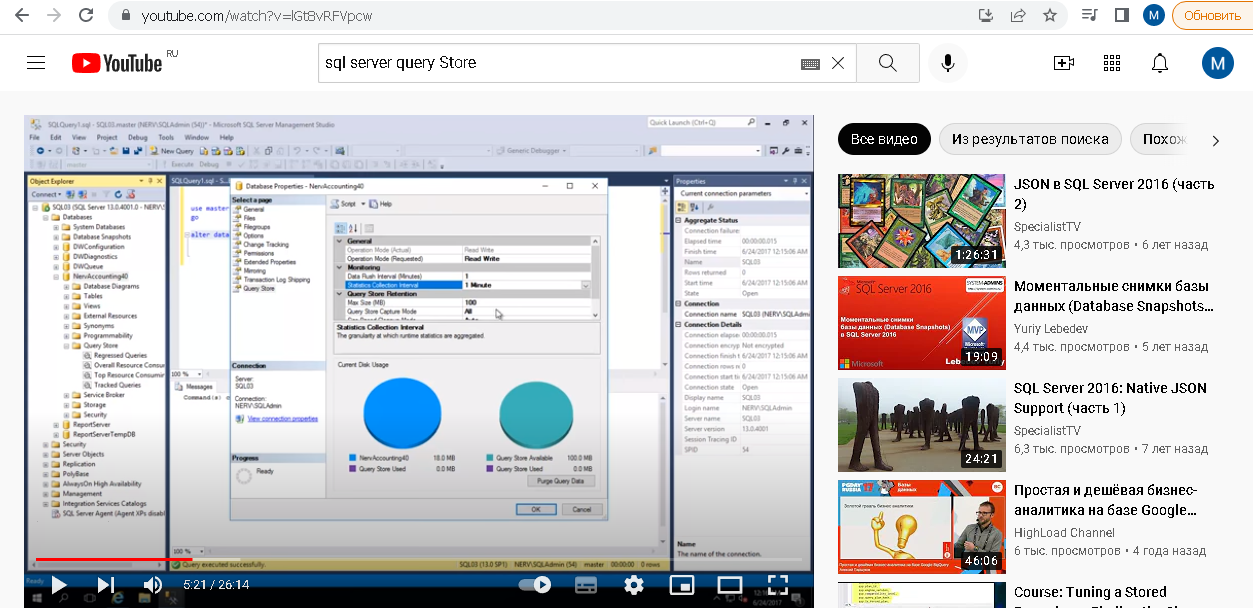
    Frankly speaking I don't understand this: "set the default values (15m and 60m) and it should be working" - the defaults are just defaults and nothing more, I may want to use them or may not - how the value of some parameter can affect the way a feature with this parameter is working (or not working)? Firstly, I've tried various values and still no single query has been added to the store and secondly here's the video showing the 1min - 1min values work perfect (from 5:21 onword):
    215276-q6.png

    I also tried SPs but to no avail - either it does not work at all on my SQL Server 2019 or only some queries can be added to the store and which ones I don't know :(


Your answer

Answers can be marked as 'Accepted' by the question author and 'Recommended' by moderators, which helps users know the answer solved the author's problem.