Azure Data Factory
An Azure service for ingesting, preparing, and transforming data at scale.
This browser is no longer supported.
Upgrade to Microsoft Edge to take advantage of the latest features, security updates, and technical support.
' cx='32' cy='32' r='32' /%3E%3Ctext x='50%25' y='55%25' dominant-baseline='middle' text-anchor='middle' fill='%23FFF' %3EVP%3C/text%3E%3C/svg%3E)
Hello there,
I have a requirement to fetch the GET method output of web activity to ADLS Gen2. Can you please guide me on how to achieve this?
Thanks in advance.
Thanks,
Venkat

Hi @Venkatesh P ,
Welcome to Microsoft Q&A platform and thanks for posting your question here.
I assume you are trying to store the web activity output to a file in ADLS. Please let me know if that is not the case.
@{activity('Web1').output.value[0]} in the value of set Variable.WebActvityOutput with value = @{variables('var1')} . In the sink , use the same dataset. In the mapping tab , click on Import schema and delete the column from dummy file and only keep the additionally added column.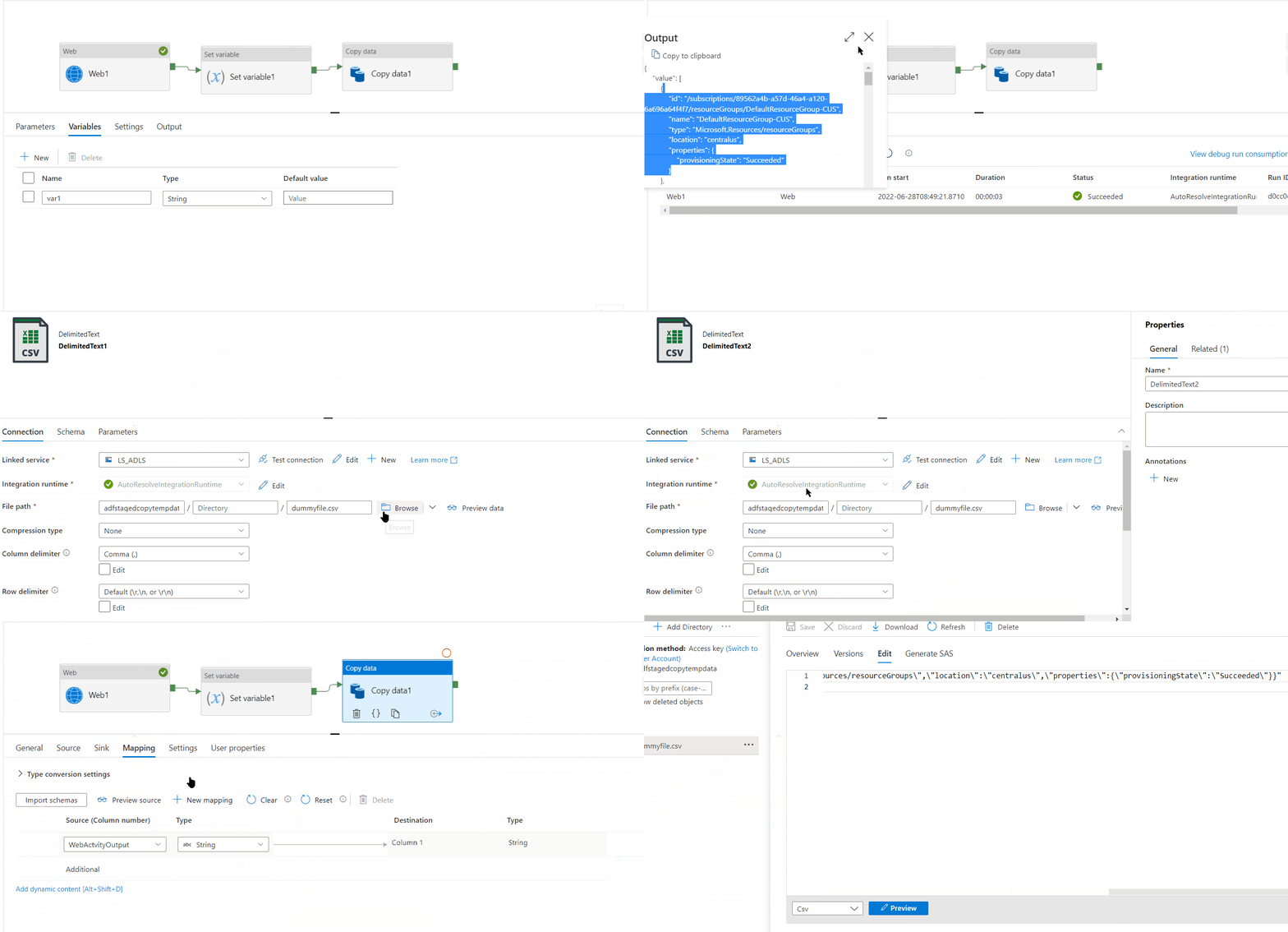
Hope this will help. Please let us know if any further queries.
 or upvote
  button whenever the information provided helps you.
 ' cx='32' cy='32' r='32' /%3E%3Ctext x='50%25' y='55%25' dominant-baseline='middle' text-anchor='middle' fill='%23FFF' %3EDM%3C/text%3E%3C/svg%3E)
Use copy activity and have a dummy .csv file with one column as the source dataset.
This was very helpful, helped me figure out how to output data that had been through some transforming in the ADF pipeline. Although personally I think Microsoft could make a source dataset not required and just take the output from a previous step.
Thankyou for the feedback.
Appreciate if you could share the feedback on our Data factory feedback channel, which would be open for the user community to upvote & comment on. This allows our product team to effectively prioritize your request against our existing feature backlog and gives insight into the potential impact of implementing the suggested feature.