Azure Virtual Machine Scale Sets
Azure compute resources that are used to create and manage groups of heterogeneous load-balanced virtual machines.
This browser is no longer supported.
Upgrade to Microsoft Edge to take advantage of the latest features, security updates, and technical support.
' cx='32' cy='32' r='32' /%3E%3Ctext x='50%25' y='55%25' dominant-baseline='middle' text-anchor='middle' fill='%23FFF' %3EAG%3C/text%3E%3C/svg%3E)
I'm trying to set up a VMSS to use for custom build agents in Azure Pipelines. I'm following the directions scale-set-agents. However, we have a policy definition in place that requires VMSS to have Automatic OS Upgrades enabled. I can't seem to create a VMSS with this option set, whether in the portal or using az cli. Ideally this would be a custom Linux VM (I've created a VHD based off the Microsoft-hosted ubuntu-latest image, which I understand will have to be place in Azure Compute Gallery to get Automatic OS Updates), but for the moment I'm just trying to get anything working.
In the portal, this field is ALWAYS disabled, regardless of which VM Image I set (I've tried with most of the "approved" images listed here: virtual-machine-scale-sets-automatic-upgrade, and with Health probes enabled (which from what I can tell is required?):

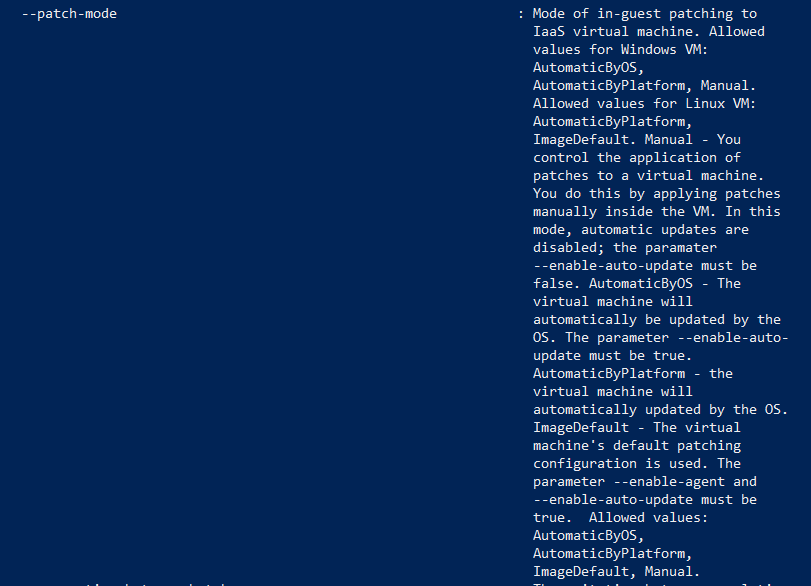
Using az cli, --patch-mode with AutomaticByOs is not even listed as an option for Linux VMs (which contradicts the supported list of images linked above), and when I try using a Windows image, I simply get the error "windowsConfiguration"

' cx='32' cy='32' r='32' /%3E%3Ctext x='50%25' y='55%25' dominant-baseline='middle' text-anchor='middle' fill='%23FFF' %3EA%3C/text%3E%3C/svg%3E)
@Anonymous
I understand you have a requirement to create VMSS with Automatic OS Upgrades enabled. There seems to be some confusion here, between Automatic VM guest patching for Azure VMs
and Azure virtual machine scale set automatic OS image upgrades. I believe you are attempting to use Azure virtual machine scale set automatic OS image upgrades, but your implementation is the other. You will need to clarify how this policy is made and enforced because it might be limiting your ability to create VMSS.
If you want to use Azure virtual machine scale set automatic OS image upgrades, you can set this after VMSS creation with "az vmss update --name myScaleSet --resource-group myResourceGroup --set UpgradePolicy.AutomaticOSUpgradePolicy.EnableAutomaticOSUpgrade=true".
If you do actually want Automatic VM guest patching for Azure VMs, then the patch orchestration mode AutomaticByOs is only available for Windows images, information about this can be found here. You can use the AutomaticByPlatform mode but need to make sure to also set "--enable-auto-update true".
Hope this helps! Let me know if you have further questions or issues.
-------------------------------
Please don’t forget to "Accept the answer" and “up-vote” wherever the information provided helps you, this can be beneficial to other community members.