
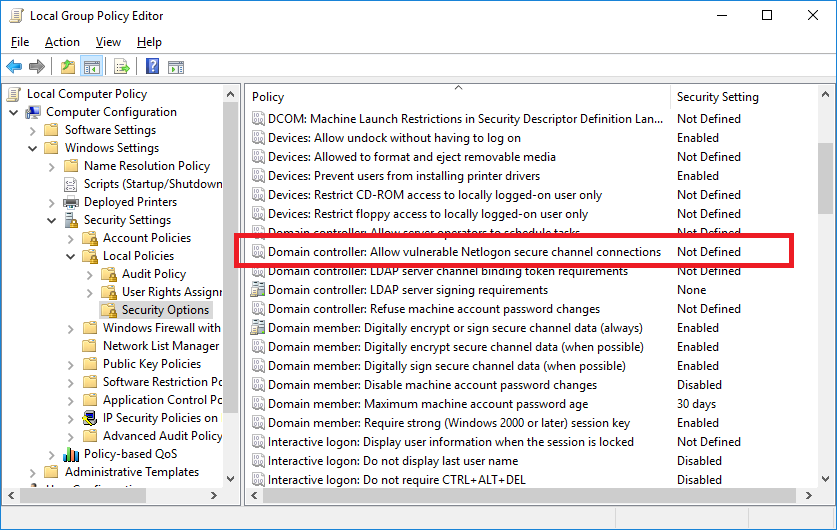
Check my earlier reply. From cmd.exe run gpedit.msc then navigate to;
--please don't forget to Accept as answer if the reply is helpful--
This browser is no longer supported.
Upgrade to Microsoft Edge to take advantage of the latest features, security updates, and technical support.
' cx='32' cy='32' r='32' /%3E%3Ctext x='50%25' y='55%25' dominant-baseline='middle' text-anchor='middle' fill='%23FFF' %3EJL%3C/text%3E%3C/svg%3E)
I am trying to create a GPO to address the netlogon secure channel vulnerability, so that certain things won't be impacted in February. However, the instructions contained in the article "https://support.microsoft.com/en-us/help/4557222/how-to-manage-the-changes-in-netlogon-secure-channel-connections-assoc" aren't working for me. I log onto my 2016 DC and open up Group Policy management. When I go to create the new GPO, per the instructions, I do not have Computer Configuration\Windows Settings\Security Settings\Security Options. Instead, I have Computer Configuration\Policies\Windows Settings\Security Settings
' cx='32' cy='32' r='32' /%3E%3Ctext x='50%25' y='55%25' dominant-baseline='middle' text-anchor='middle' fill='%23FFF' %3EA%3C/text%3E%3C/svg%3E)
Check my earlier reply. From cmd.exe run gpedit.msc then navigate to;
--please don't forget to Accept as answer if the reply is helpful--
' cx='32' cy='32' r='32' /%3E%3Ctext x='50%25' y='55%25' dominant-baseline='middle' text-anchor='middle' fill='%23FFF' %3ECC%3C/text%3E%3C/svg%3E)
Any advice how to find the missing setting!?
I don't see this setting too. Its just missing -see attached screenshot

Where you guys have 5 options starting with "Domain controller:..." I see 4, this option is MIA :/
PS: The server in question is 2012R2 - could this be the reason?
' cx='32' cy='32' r='32' /%3E%3Ctext x='50%25' y='55%25' dominant-baseline='middle' text-anchor='middle' fill='%23FFF' %3EJK%3C/text%3E%3C/svg%3E)
Hello.
I'm also busy with this point due to the fact, that our security-management is involved.
I don't know why (hopefully Microsoft knows it...), but you will find the option "Allow vulnerable Netlogon secure channel connections" only in the "LOCAL COMPUTER POLICY" - see screenshot of DSPatrick 6 days ago.
Normally I would like to configure this option in the "Default Domain Controllers Policy", but the option is not available there.
The updates on our DCs are installed and the systems made a reboot.
At the moment I have no idea to solve this in an easy way....
I don't see it in local policies either - could it be the cause my DC is 2012R2 ?!
I've tried the installation on Windows Server 2012 R2 and 2016. On the 2012-system I have the option in german language, on the 2016-system in english. On the 2012-system there are two updates from 08/11/20: KB4571703 and KB4571723 - you need both, I think.

Hi,
I have the same problem with a server 2016.
I installed windows10.0-kb4571694-x64_220af1e3a18ef36cb4abe3d34a3ce15ce656753b.msu
But I don't see option "Domain controller: Allow vulnerable Netlogon secure channel connections"
Any help ?
thanks
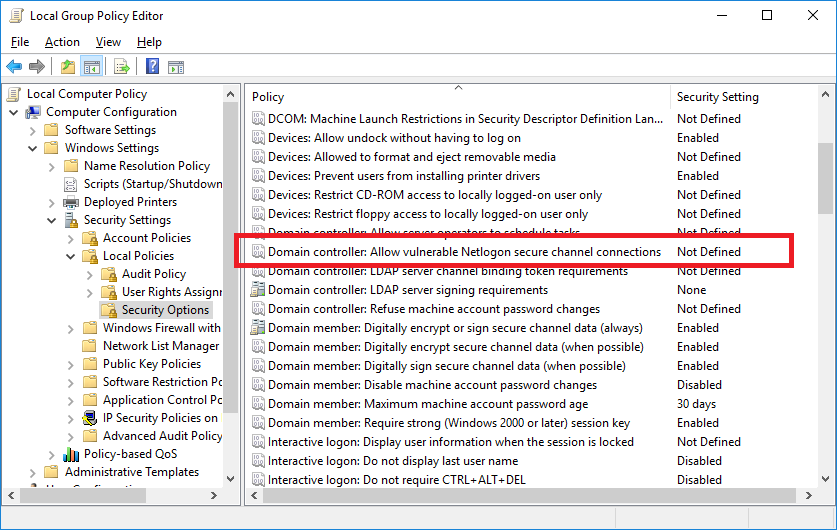
From cmd.exe run gpedit.msc then navigate to;
--please don't forget to Accept as answer if the reply is helpful--
Hi,
Based on my understanding, you have already install the updates for your 2016 DC server,right?
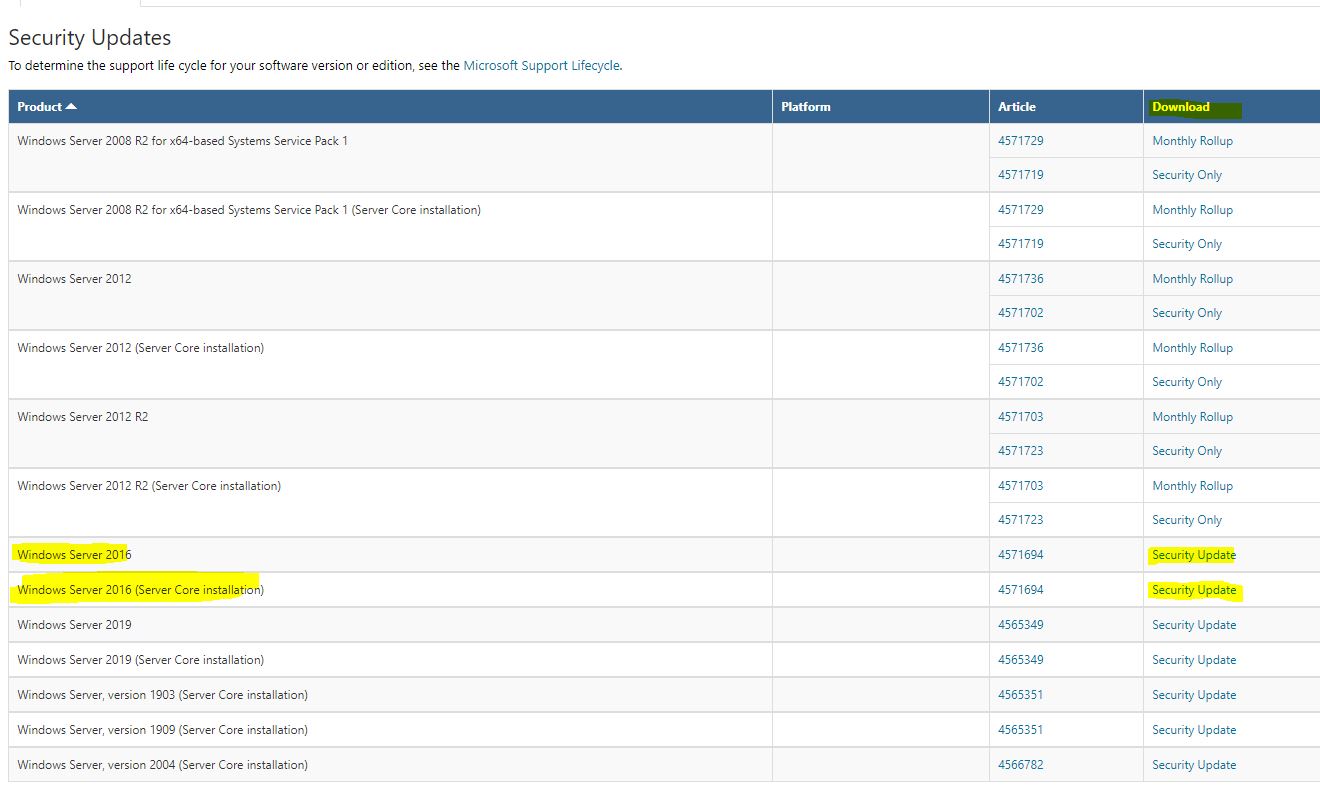
download address: https://www.catalog.update.microsoft.com/Search.aspx?q=KB4571694
When complete the updates, restart the DCs .
Under the Computer Configuration > Windows Setting > Security Settings > Local Policy > Security Options,you can find the policy.

Hello, the update has been applied to all 2016 servers, including Domain Controllers. However, MS then says to configure the "Domain controller: Allow vulnerable Netlogon secure channel connections" Group Policy. They say this is done using GPMC and going to Computer Configuration > Windows Settings > Security Settings > Security Options. It isn't there. The path appears to be Computer Configuration > Policies > Windows Settings > Security Settings > Local Policies > Security Options. Sorry for not responding sooner but I am not getting email notifications when people reply to my posts. My settings are configured to get them.