
Check my earlier reply. From cmd.exe run gpedit.msc then navigate to;
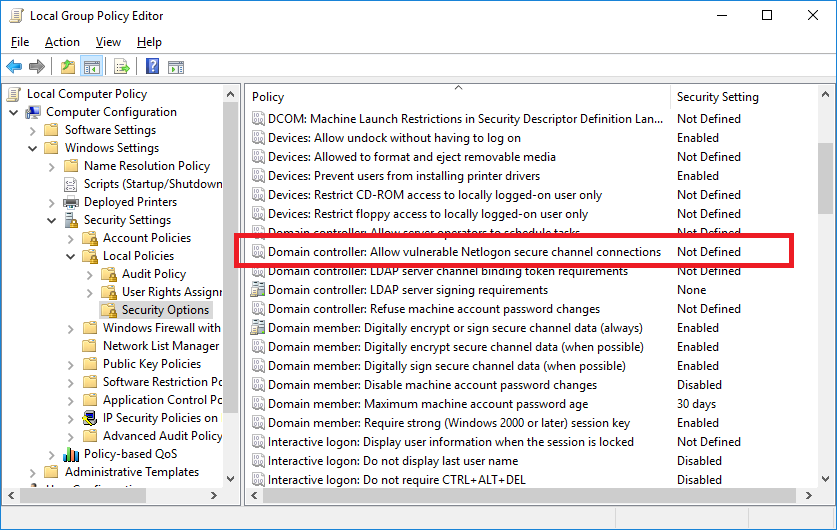
--please don't forget to Accept as answer if the reply is helpful--
This browser is no longer supported.
Upgrade to Microsoft Edge to take advantage of the latest features, security updates, and technical support.
' cx='32' cy='32' r='32' /%3E%3Ctext x='50%25' y='55%25' dominant-baseline='middle' text-anchor='middle' fill='%23FFF' %3EJL%3C/text%3E%3C/svg%3E)
I am trying to create a GPO to address the netlogon secure channel vulnerability, so that certain things won't be impacted in February. However, the instructions contained in the article "https://support.microsoft.com/en-us/help/4557222/how-to-manage-the-changes-in-netlogon-secure-channel-connections-assoc" aren't working for me. I log onto my 2016 DC and open up Group Policy management. When I go to create the new GPO, per the instructions, I do not have Computer Configuration\Windows Settings\Security Settings\Security Options. Instead, I have Computer Configuration\Policies\Windows Settings\Security Settings
' cx='32' cy='32' r='32' /%3E%3Ctext x='50%25' y='55%25' dominant-baseline='middle' text-anchor='middle' fill='%23FFF' %3EA%3C/text%3E%3C/svg%3E)
Check my earlier reply. From cmd.exe run gpedit.msc then navigate to;
--please don't forget to Accept as answer if the reply is helpful--
Glad to hear, you're welcome.
--please don't forget to Accept as answer if the reply is helpful--
Hello, I was just letting you know that the update was installed. I still don't have an answer to my post.
Right, and thank you for that. However, my question is why Microsoft's path to the setting is different. They way they say to get there is different. I guess it could be a typo on their part.
I think its got to be a typo. I just looked again and its just missing Local Policies
Computer Configuration\Windows Settings\Security Settings\Local Policies\Security Options
--please don't forget to Accept as answer if the reply is helpful--