Azure Monitor
An Azure service that is used to collect, analyze, and act on telemetry data from Azure and on-premises environments.
This browser is no longer supported.
Upgrade to Microsoft Edge to take advantage of the latest features, security updates, and technical support.
' cx='32' cy='32' r='32' /%3E%3Ctext x='50%25' y='55%25' dominant-baseline='middle' text-anchor='middle' fill='%23FFF' %3EAS%3C/text%3E%3C/svg%3E)
Hello All,
I have a source XML where the data is flatten based on lowest level. Post flatenning, my data is looking like this
Key Row1 Row2 Row3 Row4 Row5
101 A
101 NULL B
101 NULL NULL C
101 NULL NULL NULL D
101 NULL NULL NULL NULL E
102 A NULL NULL NULL NULL
102 NULL B NULL NULL NULL
102 NULL NULL NULL D NULL
102 NULL NULL NULL NULL E
103 A NULL NULL NULL NULL
103 NULL B NULL NULL NULL
103 NULL NULL C NULL NULL
103 NULL NULL NULL D NULL
104 NULL B NULL NULL NULL
104 NULL NULL C NULL NULL
104 NULL NULL NULL D NULL
Now, I want the output to be in a single row for each key field.
Key Row1 Row2 Row3 Row4 Row5
101 A B C D E
102 A B D E
103 A B C D
104 B C D
Is there any other method to achieve this with any transformation apart from a regular JOIN transformation?

Hi @Alekya Seemakurty, Sri , Could you please share the sample XML file.

Thankyou for using Microsoft Q&A platform and thanks for posting your query.
As I understand your query, you want to combine multiple columns into single column based on aggregation on Key column here. Please let me know if my understanding is incorrect.
You can try the following approach to achieve the above requirement:
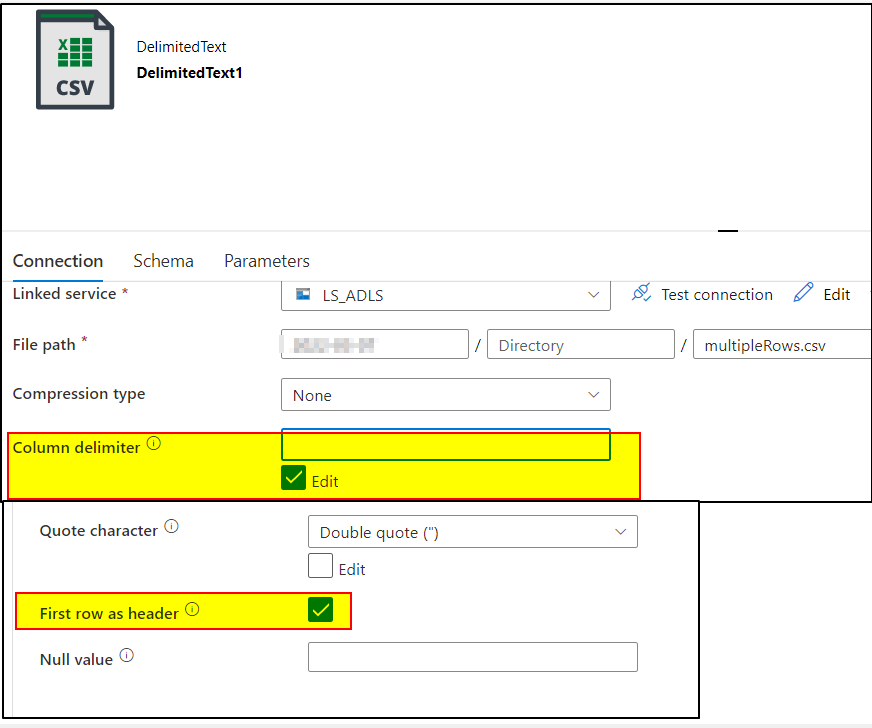
1. Create a dataset pointing to the source file . I have stored the above provided source data in .csv file . Make sure to select Edit option in Column delimiter and provide Space ' ' in the textbox as your column is not separated by comma delimiter. Also, check first row as header.
Data looks like this :
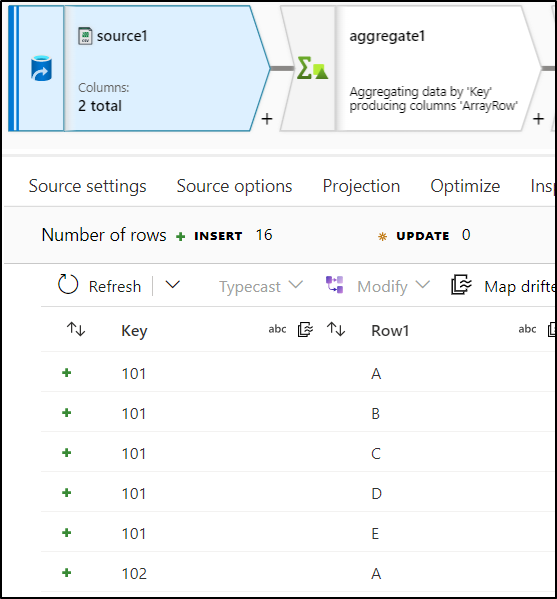
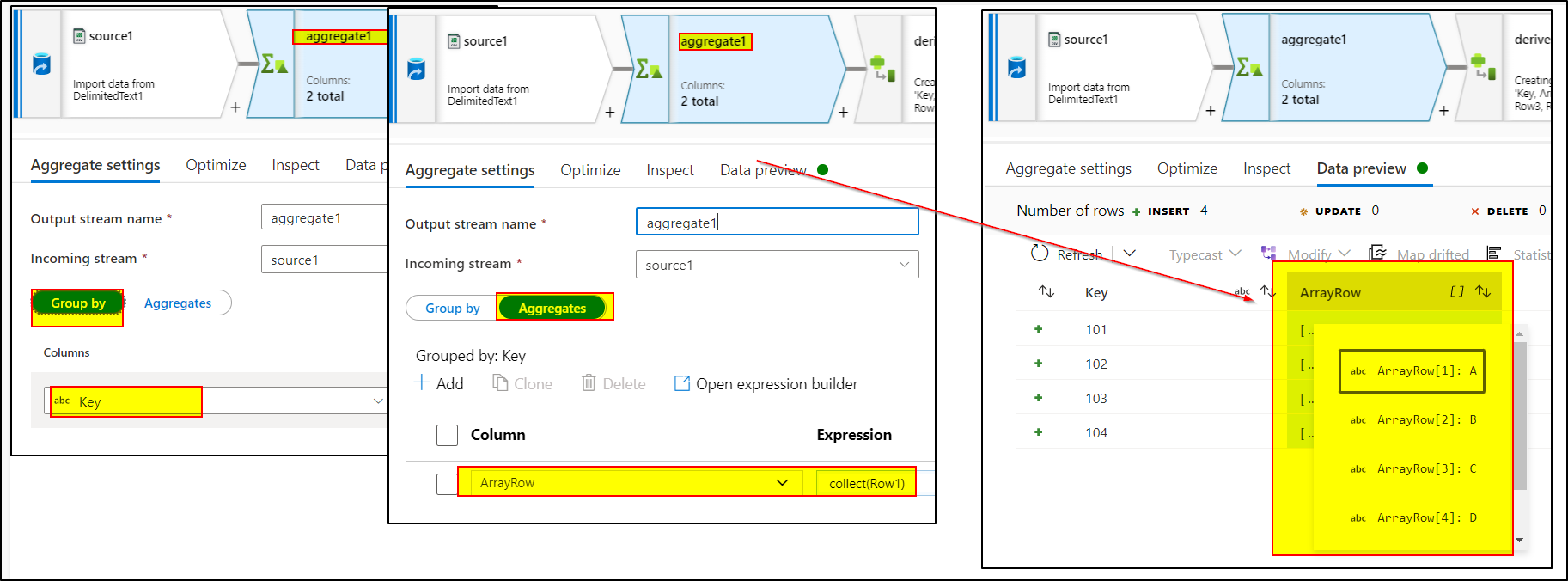
2. Use Aggregate transformation and group by using 'Keys' column and use collect(Row1) in the expression of aggregate tab.
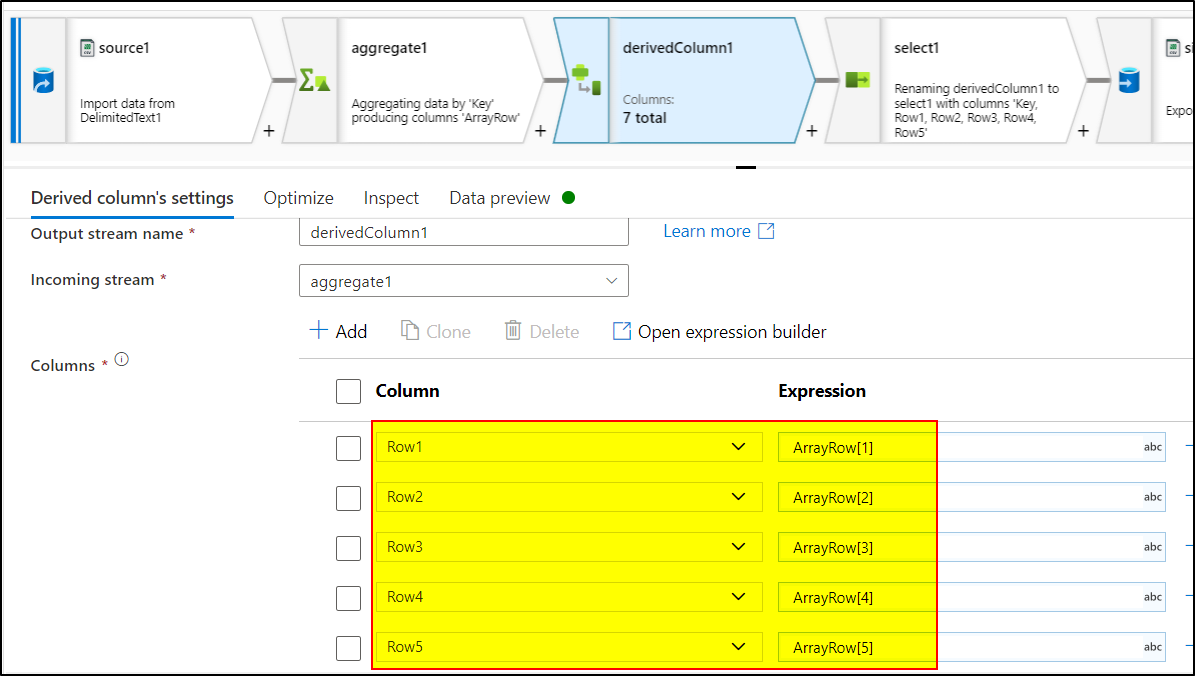
3. Use Derived column transformation to create Columns named - 'Row1','Row2','Row3','Row4','Row5'
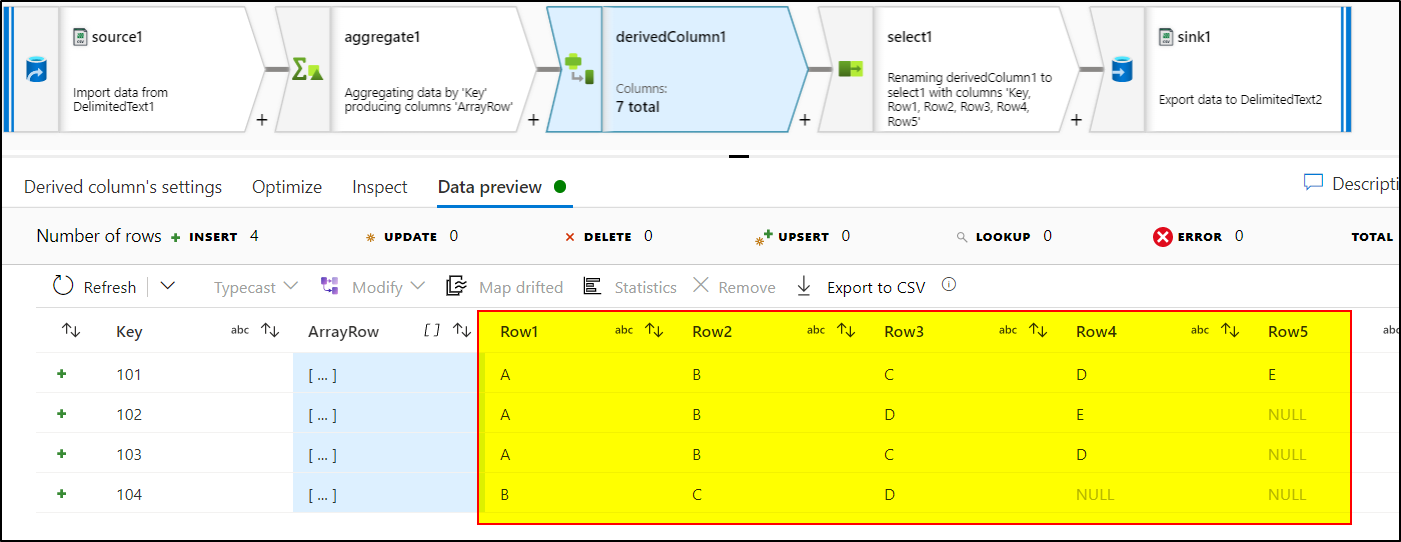
4. Use Select Transformation to select only necessary columns
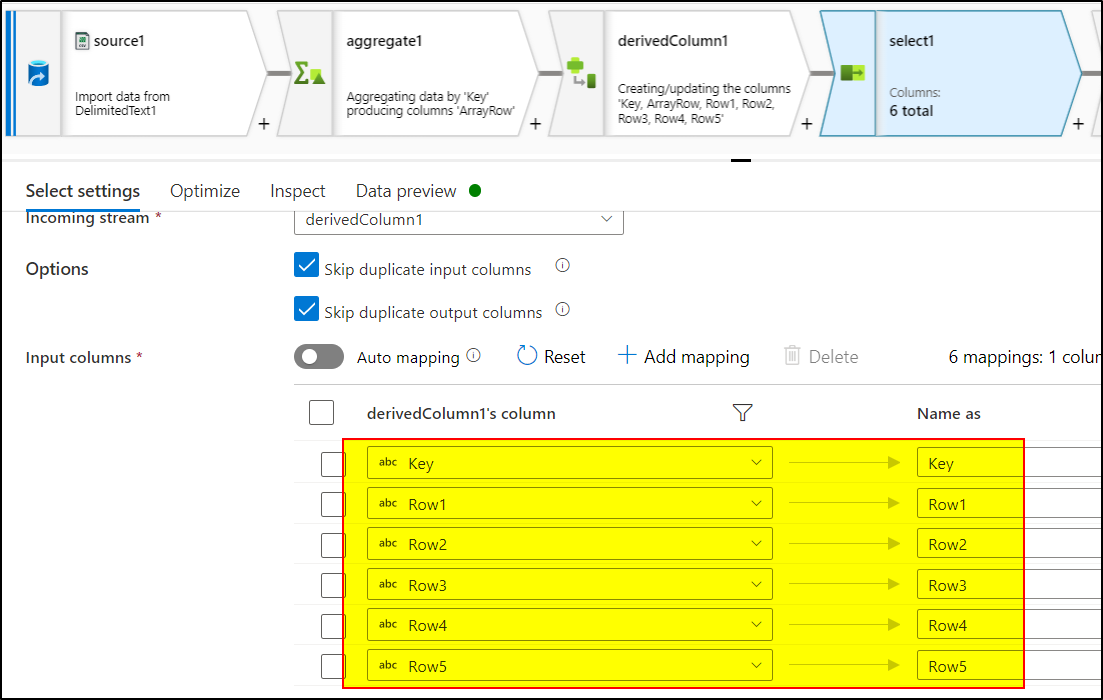
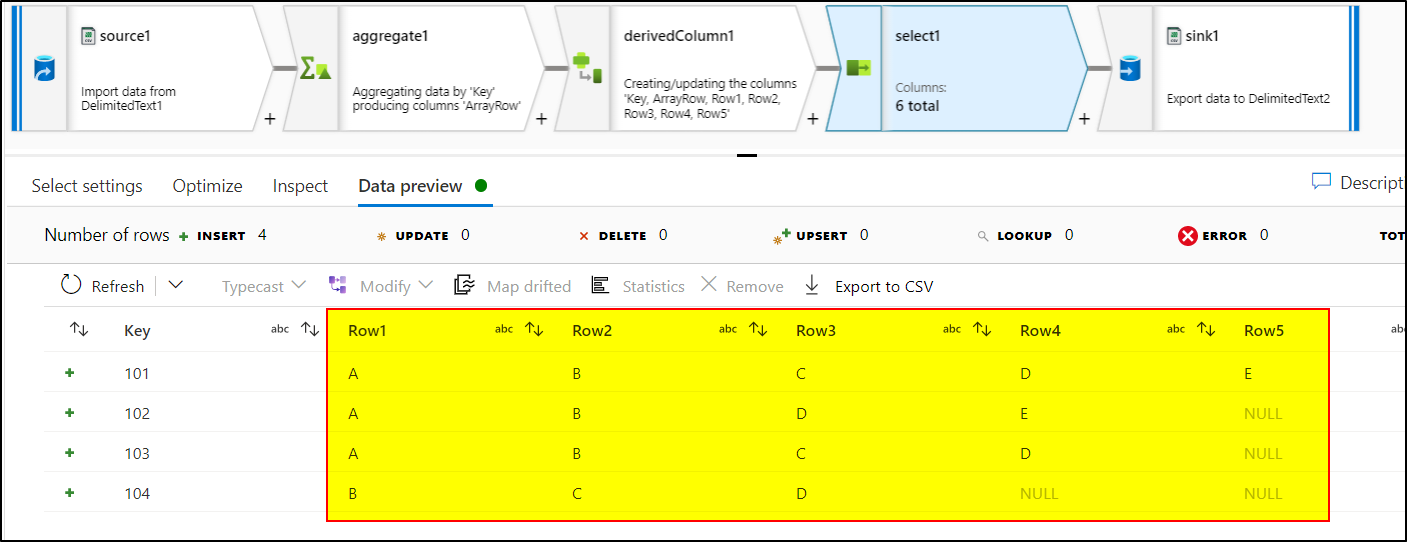
5. Use Sink transformation to load the data in csv. Check the first row as header option.
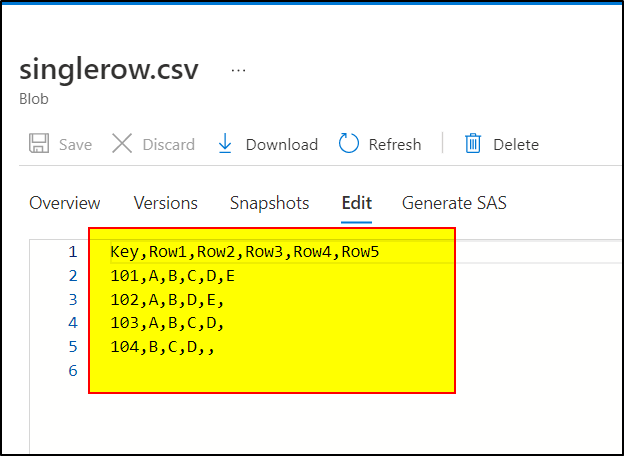
Hope this will help. Please let us know if any further queries.
------------------------------
 or upvote
  button whenever the information provided helps you.
Thank you so much. This is helpful.
But my data looks like this.
Key Row1 Row2 Row3 Row4 Row5
101 A
101 NULL B
101 NULL NULL C
101 NULL NULL NULL D
101 NULL NULL NULL NULL E
102 A NULL NULL NULL NULL
102 NULL B NULL NULL NULL
102 NULL NULL NULL D NULL
102 NULL NULL NULL NULL E
You can use coalesce(Row1,Row2,Row3,Row4,Row5) in Derived column transformation to create a new column -Row0 and follow the above steps.
If the above answer helped, please do consider clicking Accept Answer and Up-Vote for the same as accepted answers help community as well. If you have any further query do let us know.
Hi @Alekya Seemakurty, Sri ,
Just checking in to see if the above answer helped. Please do consider clicking Accept Answer and Up-Vote for the same as accepted answers help community as well. If you have any further query do let us know.
Thank you so much. This is helpful answer!
Hi @Alekya Seemakurty, Sri ,
Thankyou for sharing the feedback by taking the satisfaction survey. Just following up to request you to Accept Answer as accepted answers help community. If you have any further query do let us know.