Microsoft Security | Microsoft Entra | Microsoft Entra ID
A cloud-based identity and access management service for securing user authentication and resource access

This browser is no longer supported.
Upgrade to Microsoft Edge to take advantage of the latest features, security updates, and technical support.
' cx='32' cy='32' r='32' /%3E%3Ctext x='50%25' y='55%25' dominant-baseline='middle' text-anchor='middle' fill='%23FFF' %3EAS%3C/text%3E%3C/svg%3E)
I have configured admin consent workflow following this documentation but it's not working for me. When Non admin users want to give consent they are still able to see below form:
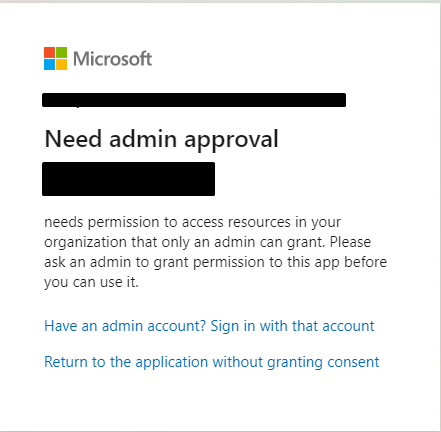
I want to make non admin user enable to see below form or something similar to that.

I have also tried this documentation but didn't work.
Any kind of solution or help is highly appreciated.

Hello @ABDUL-SHAHIED SHAHID • Thank you for reaching out.
The "Approval reqiured" page is presented to the users in the below cases:
Allow user consent for apps from verified publishers, for selected permissions (Recommended) but the application is either not from verified publishers or any of the permissions in the authentication request is not added under Azure Active Directory > Enterprise applications > Consent and permissions > Permission classifications under Low (low risk permissions) tab. You can try to set the User consent settings to Allow user consent for apps and see if it works, to confirm the same. user.read, calendars.read, calendars.read.shared, and offline_access. I confirmed that none of these scopes require admin consent. I would suggest you validate the authentication request url and check if the scopes parameter contains any other scope than the 4 scopes I mentioned. Feel free to tag me in your reply if you have any further questions.
-----------------------------------------------------------------------------------------------------------
Please "Accept the answer" if the information helped you. This will help us and others in the community as well.
Hi @AmanpreetSingh-MSFT ,
Thank you for you reply. I think this method will allow non admin user to consent.
But I want that a non admin user should be able to request consent from admin, Same I have mentioned in my question as well and shown in second SS also.
Please let me know if I didn't get it right.
@ABDUL-SHAHIED SHAHID • Thank you for the clarification. To request consent from admin, if the below option is enabled, no other configuration is required.

Make sure you are not explicitly being redirected to the Admin Consent endpoint i.e., https://login.microsoftonline.com/{tenant}/v2.0/adminconsent. Also, check if the authentication request includes the OAuth parameter prompt=consent, you can try updating the application to not include this parameter.
@AmanpreetSingh-MSFT I am being redirected to https://login.microsoftonline.com/common/adminconsent, and have checked to use any alternate but didn't reach the solution. Can you write any details or suggest any documentation containing all required details?