Developer technologies | Visual Studio | Debugging
A core feature of Visual Studio that allows developers to inspect, analyze, and troubleshoot code during execution.
This browser is no longer supported.
Upgrade to Microsoft Edge to take advantage of the latest features, security updates, and technical support.
' cx='32' cy='32' r='32' /%3E%3Ctext x='50%25' y='55%25' dominant-baseline='middle' text-anchor='middle' fill='%23FFF' %3EMM%3C/text%3E%3C/svg%3E)
Hello, so two days ago I had an error message after updating VS and apparently couldn't repair it so I decided to reinstall it.
Now the visual studio installer crashes and shows these errors:
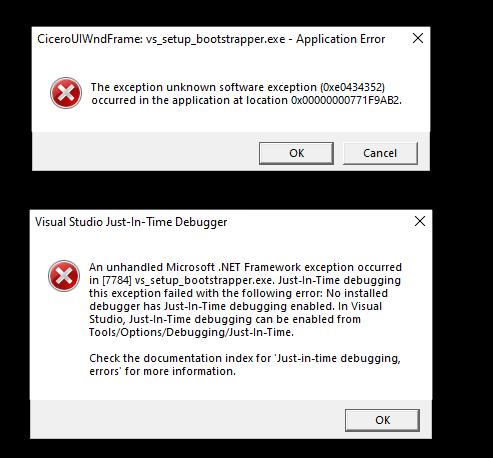
I uninstalled and reinstalled all .net frameworks/sdks and runtimes but it didn't change anything. I really don't know what to do, everything worked flawlessly before I decided to update 2 days ago..
I join the log files. Any help will be much appreciated!
230496-dd-visualstudiosetup-decompression-log.txt230447-dd-bootstrapper-20220811193842.log
' cx='32' cy='32' r='32' /%3E%3Ctext x='50%25' y='55%25' dominant-baseline='middle' text-anchor='middle' fill='%23FFF' %3EAX%3C/text%3E%3C/svg%3E)
Hi @Mdouille Mda ,
Would you like to do a clean uninstallation of VS?
After the clean uninstallation, please check for your Windows Updates and install all pending updates.
Besides, you can run the troubleshooter to check if there are any problems in your computer: open Windows Settings ( Windows + I ) > Go to Update & Security > Troubleshoot > Windows Update.
Then, reboot your computer and download the new bootstrapper file from https://visualstudio.microsoft.com/downloads/ to install VS.
Sincerely,
Anna
*
If the answer is the right solution, please click "Accept Answer" and kindly upvote it. If you have extra questions about this answer, please click "Comment".
Note: Please follow the steps in our documentation to enable e-mail notifications if you want to receive the related email notification for this thread.
