Azure Data Factory
An Azure service for ingesting, preparing, and transforming data at scale.
This browser is no longer supported.
Upgrade to Microsoft Edge to take advantage of the latest features, security updates, and technical support.
' cx='32' cy='32' r='32' /%3E%3Ctext x='50%25' y='55%25' dominant-baseline='middle' text-anchor='middle' fill='%23FFF' %3EAP%3C/text%3E%3C/svg%3E)
I want to write all filenames I got from my data source into a txt file where each filename stands in its own line.
I used a Get Metadata activity to get all childitems and a for loop iterates over the childitems. A Append variable appends the variable and after the for loop i use Set variable to save the array into a variable. After that I use the additional Columns in the Copy data activity. But the additional column doesn't accept an array variable so I have to convert it to a String. Then the output file is a txt file where everything stands on one line and the square brackets from the array and quotationmarks are also printed.
please answer without use of dataflow as i cant use them due to few restrictions
@KranthiPakala-MSFT , @AnnuKumari-MSFT can you please look into it as its bit urgent

Hi @Atharv Phadnis ,
Just checking in to see if the below answer helped. Please do consider clicking Accept Answer and Up-Vote for the same as accepted answers help community as well. If you have any further query do let us know.
Hi @Atharv Phadnis ,
Welcome to Microsoft Q&A platform and thanks for posting your question here.
As I understand your requirement, you want to load the filenames from a folder in ADLS to .txt file where each line of the excel sheet holds individual filenames. But you don't want to use dataflow for meeting the requirement as suggested in this post. Please let me know if that's not the case.
As you have strict requirement to achieve the above scenario using ADF pipeline without dataflow, one possible workaround I can think of is to load the data in Azure SQL table using the below steps and then load the same to .xls file using copy data activity.
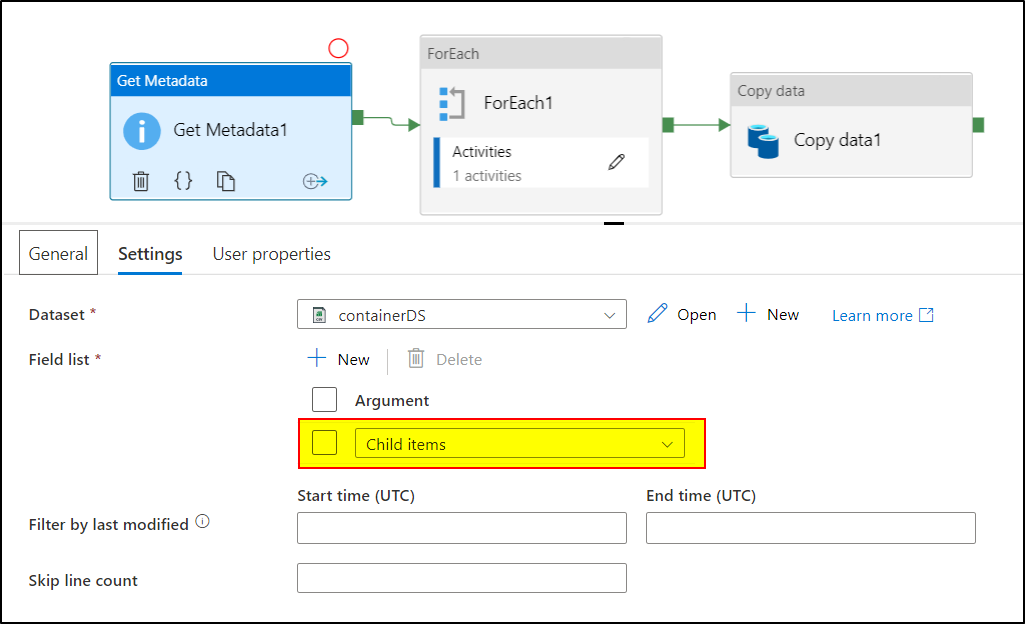
1. Use Get metadata activity to retrieve the FileName by selecting Child Items as Field List:

2. Use ForEach activity with Items as @activity('Get Metadata1').output.childItems
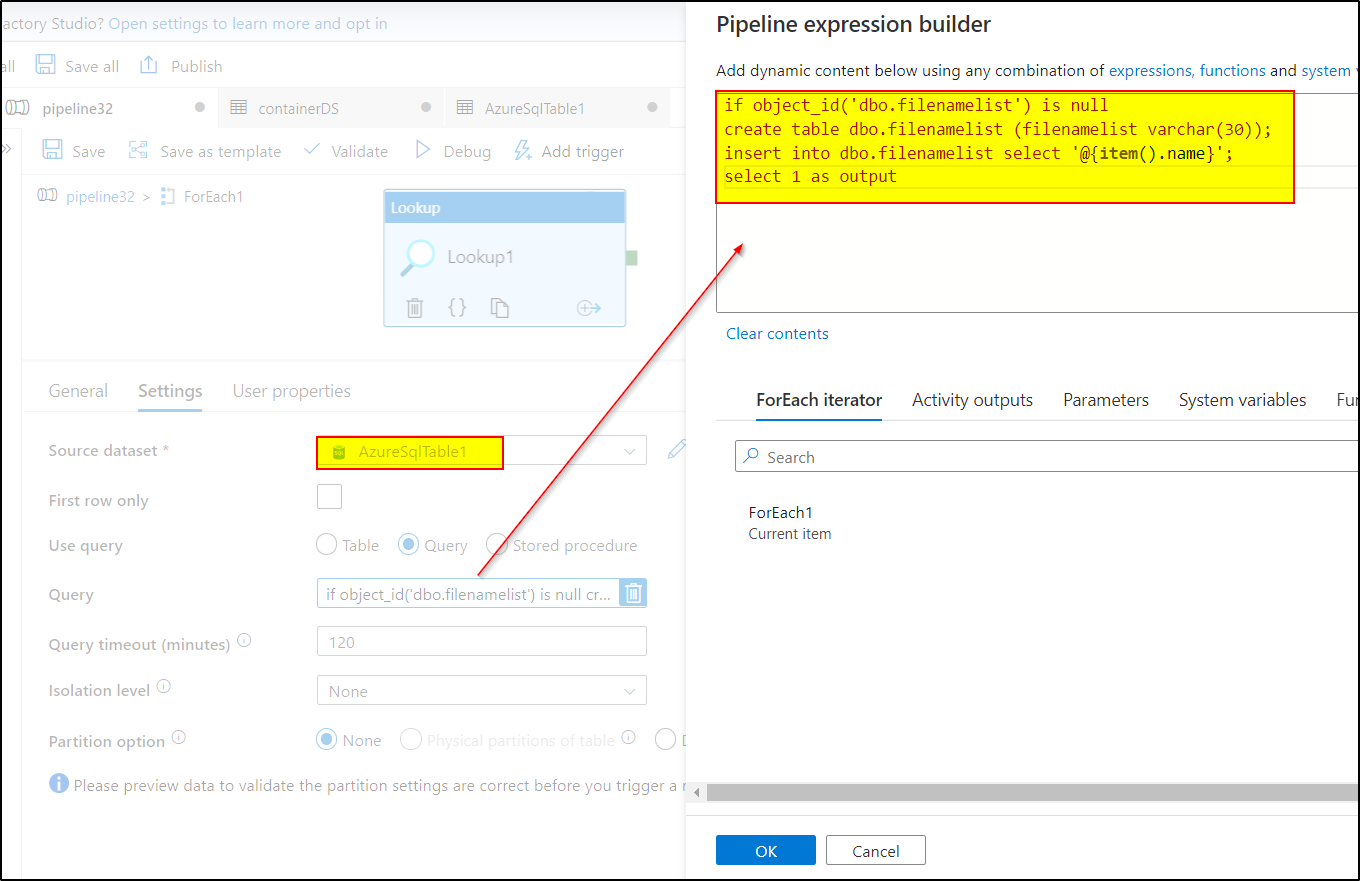
3. Use LookUp inside ForEach , and use the dataset pointing to the Az SQL table and use the following query:
if object_id('dbo.filenamelist') is null create table dbo.filenamelist (filenamelist varchar(30));insert into dbo.filenamelist select '@{item().name}'; select 1 as output
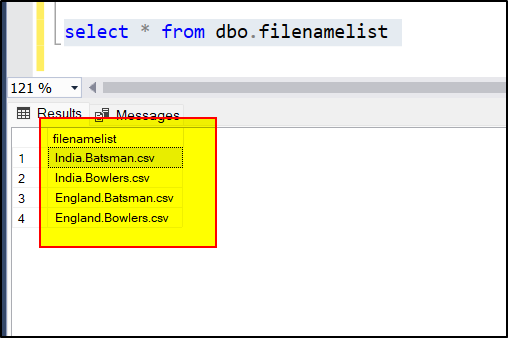
4. Once the data has been loaded to the above SQL table , you can use Copy data activity pointing the source dataset to SQL table and sink dataset to Excel file
Hope this will help. Please let us know if any further queries.
------------------------------
 button and take satisfaction survey whenever the information provided helps you.
Hi @Atharv Phadnis ,
Just checking in to see if the above answer helped. Please do consider clicking Accept Answer and Up-Vote for the same as accepted answers help community as well. If you have any further query do let us know.
@AnnuKumari-MSFT can u please upload the lookup activity image also
Hi @Atharv Phadnis ,
Please check the below image:
----------------
If this helps, Please do consider clicking Accept Answer and take the satisfaction survey as accepted answers help community as well. If you have any further query do let us know.
@AnnuKumari-MSFT our pipeline runs daily so we cant create table in each run, we have to truncate the table in each pipeline run , can this be solved through stored procedure?

Hey,
you can drop/truncate the table in the query itself . No need of a separate SP
Hi @Atharv Phadnis ,
As suggested above, Outside the ForEach block, after copy activity (which would copy the data from Az SQL to Excel) , you can add another lookup activity/script activity to delete the table .