Developer technologies | ASP.NET | ASP.NET Core
A set of technologies in the .NET Framework for building web applications and XML web services.
This browser is no longer supported.
Upgrade to Microsoft Edge to take advantage of the latest features, security updates, and technical support.
' cx='32' cy='32' r='32' /%3E%3Ctext x='50%25' y='55%25' dominant-baseline='middle' text-anchor='middle' fill='%23FFF' %3EMT%3C/text%3E%3C/svg%3E)
Hi,
How can I send the model from MVC Controller Action to Razor Page ? I am developing in Asp.Net MVC Core 6.
I added the view
This is the controller action
public async Task<IActionResult> ParamIndex(string path = "/locations/eng/", string apiKey = "")
        {
            ViewBag.SrvDtTime = DateTime.Now.ToString("MM/dd/yyyy HH:mm");
            int franchiseId = 0;
            int.TryParse(apiKey, out franchiseId);
            FranchiseWidgetSetting? windgetSetting = null;
            if (!string.IsNullOrWhiteSpace(path) || !string.IsNullOrWhiteSpace(apiKey))
            {
                windgetSetting = await _widgetSettingsRepository.FindFranchiseWidgetSettings(franchiseId, 0, apiKey, string.Empty, path);
            }
            return View("~/Views/Param/ParamIndex.cshtml", windgetSetting );
        }
this is the page view
@page "{path:string,apiKey:string}"
@model RentalWidget.Views.Home.ParamWidget.ParamPageModel
@using   RentalWidget.Models.DBEntities.Franchises
@model FranchiseWidgetSetting
@{
  }

<div id="SearchVehiclePage">
    @await Html.PartialAsync("ParamSearchCar.cshtml",Model)
</div>
The Exception is related to Null Exception and It always return null.
This is the page model but it doesn't receive any debugger. I placed some debugger point in it but the debugger doesn't hit here.
public class ParamPageModel : PageModel
    {
        [BindProperty(SupportsGet = true)]
        public string Path { get; set; } = "";

        [BindProperty(SupportsGet = true)]
        public string ApiKey { get; set; } = "";
        public void OnGet()
        {
        }
    }
Either correct me or bring a good/recommended solution.
Thank you
' cx='32' cy='32' r='32' /%3E%3Ctext x='50%25' y='55%25' dominant-baseline='middle' text-anchor='middle' fill='%23FFF' %3EA%3C/text%3E%3C/svg%3E)
Hi @mehmood tekfirst ,
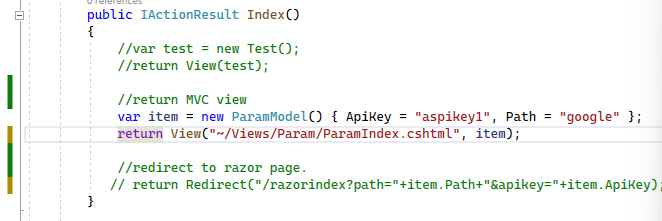
You can try to convert the Razor pages to a MVC views, then in the controller, return the MVC view with the model.
Code like this:
Create a ParamModel: 231333-parammodel.txt
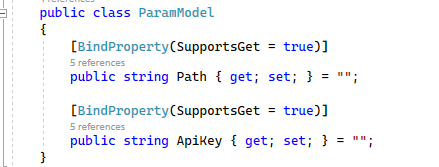
Controller: 231361-controller.txt
Right click the Param folder and add a MVC view (ParamIndex.cshtml):
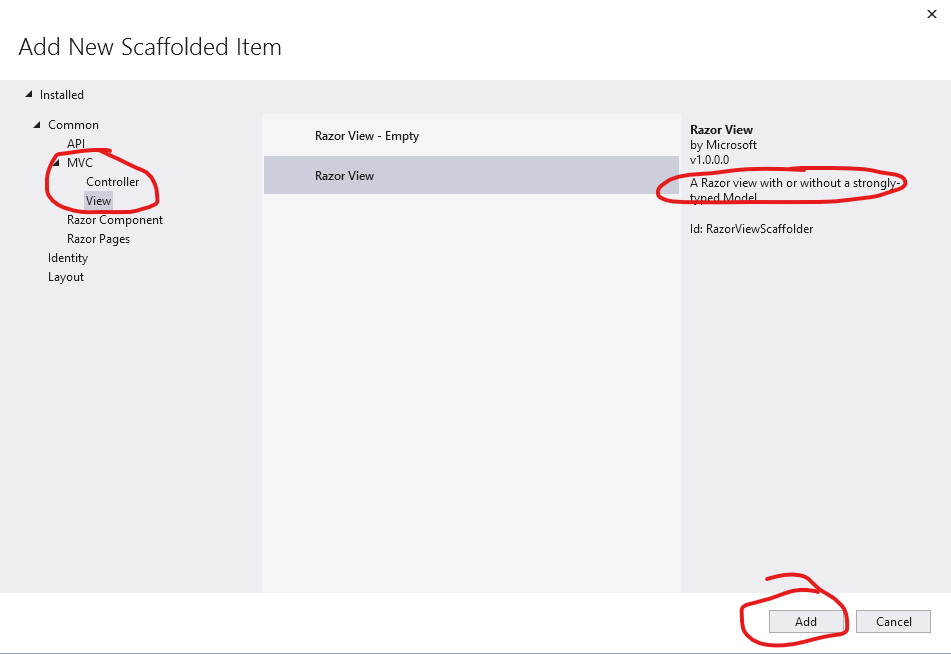
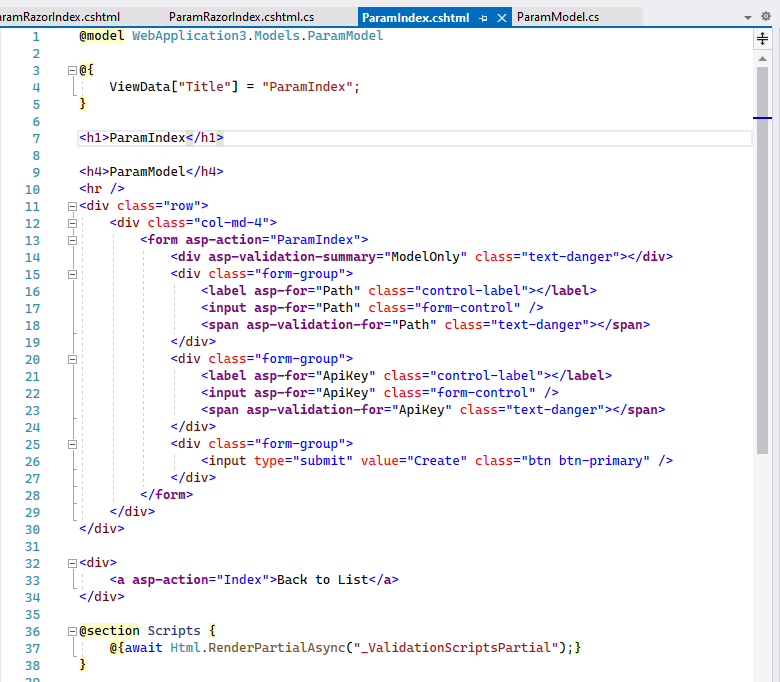
Then the ParamIndex.cshtml like this: 231352-paramindex.txt
If you still want to use Razor Page, you can add the Razor Pages in the Pages folder, then in the controller, use the Redirect method to redirect to the Razor pages.
Code like this:
Controller:
return Redirect("/razorindex?path="+item.Path+"&apikey="+item.ApiKey);
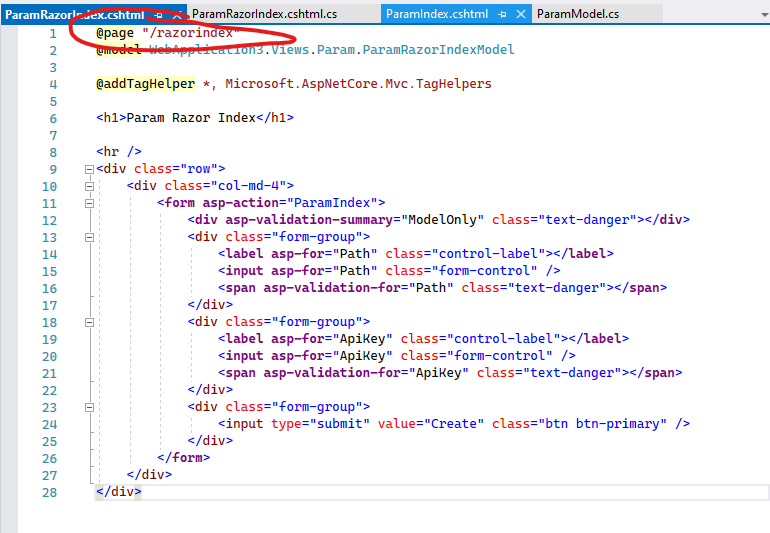
and in the razor page, the @page like this: 231362-paramrazorindex.txt
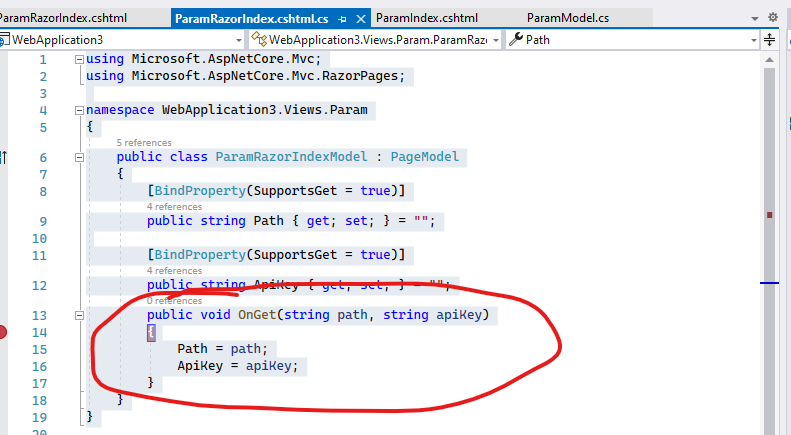
Then, in the Razor Page's Get method, receive the parameter, like this:
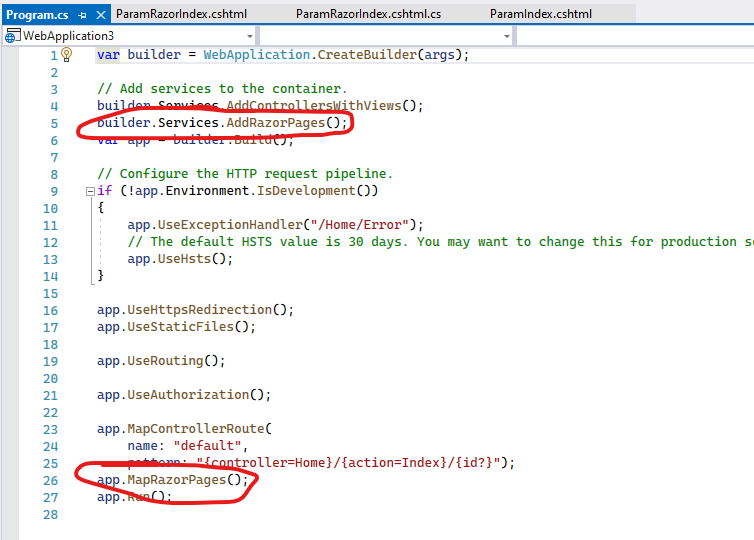
[Note] in this method, you need to register the Razor Page service and middleware.
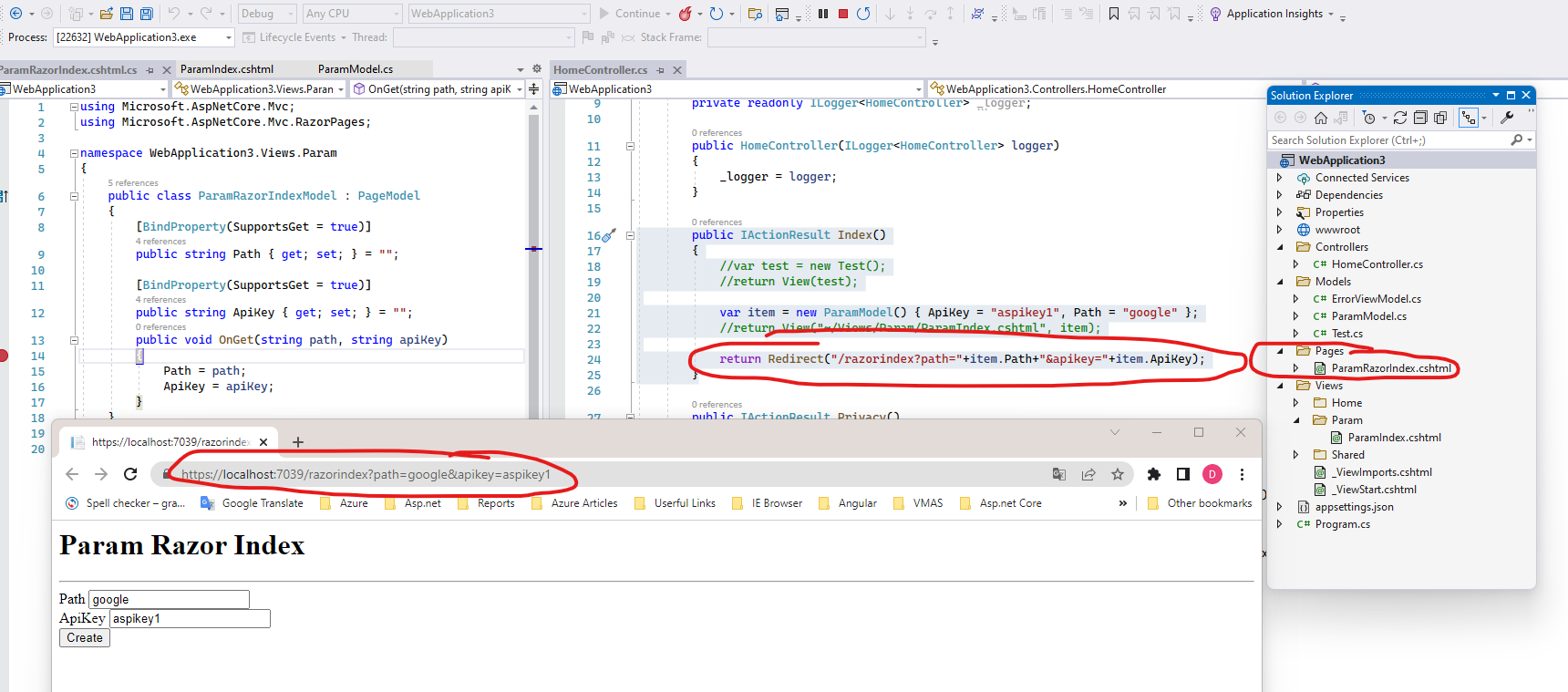
The output like this: when access the Home controller Index action, it will redirect to the ParamRazorIndex Razor page.
If the answer is the right solution, please click "Accept Answer" and kindly upvote it. If you have extra questions about this answer, please click "Comment".
Note: Please follow the steps in our documentation to enable e-mail notifications if you want to receive the related email notification for this thread.
Best regards,
Dillion
Thank you ZhiLv-MSFT .
I try it and then inform you back
Thank you ZhiLv-MSFT.
The only issue about send complex object now . please see below
 public async Task<IActionResult> ParamIndex(string path = "", string apiKey = "")
            {
                FranchiseWidgetSettingVM? windgetSetting = null;
                if (!string.IsNullOrWhiteSpace(path) || !string.IsNullOrWhiteSpace(apiKey))
                {
                    windgetSetting = await _widgetSettingsRepository.FindWidgetSettings(apiKey, path);
                }
                ParamPageModel item = new ParamPageModel() { ApiKey = apiKey, Path = path, Data =  windgetSetting };
                return Redirect("parambooking/?path=" + item.Path + "&apikey=" + item.ApiKey);
            }
I need to send windgetSetting object to the page as well. How should I make the model now . please see below
public class ParamPageModel : PageModel
        {
            [BindProperty(SupportsGet = true)]
            public string Path { get; set; } = "";
            public FranchiseWidgetSettingVM? Data {get;set;}
            [BindProperty(SupportsGet = true)]
            public string ApiKey { get; set; } = "";
            public void OnGet(string path, string apiKey)
            {
                Path = path;
                ApiKey = apiKey;
            }
        }
please correct me where you think it needs a fixation.

You've asked the same question and did not fix your design to work properly in a web application!
Web applications pass data in the URL (Get) or the HTTP message (Post). Your code is doing a redirect (Get). Simply add the parameters to the URL. Another option is to store the data in a database and pass an Id to the parambooking which can look up the data in the database.
Thank you AgaveJoe.
I can prefer the MVC views than razor pages If there are no performance increase in both.
And If I prefer MVC Views then URL (Get) will not work as per my understanding.
and there are some errors
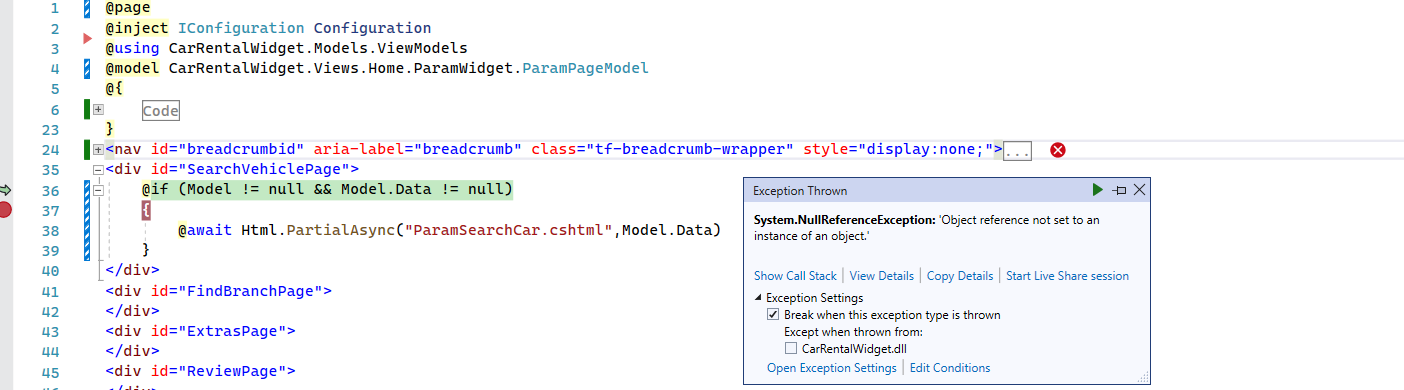
And If I prefer MVC Views then URL (Get) will not work as per my understanding.
I'm confused, your previous post shows the code is doing a redirect to parambooking. A redirect causes the browser to do an HTTP GET. You are already doing an HTTP GET unless you changed the subject and did not tell us.
The code you shared is NOT MVC it is from a Razor Page that tries to populate a partial. I assume the null reference is happening before the If, probably within the "Code" section. Use the debugger to find the null object rather than making the community guess.
Unfortunately, your responses and code are not in any kind of logical order to figure out the intent. I suspect there are large gaps in your understanding which is causing design bugs. The community is unable to figure out what fundamentals concepts you do not understand.
Hi @AgaveJoe ,
I was using some mixed approach as @Anonymous suggested two solutions.
First one is by using the MVC views and in that case, I need to remove the @Anonymous from the .cshtml file.
Then my code works as expected.
The second solution was to use the razor pages through directly invoking from the code behind files of .cshtml. such as ParamIndex.cshtml.
and in that case, I must have to use the @Anonymous directive.
While I am using the second solution/approach then I am getting the null object exception.
 FranchiseWidgetSettingVM?  windgetSetting = await _widgetSettingsRepository.FindWidgetSettings(apiKey, path);
 ParamPageModel item = new ParamPageModel() { ApiKey = apiKey, Path = path, Data =  windgetSetting };
 return Redirect("parambooking/?path=" + item.Path + "&apikey=" + item.ApiKey);
The problem here which I shared in my above two posts is that passing Data property in ParamPageModel.
I think the problem occurs in the way of passing Data property and Data property is being null while I am using it on my razorpage (ParamIndex.cshtml). and ParamIndex.cshtml page again call a partialview SearchCar.cshtml.
partial view is always receiving the null parameters and throwing an exception.
I again tried to summarize my issue. Sorry for the mis-understanding. When I am using the MVC Views without @Anonymous directive then my code is now working as expected but in case of using RazorPage with @Anonymous directive, there is an issue of receiving always null.
Ok please use this branch
and get the download sample app
The problem here which I shared in my above two posts is that passing Data property in ParamPageModel.
The community has explained several solutions. The problem is you do not understand web design fundamentals and therefore you do not understand the solutions provided by the community. You probably have heard HTTP is stateless? That's the problem you are trying to solve - maintaining state. Maintaining state is problem that exists in every web application that a web developers must deal with. Fortunately, there are many common methods for maintain state in a web application that you get to pick from; cookies, URL, session, database, etc.
The following line of code is an example of maintaining state in the URL; Path and apiKey.
return Redirect("parambooking/?path=" + item.Path + "&apikey=" + item.ApiKey);
The redirect returns a HTTP 301 to the browser. The 301 has a location header that tells the browser where to make the next HTTP GET request which you set to parambooking/?path=somedata&apiKey=somedata. If you want to pass the Data object to parambooking then add parameters to the URL as I explained above. But this might not be the most effective way to maintain state between requests if Data is large. There is a limit to the length of a URL
A standard approach found in every beginning level tutorial is to pass the Id (primary key) of where the data exists in a database table. The logic on the parambooking fetches the data by Id. In MVC and Razor Page this is called the route parameter.
Routing to controller actions in ASP.NET Core
Configure a page route
Another option is storing Data in Session.
Ok please use this branch
and get the download sample app
thank you all. many people participated in this effort.
I really appreciated. I think everyone's solution should be marked as an Answer.
but it is difficult for me to decide please mark the answer as you all think which is most close to the answer