Windows Server 2019 cannot connect to other computers in the Workgroup

Clive Potter 1 Reputation point
2022-08-14T22:22:01.197+00:00

I have setup Windows Server 2019 on a workgroup (we don't need a domain). I have initiated all the correct Services for Network Discovery, enabled the Firewall apps and activated Network Discovery. The problem is though the Server can see itself and the Network Printer, it cannot see or connect to any of the shared folders on other computers in the Workgroup. The other computer however, can see the Server. Anyone hlp what I have to do so the Server can see the other computers?

Windows for business | Windows Server | User experience | Other
0 comments No comments
{count} votes

7 answers

Sort by: Most helpful
  1. Anonymous
    2022-08-14T22:43:12.283+00:00

    For the newer OS's enabling network discovery may help.

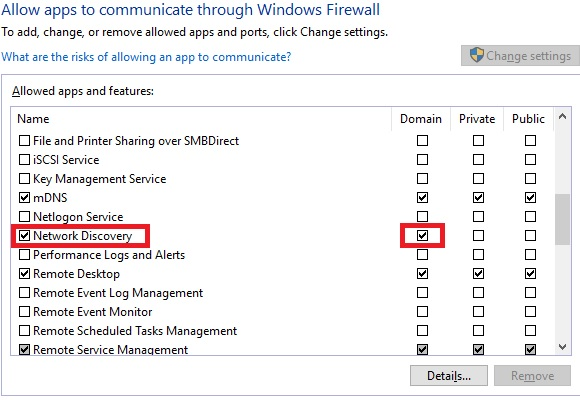
    Check these services are started on all members DNS Client, Function Discovery Resource Publication, SSDP Discovery UPnP Device Host and also check the firewalls allow Network Discovery for the network profile you're using (in my example below using domain).
    230999-image.png

    --please don't forget to upvote and Accept as answer if the reply is helpful--


  2. Clive Potter 1 Reputation point
    2022-08-15T13:19:59.043+00:00

    All correct services have been initialised and Network Discovery switched on for Private and Public.
    Not, however for Domains because as I explained in the first instance I am using it on a workgroup.

    0 comments No comments

  3. Anonymous
    2022-08-15T13:31:28.7+00:00

    What do the members use for DNS? Most likely you'll want to stand up a workgroup DNS server, then point all members to local DNS server.

    --please don't forget to upvote and Accept as answer if the reply is helpful--

    0 comments No comments

  4. Clive Potter 1 Reputation point
    2022-08-15T14:48:51.733+00:00

    I have three desktop computers in my house running WIndows 11 on a WORKGROUP.
    They can all see each other and the Server which is running Server 2022 as part of the WORKGROUP. The Server cannot see any of them.
    All computers take there network settings and DNS settings automatically from the hub's DHCP

    0 comments No comments

  5. Anonymous
    2022-08-15T15:12:07.32+00:00

    All computers take there network settings and DNS settings automatically from the hub's DHCP

    Your ISP's router will not have information or know anything about your network which is why I suggested the local DNS server.

    --please don't forget to upvote and Accept as answer if the reply is helpful--

    0 comments No comments

Your answer

Answers can be marked as 'Accepted' by the question author and 'Recommended' by moderators, which helps users know the answer solved the author's problem.
