Microsoft 365 and Office | SharePoint | For business | Windows
A group of Microsoft Products and technologies used for sharing and managing content, knowledge, and applications.

This browser is no longer supported.
Upgrade to Microsoft Edge to take advantage of the latest features, security updates, and technical support.
' cx='32' cy='32' r='32' /%3E%3Ctext x='50%25' y='55%25' dominant-baseline='middle' text-anchor='middle' fill='%23FFF' %3EOM%3C/text%3E%3C/svg%3E)
Hi,
We are looking for a way to add sub-tasks to MS List items.
We decided to use the MS List to manage our tasks after looking at planner, to-do and others.
It works for the most part, but we need to be able to track sub-tasks.
We explored lookups and grouped views, and choice columns but none of them meet our needs.
So, we are using the multi-line text field and I'm wondering if there is any possibility we could insert a loop component (task list ) in the notes field.
if this is impossible, is there a way to insert an actionable radio button to mimic the to-do list?
There is a radio button emoji, so the users will have to select the radio button and when the task completes they will change the radio button to a checkmark. These are very manual steps and will hinder user adoption.
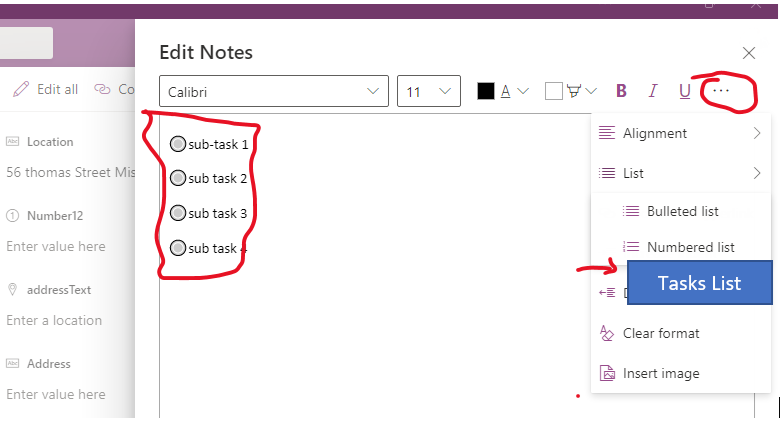
Any suggestions would be appreciated.

Hi,
You can use SharePoint Task List to create Task, subtask, and reorder them as shown.
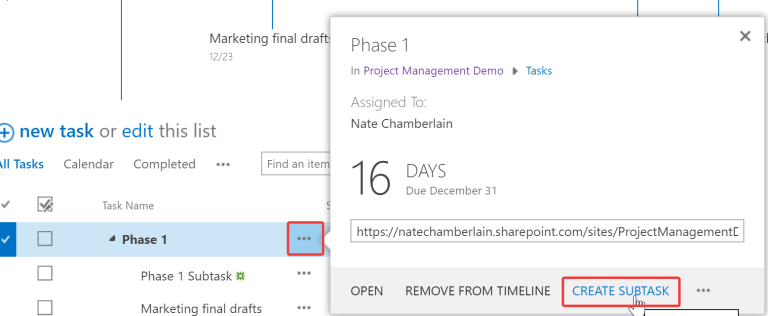
https://natechamberlain.com/2019/12/15/reorder-and-organize-sharepoint-tasks-and-timelines/

Hi @Olga Melo
Is rijwanansari's answer helpful for you? Please feel free to reply.