Azure Monitor
An Azure service that is used to collect, analyze, and act on telemetry data from Azure and on-premises environments.
This browser is no longer supported.
Upgrade to Microsoft Edge to take advantage of the latest features, security updates, and technical support.
' cx='32' cy='32' r='32' /%3E%3Ctext x='50%25' y='55%25' dominant-baseline='middle' text-anchor='middle' fill='%23FFF' %3ETS%3C/text%3E%3C/svg%3E)
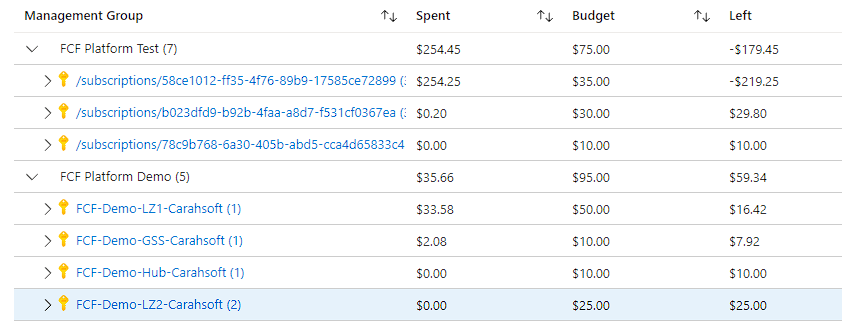
I have created a custom workbook tile in Azure but there is a loading bug that makes the tile not look the way it is supposed to. When initially loading the page the Tile is not displayed correctly, but refreshing the Tile with the refresh icon makes it look correctly.
When initially loading the page:
After refreshing:
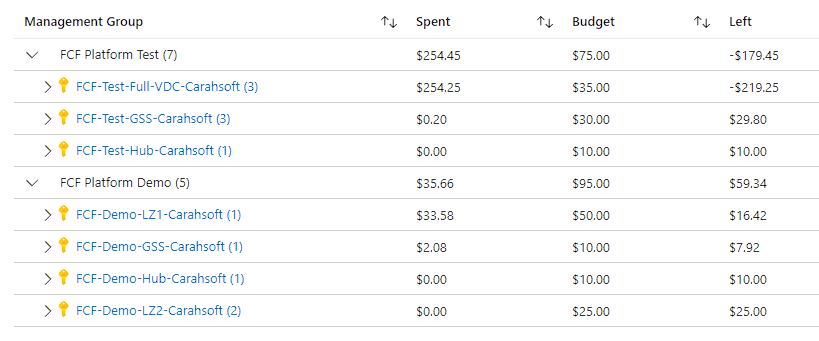
As you can see the way subscriptions are being displayed in the first pictured is not correct
An Azure service that is used to collect, analyze, and act on telemetry data from Azure and on-premises environments.
' cx='32' cy='32' r='32' /%3E%3Ctext x='50%25' y='55%25' dominant-baseline='middle' text-anchor='middle' fill='%23FFF' %3EAM%3C/text%3E%3C/svg%3E)
@Tyler Smith , I am sorry for the inconvenience and delayed response. I see that you have opened a support ticket for this issue, and it is under review by our team.
Please give us some time to investigate it and we will get back to you soon. Thank you
Hi @Tyler Smith ,
Thank you for your time and patience working on this issue with our support team. I wanted to share the findings with the community so that it can help others facing this issue.
The subscriptions names that don't get loaded initially are not in the default subscriptions filter in the portal settings. The ones in that default set of subscription filter gets shown correctly on any first pass. In case the subscriptions are not selected in the default subscription filter, the very first time the portal loads these names wouldn't be available and refreshing the view (not the whole portal, just the one part) would resolve the names correctly - as mentioned int he question.