Azure Data Factory
An Azure service for ingesting, preparing, and transforming data at scale.
This browser is no longer supported.
Upgrade to Microsoft Edge to take advantage of the latest features, security updates, and technical support.
' cx='32' cy='32' r='32' /%3E%3Ctext x='50%25' y='55%25' dominant-baseline='middle' text-anchor='middle' fill='%23FFF' %3E_%3C/text%3E%3C/svg%3E)
Hi,
I have a big dataflow (100+ activities) which has lot of memory intensive operations like lookups & joins. Normally the dataflow runs under 256 (+ 16 driver cores) Memory optimized configuration only however, the input data row count is very low only 16000. The dataflow runs indefinitely no errors no output nothing it simply keeps running.
In debug mode I picked only 500 rows and few activities ran properly as expected however, few activities did not yield any output buy simply say 'Timeout error'. I don't understand why it keeps running. It is hard to debug without proper error info too. Timeout error is not very informative. Could someone please help
Regards,
_arc
An Azure service for ingesting, preparing, and transforming data at scale.
' cx='32' cy='32' r='32' /%3E%3Ctext x='50%25' y='55%25' dominant-baseline='middle' text-anchor='middle' fill='%23FFF' %3EH%3C/text%3E%3C/svg%3E)
Hello @_arc ,
Thanks for the question and using MS Q&A platform.
As we understand the ask here is to find out as to what is the source of time out error , please do let us know if its not accurate.
You never mentioned if the pipeline has every worked fine .But since you mentioned that you have 100 + activitites , I think I will try and use the custom compute size and see if that helps
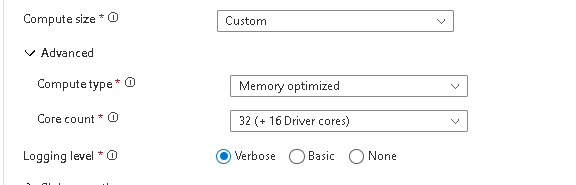
Also while debugging I will set the Time to live to max of 4 hrs .
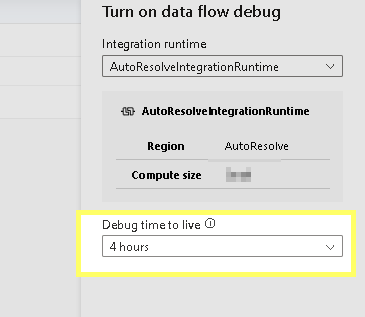
Also while the debug session is "On" you can move around the activities from left to right
and select the activity and check the "refresh" this may be able to give the info as to whcih activities are fetching data , but keeping in mind that you have so many activities it may be diffcult .
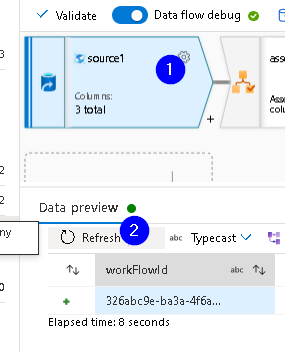
Please do let me if you have any queries.
Thanks
Himanshu
 or upvote
  button whenever the information provided helps you. Original posters help the community find answers faster by identifying the correct answer. Here is how
Hi @HimanshuSinha ,
Yes, I need to find the source of the error (also, please note that dataflow does not throw any error at all it simply keeps running. Error only comes in debug mode & that only says 'activity failed due to timeout') & also need to understand why the pipeline keeps running. No output is also generated
The dataflow used to work properly before with
256 (+ 16 driver cores)
Memory optimized configuration
I'm not sure what is the issue here because I tried debugging activity by activity like you suggested. Few activities do run as expected few just say 'timeout error'. Is there any way to get detailed error info instead of simply timeout.
Regards,
_arc
Hi @HimanshuSinha ,
After going through the logs I was able to find that the pipeline for some reason is stuck in Queued status for hours.
Could you please help me out.
Regards,
_arc
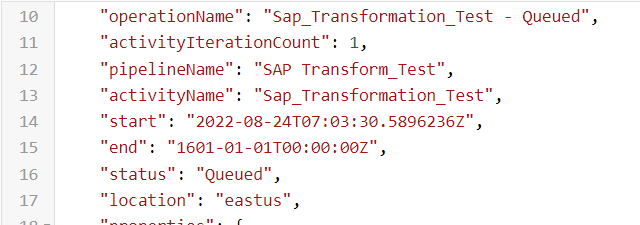
Hi @HimanshuSinha , @AnnuKumari-MSFT , @KranthiPakala-MSFT ,@David Broggy ,
Can anyone please help.
Regards,
_arc
Hello @_arc ,
Thanks for the patience , unfortunately we are not getting the kind of response from the team here . if you have a support plan you may file a support ticket, else could you please send an email to azcommunity@microsoft.com with the below details, so that we can create a one-time-free support ticket for you to work closely on this matter.
Subscription ID:
Subject : Attn Himanshu
Please let me know once you have done the same.
Thanks
Himanshu